





Sparkie
Members
-
Joined
-
Last visited
-
OK, I will wait until a new kernel is out then try again. In the meantime I have contacted ASRock Technical Support and posted the error messages from the System log. I will report back if they answer with anything meaningful. Cheers, Sparkie
-
Just an update on TPM issues under Windows 11 for ASRock X399 mobo's. I have this same Mobo and processor in my Windows 11 System. Running tpm.msc reports tpm is working fine with no errors. The ASRock forums report no TPM issues under Windows 11. So wondering if this might be a Linux issue for some reason. Windows 11 is happy with the TPM. Linux/Unraid is not. Cheers, Sparkie
-
No joy on the Bios Upgrade, same TPM error under the syslog. I guess I will close things our from here and contact the Mobo manufacturer to query if they are experiencing any issues with TPM like I am seeing. I am scratching my head over this one, this is a very popular motherboard. I am finding it strange that no one is reporting TPM issues with this Mobo under Windows 11. Maybe I am missing something. Anyway thanks for all the help on the internal boot and the great advice. Cheers, Sparkie
-
LoLight & JorgeB: Thanks for all your help and feedback. I am finally at point where I have greater confidence in my internal boot setup. My USB Flash showed as failed which just happened before I went down the internal boot path. Put the flash drive into my windows 11 machine and ran CHKDSK which detected errors and repaired. Put back into my server and all is well with that. Regarding fTPM on AMD motherboards - Specifically my ASRock X399 mobo is running a Threadripper 2950X. Sadly my mobo is an ASRock Fatal1ty x399 Gaming. Picked that one because it had 8 SATA ports. But is does not have a SPI Header to add an external TPM module. According to AMD there was an issue with some fTPM implementations as follows but not a complete loss of TPM functionality: AMD has determined that select AMD Ryzen™ system configurations may intermittently perform extended fTPM-related memory transactions in SPI flash memory (“SPIROM”) located on the motherboard, which can lead to temporary pauses in system interactivity or responsiveness until the transaction is concluded. Update and Workaround Update: Affected PCs will require a motherboard system BIOS (sBIOS) update containing enhanced modules for fTPM interaction with SPIROM. AMD expects that flashable customer sBIOS files to be available starting in early May, 2022. Exact BIOS availability timing for a specific motherboard depends on the testing and integration schedule of your manufacturer. Flashable updates for motherboards will be based on AMD AGESA 1207 (or newer). The specific issue here is related to "pauses in system interactivity" not a broken fTPM functionality. So I assume my fTPM is somehow broken. But that being said it is possible but not unlikely that ASRock introduced some 'bug' when they implemented AGESA into their firmware update before 3.8, if that is even a thing, implementing AGESA that is. My mobo is at bios version 3.8. There is a bios update to 4.01 (beta 2023/5/5) which updates AGESA to SummitPI-SP3r2 1.1.0.7. They have a later 4.03 (2024/1/26) which I assume includes 4.01AGESA update. They have a later 4.05 (Beta 2026//3/9) which updates the Secure Book Key (2023/KEK-DB-PK), but I will hold off on that one for now. I will update the BIOS to 4.03 and report back. Again thx for all the help getting to this point. Cheers, Sparkie
-
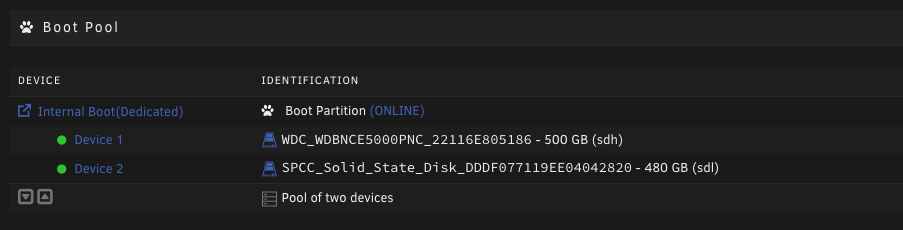
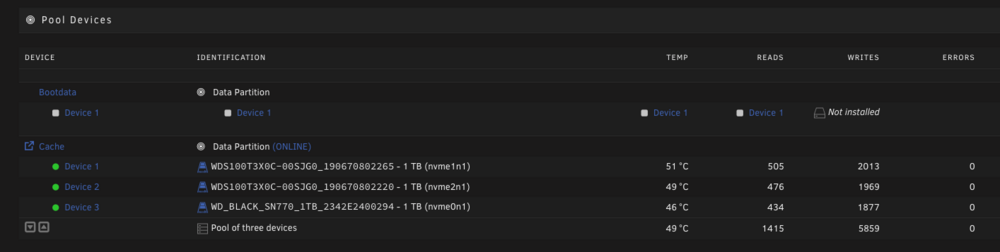
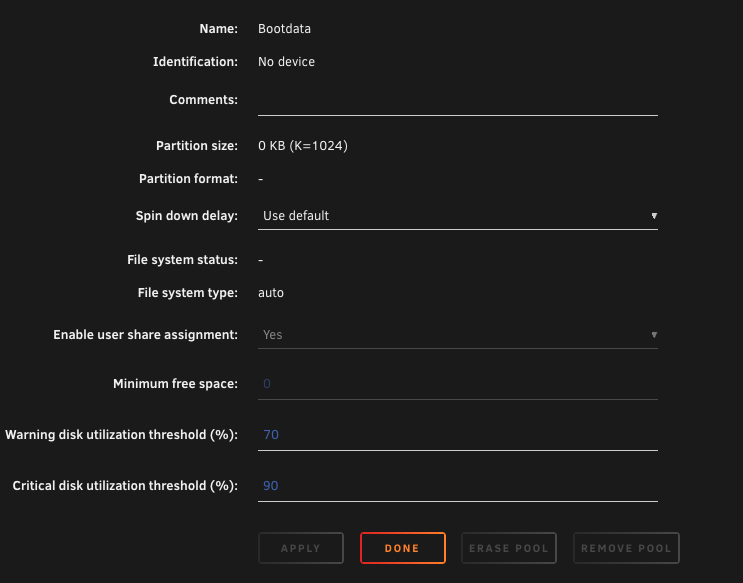
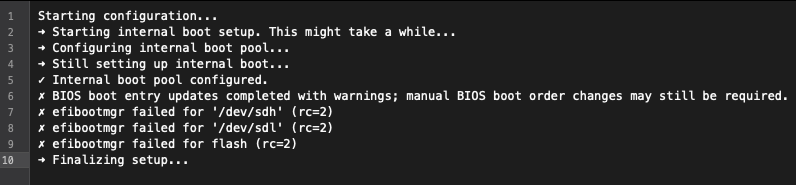
oK, as per your instructions I have reconfigured the server to boot of the mirrored ssd's. See below: I chose not to incorporate a data component to the boot pool, just boot only. Not much space to really justify. But I am seeing under pool devices the following; Don't know if Device 'bootdata' was a leftover from the old configuration, no big deal to leave it alone I would assume. Here are the properties: Assume that this might be a leftover from previously but did not want to delete just in case. If this is a leftover then I can delete if you recommend. The Unraid USB Flash Drive is showing under Unassigned Disk Devices. Here is the message list from the Onboarding Wizard: The wizard tried to modify the bios (I assume to the mobo bios) but showing failed, but checking the bios it was successful. Here was what was automatically configured: (Maybe the mobo saw the two new 'hdd' boot devices and automatically added them?) Anyway it's working just fine. Boot Option #1 - 1st SSD Boot Option #2 - 2nd SSD Boot Option #3 - USB Flash Drive The TPM licence move option is not showing under Registration, so TPM is not working. So can't go any further there at this point. Cheers, Sparkie ps. There was no continuation of the Onboarding Wizard after reboot under internal boot. Don't know if that was supposed to happen. I assume not.
-
Thanks, will do. Sparkie
-
Hey Loligh: Thanks for the great advice. Luckily I came up with a second SSD which was installed in the case but not plugged into my Mobo on my Windows 11 PC. So given that great news I will proceed as recommended and report back. Yeah, I take your point on the fTPM. I read somewhere that should I upgrade the bios on the server mobo I would most likely have licencing issues. So the SPI header solution is probably the way to go. So I will report back here once I get everything sorted with the SSD internal boot. Cheers, Sparkie
-
Thanks for your response. Answers below. Originally they were in the array and used for two parity drives. I upgraded those two parity drives to 2 - 8tb replacing the two 4tb drives. So there is no data of any importance on those drives. They were parity drives so I would assume they were filled with parity data. I did not wipe them assuming the onboarding wizard would clear them out. So when the onboarding wizard finished and rebooted the server the two 4tb drives were listed as available and needed a format (specifically the "bootdata" partition, which I proceeded to do. I do have a 512GB SSD as shown on the previous posted image which I could repurpose for internal boot. Would like a 2nd 512GB but they are crazy expensive now. I assume from your comment that I should probably delete the hdd boot pool and go back to the USB Flash Drive? I will not do this yet until I see if I can rustle up another 512GB SSD that I might have stashed somewhere and await further instructions on how to properly do this. The USB Flash Drive is still plugged into the server for Licencing purposes. Cheers, Sparkie
-
Confirmed that fTPM is enabled on the Mobo Bios. Boot settings confirmed, looks like Hdd boot takes priority over USB boot. Cheers, Sparkie
-
OK, Thanks for your quick response. Very much appreciated. Looks like I have success on internal boot. Will check the bios of my motherboard to determine boot settings for clarity. So, should anything show up under Main/Boot pool ? I remember watching Ed's video on "The Uncast Show" and he had something listed there but the Heading was slightly different. I wonder if he was running a beta version when he did that video and maybe a slight change in the final release 7.3.0 stable. Mine is empty. See attached image. Now if can get fTPM working. I will double check the setting in the Bios although I am almost 100% certain it is enabled. Here are the diagnostics. Cheers, Sparkie tower-diagnostics-20260516-0957.zip

-
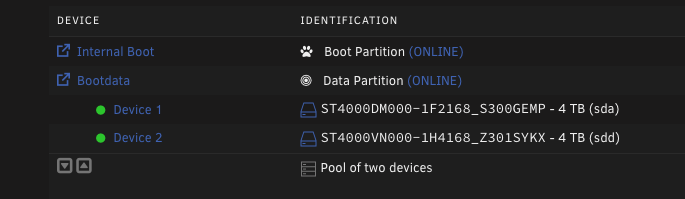
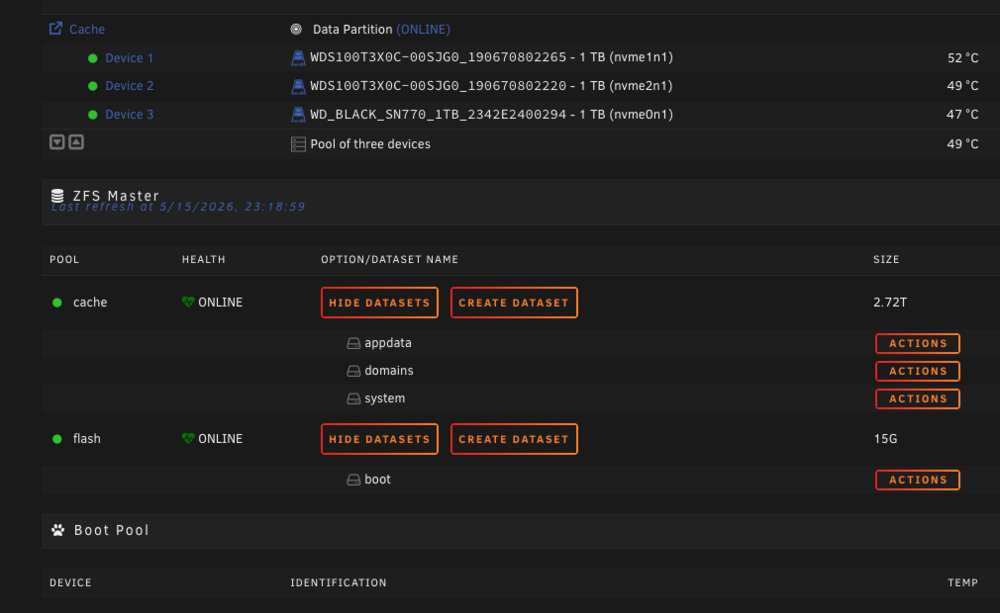
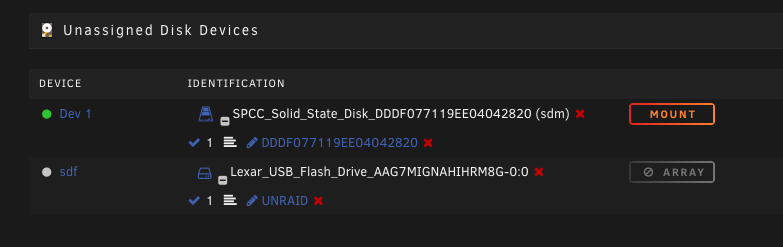
I just upgraded to Unraid 7.3.0 and setup Internal boot. I set it up as two mirrored volumes with boot + data partitions. Ran into a bunch of problems with failure errors on setting up the internal boot using the onboarding wizard. Did this several times with various degrees of failure but one with a message that errors occurred but probably OK, recommend reboot. Did that and it booted up via flash. I had previously set the boot to the internal boot volume in my bios, but it booted up on the flash drive. Shud down the server and gave up on internal boot and set the bios back to the USB Flash drive instead of the internal boot drive. Rebooted and I was shocked to see the server booting up on the internal hard drives (2 in the pool). Surprised to say the least. Below is what the system shows now. Note that after booting up on internal, brought the array back online and formatted the data volumes as seen below. Server came up and Internal boot was in fact working as shown above. But I don't trust it. Don't see anything under the Boot Pool: See following: As can be seen above the Pool shows 'flash' and HEALTH as "ONLINE" and datasets as 'boot'. So what am I booted up on??? What should I do here? Am I reading this wrong? The Unraid flash device is showing under unassigned devices as shown below: So don't know what to do now. Keep the config as is or revert to the Unraid flash drive. Thoughts? BTW, my motherboard is an ASRock X399 Gaming running a 16 Core Threadripper. It has "AMD fTPM Switch" with comment "Use this to enable or disable AMD CPU fTPM." Enabled this in bios and went to Tools/Registration but no option for "Move License to TPM", just "Manage Licence". Was not going to do this at this time but wanted to see if it was compatible. Does anyone know if Unraid 7.3.0 is compatible with AMD fTPM? Looks like it is not as I think this is attached to the CPU and not the motherboard? Any comments or recommendations would be greatly appreciated. Cheers, Sparkie
-
@allroy1975 I eventually resolved this but not in a way that will be helpful to you running a 1050 passed thru to a VM in Unraid. I pretty well tried everything with no positive result. Possibly something got corrupted during the power fail I noted previously that started all this. I eventually resolved this by putting together a new computer based upon a B550 MOBO and installed the 1050 along with windows. Multi-monitor support on the 1050 was fully restored and everything is now working OK. Could not devote further time troubleshooting this issue as the VM was used for Digital Audio Workstation functionality connected to a PreSonus StudioLive 32 channel mixer as well as multimedia presentations in a church. Time was not on my side getting the VM fixed. Brute force solution but sometimes that's what it takes LOL.
-
Was unable to download diagnostics. When I get a chance I will try again next week and attempt to download diagnostics. Regarding browser cache it was the same behaviour on both Linux and Windows and the problem was no longer there when I downgraded back to 6.12.13. But as I noted above I will try to flush cache on both workstations after I upgrade to 6.12.14 again next week. Thanks for your responses. I will report back.
-
I upgraded from 6.12.13 to 6.12.14. Looks like my unraid server started up fine. Upon launching the WebGui from my Windows, and Linux workstations the WebGui is 'partially broken' at least on my machines. Looking at the Dashboard the PROCESSOR widget shows all the cores, but all the bar graphs are empty. On the MAIN page the Device pages show the parity disks and disks 1-7 but under IDENTIFICATION and the rest of the columns are all empty. Same for Pool Devices. Going to PLUGINS, correctly shows all plugins correctly and all columns are populated correctly BUT clicking on 'Update' the pop-up window is empty and it indicates the update is progressing (three animated dots in the bottom of the window) but no further update. Cannot get to the close button as it does not show. Launching another browser window and going to the plugin page shows the plugin correctly updated. Had to kill the browser window in the first instance. Same behavior on the DOCKER page. Every Docker shows but the update pop-up window is empty. Anyway, successfully performed a downgrade and everything returned to normal in 6.12.13. So for now I will stay away from 6.12.14 as this is my production server. BTW in windows I used Firefox, WebGui broken as noted above. On my Linux workstation, under Chrome exactly the same behavior. This is just for information for what it is worth to document my experience. I will take a pass on 6.12.14 for now.
-
Reformatted the pool as suggested. All working now.



