




Skip to content
View in the app

A better way to browse. Learn more.

Unraid

A full-screen app on your home screen with push notifications, badges and more.

To install this app on iOS and iPadOS
  1. Tap the Share icon in Safari
  2. Scroll the menu and tap Add to Home Screen.
  3. Tap Add in the top-right corner.
To install this app on Android
  1. Tap the 3-dot menu (⋮) in the top-right corner of the browser.
  2. Tap Add to Home screen or Install app.
  3. Confirm by tapping Install.

Maxson

Members
  • Joined

  • Last visited

  1. 一台unraid的数据满了,我想将里面的一部分数据转移到另一台unraid,有什么简单便捷的方法吗?
  2. 最终解决办法: 1、停止阵列 2、复制附件的 apps.txt 到U盘根目录覆盖原文件 3、在终端内执行上面提供的命令 4、重启阵列 5、成功修复
  3. 最终解决办法: 1、停止阵列 2、复制附件的 apps.txt 到U盘根目录覆盖原文件 3、在终端内执行上面提供的命令 4、重启阵列 5、成功修复
  4. 我用你提供的文件和命令,未能解决问题。 有其它的解决方法吗?
  5. 不起作用,我比较了你提供的文件,和我系统文件的内容一模一样。
  6. 升级中文语言包后,“应用“里面变成一半中文一半英文了,谁知道怎么解决吗? 就是这里:https://192.168.100.1/Apps
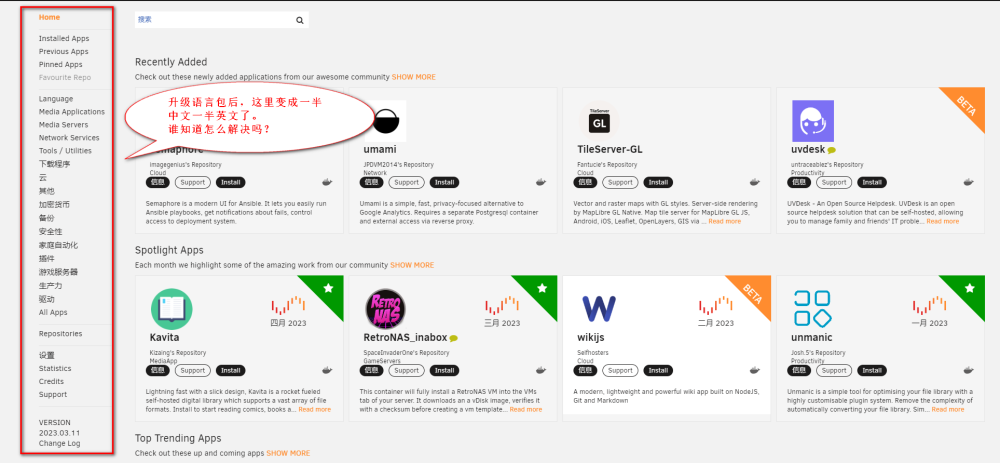
  7. 我也出现这个问题了,有谁知道如何解决吗?求解惑

Account

Navigation

Search

Search

Configure browser push notifications

Chrome (Android)
  1. Tap the lock icon next to the address bar.
  2. Tap Permissions → Notifications.
  3. Adjust your preference.
Chrome (Desktop)
  1. Click the padlock icon in the address bar.
  2. Select Site settings.
  3. Find Notifications and adjust your preference.
