





Ankur
Members
-
Joined
-
Last visited
-
No sir, but I did use an .apk file and install on my mobile. This mobile app came from a friend who use torrents. It’s was a crack of Emby which I think has infected my server. my jellyfin folder which had my media is completely empty of movies file however the movie poster are left in there. I don’t understand what s happening on this server. I have used default jellyfin settings of admin account. till date all my media are deleted if I put any new movie file.. I can send diagnostic of unraid if required. pl help.
-
Dear friends and fellow community member My unraid is hacked: (I think)all my media in jellyfin folder is automatically deleted. How do I verify it ,from 556 files it’s now zero files. Unraid Security Best Practices Video and recommendations are followed. is there a way to find who hacked my server and deleting my files. As I put any video file on share all files get deleted. I have seen on jellyfin movie section in front of me. All my files got deleted
-
no body is able to help i will reset my whole server
-
no it didnt worked
-
added 16gb ram but still getting error
-
no ethernet issue
-
no it did not
-
expert advice required nobody is able to solve this. very poor community support
-
expert advice required
-
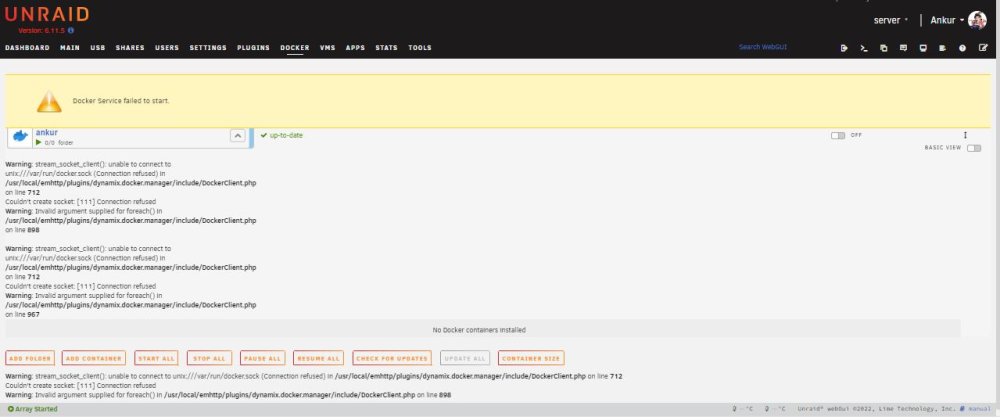
PL SEE SCREENSHOT, IF IT HELPS
-
NO IT'S STILL UNRESOLVED
-
hi pfa unraid-diagnostics-20221227-1703.zip
-
HI PFA-DAIGNOSTICSunraid-diagnostics-20221227-1703.zip
-
arning: stream_socket_client(): unable to connect to unix:///var/run/docker.sock (Connection refused) in /usr/local/emhttp/plugins/dynamix.docker.manager/include/DockerClient.php on line 712 Couldn't create socket: [111] Connection refused Warning: Invalid argument supplied for foreach() in /usr/local/emhttp/plugins/dynamix.docker.manager/include/DockerClient.php on line 898 PL HELP ME RESOLVE THIS

