Ruda rdp
Members
-
Joined
-
Last visited
-
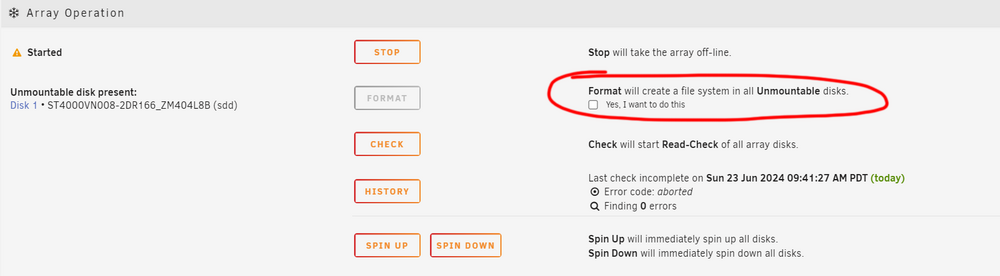
This is the chronology of tragedy: 1. When I started the server and array, one of the drives in the array (an 8TB drive, almost full) was disabled during the live start of the array. 2. In the "Array Operation" section below, I noticed an unmountable disk and the "Format" option. I selected "Format." 3. Foolishly, I clicked "OK" to start the format, and the disk was live in the array but with an empty 8TB (enabled in the array).
-
Hi Everyone, I am a videographer and have been using Unraid for several years. I really enjoy it, even though I am not very tech-savvy. I have successfully built my own server. I have 11 disks and 1 parity disk. My server is used for cold backups and is rarely powered on. Today, I turned it on and noticed that one of the disks was disabled. Unfortunately, I made a big big mistake. I saw an option to format the disk, checked it, and proceeded to format it. The disabled disk then appeared green and healthy, but I realized this was the wrong step—the disk became empty. I should have performed a rebuild instead of formatting. Please help! Is there any way to recover the data?And I immediately turned off the server and tried to open the disk on a PC, but I have no clue what to do next. Best Regards (The picture below is not mine, just an illustration of what I have done.)