Tim Button
Members
-
Joined
-
Last visited
Everything posted by Tim Button
-
Diagnostics buttonmedia2-diagnostics-20220305-0146.zip
-
On a separate entry here I got assistance to recover my Unraid from a failed drive. Now everything is restored I can't get Plex to work at all. I can install and uninstall the Plex-Media-Server Application to a Docker Container over and Over and the behavior persists. I see the Application and it cannot connect to the WebUI..... This site can’t be reached XXX.XXX.XX.XXX refused to connect. If I go out to a browser session and log in, my server isn't there, and it's not giving me an option to add I have set 32400 in port forward I am at a loss to determine next steps.
-
I have an issue with Docker and recovered Plex Server configs. Should I continue here or is that considered a new Issue?
-
Yes, that worked for me. I did some cursory checks of the files on the recovered drive and it seems to all be there. I will continue to check things.
-
I wanted to circle back and let you know that this worked. All Drives are recognized and working. The Array is back to complete. It took longer than expected due to 2 factors: I travelled for a week and was unable to work on this, and I was generally being over cautious about these steps. Plex is all messed up but that's a minor problem. Drive recovery was the priority. Thanks so much for the help!
-
OK, so lets assume the drive is unrecoverable. The whole reason I set up Unraid with a parity drive is to avoid everything falling apart if one of the drives fails. Can I not just add a new Drive to Disk 5 and start avoiding Disk 4?
-
The one listed under Missing
-
Yes, the dead one that the cables broke and I can't re-attach.
-
Thanks, see attached file buttonmedia2-diagnostics-20220210-1450.zip
-
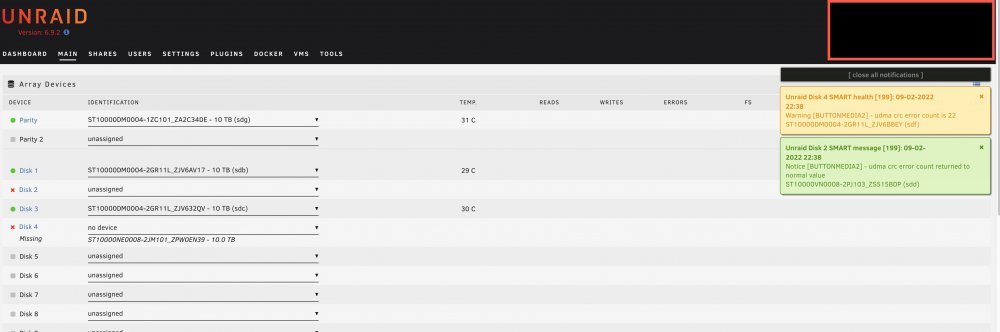
Hi, I have what I thought was a simple issue but its gotten Complicated. Unraid 9.6.2 Server, Used for Plex. 5 Drives, all 10 TB. One Parity 4 media Drives. Fill Up method I had a drive not fail, but the Sata cable broke in a way that it can't connect any more (broken teeth look). So I bought a new drive. I read up and watched some youtube videos, and booted up my unraid server. It now shows 2 drives with the red X, but one lists as missing, and the other unassigned. The missing drive Is the one I cannot connect, and it won't let me set any other value than the Drive that's broken. Disk 1: Good Disk 2: Unassigned with 2 drives listed My New one and one of the existing Disk 3: Good Disk 4: No Device Missing - Lists the Device that the sata port broke Issue: Disk 4 will not accept any value except the missing drive that failed How can I identify that I am adding a drive to replace a drive? Does it matter that I put it back exactly as it was, because I never really looked to see if Disk 2 is one drive vs another?