TheSJDRising
Members
-
Joined
-
Last visited
Everything posted by TheSJDRising
-
Just to add a little colour to this. Here is the XML: When I first set up this VM in 2020 I thought I had to add some manual xml to this? Maybe something to do with /dev/dri, is that right? Either way looks like whatever I added has been lost in subsequent upgrades.... <?xml version='1.0' encoding='UTF-8'?> <domain type='kvm' id='1'> <name>Atlas</name> <uuid>3688f9ef-9870-8c10-0689-c6edbbe2ba7c</uuid> <description>Odd-job machine</description> <metadata> <vmtemplate xmlns="unraid" name="Windows 10" icon="windows11.png" os="windows10" webui="" iconold="windows11.png"/> </metadata> <memory unit='KiB'>16777216</memory> <currentMemory unit='KiB'>16777216</currentMemory> <memoryBacking> <nosharepages/> </memoryBacking> <vcpu placement='static'>4</vcpu> <cputune> <vcpupin vcpu='0' cpuset='2'/> <vcpupin vcpu='1' cpuset='3'/> <vcpupin vcpu='2' cpuset='4'/> <vcpupin vcpu='3' cpuset='5'/> </cputune> <resource> <partition>/machine</partition> </resource> <os> <type arch='x86_64' machine='pc-i440fx-9.2'>hvm</type> <loader readonly='yes' type='pflash' format='raw'>/usr/share/qemu/ovmf-x64/OVMF_CODE-pure-efi-tpm.fd</loader> <nvram format='raw'>/etc/libvirt/qemu/nvram/3688f9ef-9870-8c10-0689-c6edbbe2ba7c_VARS-pure-efi-tpm.fd</nvram> </os> <features> <acpi/> <apic/> <hyperv mode='custom'> <relaxed state='on'/> <vapic state='on'/> <spinlocks state='on' retries='8191'/> <vpindex state='on'/> <synic state='on'/> <stimer state='on'/> <vendor_id state='on' value='none'/> </hyperv> </features> <cpu mode='host-passthrough' check='none' migratable='on'> <topology sockets='1' dies='1' clusters='1' cores='4' threads='1'/> <cache mode='passthrough'/> </cpu> <clock offset='localtime'> <timer name='hpet' present='no'/> <timer name='hypervclock' present='yes'/> </clock> <on_poweroff>destroy</on_poweroff> <on_reboot>restart</on_reboot> <on_crash>restart</on_crash> <devices> <emulator>/usr/local/sbin/qemu</emulator> <disk type='file' device='disk'> <driver name='qemu' type='raw' cache='writeback' discard='ignore'/> <source file='/mnt/user/vms/Atlas/vdisk1.img' index='1'/> <backingStore/> <target dev='hdc' bus='virtio'/> <boot order='1'/> <alias name='virtio-disk2'/> <address type='pci' domain='0x0000' bus='0x00' slot='0x0c' function='0x0'/> </disk> <controller type='pci' index='0' model='pci-root'> <alias name='pci.0'/> </controller> <controller type='pci' index='1' model='pci-bridge'> <model name='pci-bridge'/> <target chassisNr='1'/> <alias name='pci.1'/> <address type='pci' domain='0x0000' bus='0x00' slot='0x02' function='0x0'/> </controller> <controller type='pci' index='2' model='pci-bridge'> <model name='pci-bridge'/> <target chassisNr='2'/> <alias name='pci.2'/> <address type='pci' domain='0x0000' bus='0x00' slot='0x03' function='0x0'/> </controller> <controller type='pci' index='3' model='pci-bridge'> <model name='pci-bridge'/> <target chassisNr='3'/> <alias name='pci.3'/> <address type='pci' domain='0x0000' bus='0x00' slot='0x05' function='0x0'/> </controller> <controller type='pci' index='4' model='pci-bridge'> <model name='pci-bridge'/> <target chassisNr='4'/> <alias name='pci.4'/> <address type='pci' domain='0x0000' bus='0x00' slot='0x06' function='0x0'/> </controller> <controller type='pci' index='5' model='pci-bridge'> <model name='pci-bridge'/> <target chassisNr='5'/> <alias name='pci.5'/> <address type='pci' domain='0x0000' bus='0x00' slot='0x08' function='0x0'/> </controller> <controller type='pci' index='6' model='pci-bridge'> <model name='pci-bridge'/> <target chassisNr='6'/> <alias name='pci.6'/> <address type='pci' domain='0x0000' bus='0x00' slot='0x09' function='0x0'/> </controller> <controller type='pci' index='7' model='pci-bridge'> <model name='pci-bridge'/> <target chassisNr='7'/> <alias name='pci.7'/> <address type='pci' domain='0x0000' bus='0x00' slot='0x0a' function='0x0'/> </controller> <controller type='virtio-serial' index='0'> <alias name='virtio-serial0'/> <address type='pci' domain='0x0000' bus='0x00' slot='0x04' function='0x0'/> </controller> <controller type='usb' index='0' model='qemu-xhci' ports='15'> <alias name='usb'/> <address type='pci' domain='0x0000' bus='0x00' slot='0x07' function='0x0'/> </controller> <interface type='bridge'> <mac address='a8:a1:59:2c:a3:aa'/> <source bridge='br0'/> <target dev='vnet0'/> <model type='virtio-net'/> <alias name='net0'/> <address type='pci' domain='0x0000' bus='0x00' slot='0x0b' function='0x0'/> </interface> <serial type='pty'> <source path='/dev/pts/0'/> <target type='isa-serial' port='0'> <model name='isa-serial'/> </target> <alias name='serial0'/> </serial> <console type='pty' tty='/dev/pts/0'> <source path='/dev/pts/0'/> <target type='serial' port='0'/> <alias name='serial0'/> </console> <channel type='unix'> <source mode='bind' path='/run/libvirt/qemu/channel/1-Atlas/org.qemu.guest_agent.0'/> <target type='virtio' name='org.qemu.guest_agent.0' state='connected'/> <alias name='channel0'/> <address type='virtio-serial' controller='0' bus='0' port='1'/> </channel> <input type='tablet' bus='usb'> <alias name='input0'/> <address type='usb' bus='0' port='1'/> </input> <input type='mouse' bus='ps2'> <alias name='input1'/> </input> <input type='keyboard' bus='ps2'> <alias name='input2'/> </input> <tpm model='tpm-tis'> <backend type='emulator' version='2.0' persistent_state='yes'/> <alias name='tpm0'/> </tpm> <graphics type='vnc' port='5900' autoport='yes' websocket='5700' listen='0.0.0.0' keymap='en-gb' sharePolicy='ignore'> <listen type='address' address='0.0.0.0'/> </graphics> <audio id='1' type='none'/> <video> <model type='qxl' ram='131072' vram='65536' vram64='64512' vgamem='65536' heads='1' primary='yes'/> <alias name='video0'/> <address type='pci' domain='0x0000' bus='0x00' slot='0x1e' function='0x0'/> </video> <hostdev mode='subsystem' type='pci' managed='yes'> <driver name='vfio'/> <source> <address domain='0x0000' bus='0x00' slot='0x02' function='0x0'/> </source> <alias name='hostdev0'/> <rom file='/mnt/user/vms/Atlas/i915ovmf.rom'/> <address type='pci' domain='0x0000' bus='0x07' slot='0x01' function='0x0' multifunction='on'/> </hostdev> <hostdev mode='subsystem' type='pci' managed='yes'> <driver name='vfio'/> <source> <address domain='0x0000' bus='0x00' slot='0x1f' function='0x3'/> </source> <alias name='hostdev1'/> <address type='pci' domain='0x0000' bus='0x07' slot='0x01' function='0x3'/> </hostdev> <memballoon model='none'/> </devices> <seclabel type='dynamic' model='dac' relabel='yes'> <label>+0:+100</label> <imagelabel>+0:+100</imagelabel> </seclabel> </domain>
-
So in 2020 when I setup my Unraid box I also setup a Win10VM on it for other general duties and successfully passed through the iGPU which I ran in Plex on the VM for hardware transcoding. I've noticed that at some point during the last few months that iGPU now has a code 43 in Device Manager. The iGPU is present, I think, as when I go to display settings on the vm console (I have QXL virtual gpu as primary gpu and intel as second) I have 2 screens identified. Maybe this was as a result of 7.x upgrade? I have a hdmi port emulator plugged in to the actual hdmi port. But I still have code43 in device manager and no HW transcode in plex. Anyone with any ideas i'd be eternally grateful.
-
Thank you!
-
Thank you so much for replying to this. Just one question - when I use the 'new config' tool will I lose anything? Like shares, data, config/settings etc? Because obviously all my data, SAMBA settings etc are all there at that point. Thank you!
-
Evening all I'd really appreciate any advice you experts can shine upon my predicament. So, my NAS is home built (in early 2020). It's a 6 bay, but currently using just 2 WD Red Plus 14TB disks. One for data, one for parity. Obviously I had plans to add more later but never needed to. The array has about 10TB of data on it. I returned from holiday to find my parity disk has died. Switched the cable, PSU, SATA port etc etc, it just clicks and clicks and isn't even visible to the BIOS anymore. So mad, so sad. It's my first HDD loss in 30 years of working in IT so I can live with it. However, this thing lives next to my desk where I spend all of my working day. It was built to be SILENT and it's a job the Red Plus disks do well. Only problem is that WD don't sell the 14TB Plus disks anymore. Plus now tops out at 12TB, and Red Pro goes up to 26(?)TB. Thing is that Red Pro is 7200 spin and louder than the Plus disks. So, if I get a 12TB Plus HD,(or two), can I use that/them in any way? Remember, I only have 10TB of data so far. Will Unraid even accept that as a parity disk for now, or will it flat out deny me saying that I need a 14TB or more? Failing that, can I somehow put a 12TB as another disk in the array, and use some sort of move function to move my data from the one remaining working 14TB to the 12TB and then put the 14TB as a parity? I could even add a second 12TB to the party and take my storage to 24TB for not too much money. Thoughts? It's been a while since I've even looked at Unraid - it just... worked, until fate and WD let me down. How can I get back to drive resilience please? Thanks!
-
Ah that explains it then! Thanks both.
-
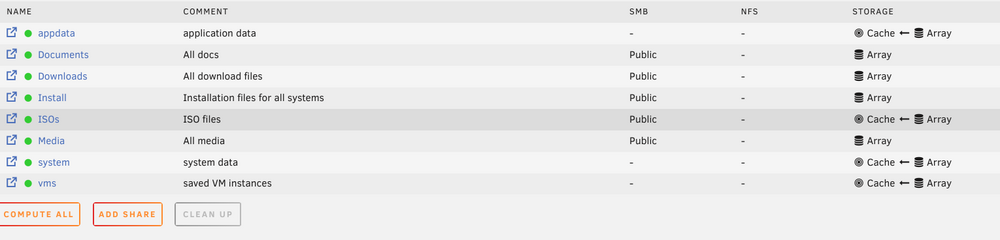
Thank you! The thing is that the ISOs share is my own creation and I don't remember turning it on for that?
-
Hi all Logged into my latest 6.2.14 Unraid and I see that some shares are showing as having a cache disk? Is that right from the attached pic? Thing is, I don't have a cache disk and I've never set them up this way. Why would it be saying this and how do I go about fixing it please?