





Myleslewis
Members
-
Joined
-
Last visited
-
Hi, I've actually had the same issue, recently got everything working with the nordlynx docker, added deluge port to nordlynx and was able to connect to deluge just fine. Now when I try, the page just doesn't load. I also get the same output in my deluge log. I also notice in deluge row in docker, there are no ports, where there were before. Switching the docker back to the normal network fixes it and I'm able to connecto the UI just fine. I've been using deluge for a while now without the VPN and only very recently decided to buy a subscription to one, I've got in progress torrents that I don't want to lose by making the switch to DelugeVPN. Any help/suggestions is appreciated! Thanks, - Myles

-
Hi trurl, thank you for the response, we checked connections and it was still having issues, I then switched the drives from a power splitter to sata plugs wires directly and parity was then detected properly, no read errors etc. so we’ve gotten a new splitter to replace the previous one (a new psu is going to be ordered VERY soon) and all seems to be running as expected! thank you for your response again
-
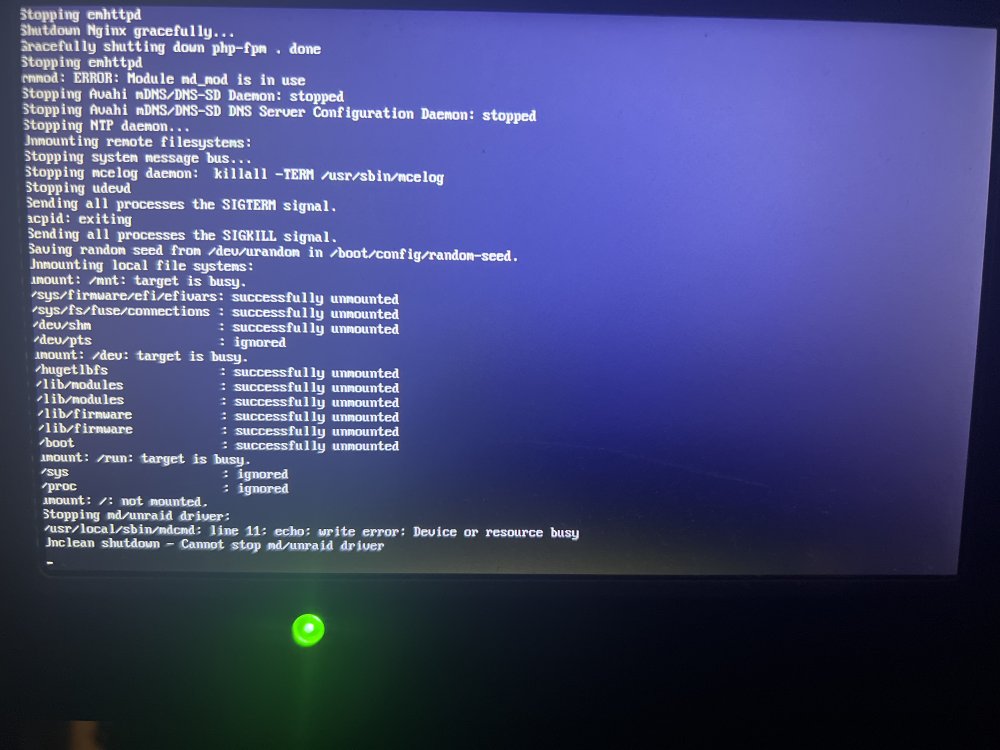
A small update, we tried to issue power down command via command line, as it had completely frozen, UI is inaccessible and on the screen connected to the server we have this. Any advice is appreciated as always. Thanks, myles
-
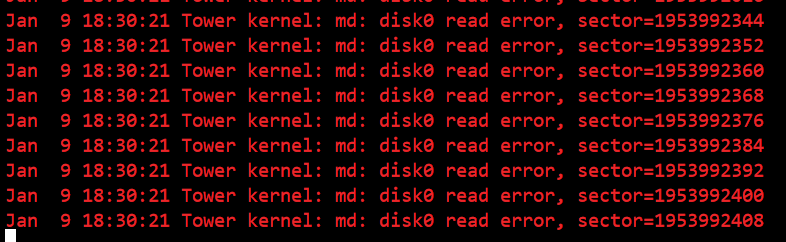
Hi all, posting on behalf of a freind. We powered down his unraid after a disk had failed so we could disconnect it as it kept making a clicking noise. We then powered on the server to make sure data was being emulated etc. All fine at this point, so powered it down as we're waiting for a replacement drive. This was Friday. Fast forward today and my freind notices that that the array was stuck on 'Array Stopping. Unmounting disks...', we could access the UI so tried to run 'powerdown' via command prompt, no result, couldn't get any further so did a hard power down. We then power the server up, all disks were present (bar the one that had been removed due to failing, data was being emulated), go to start the array as there was some important data we needed to access, only to be given a warning that the array has 1 drive with read errors. The Main tab looks like this None of the other drives should have issues, though when veiwing the syslog, we are given these errors, one cpu core is also pinned at 100%, HTOP tells us that it's the syslog utilising the core (This snippet was taken at 9pm): I've attached diagnostics taken when we found the errors/just after we started the array. Any advice, on how to move forward will be appreciated. The server is still running, we have not tried to shutdown or anything. Thanks in advance, Myles tower-diagnostics-20230109-1842.zip

-
@ich777 We have tried to play on the server today, it's been up all night with no issues, last night multiple people were able to connect and disconnect with no loss of progress. However today, when connecting, there was no continue option, only join so player progress was lost, a reset of the docker has restored world data but player progress was still not present. Where is player data saved, is it server or client side ? Update: I've figured something out in terms of what's happened, I'll try and detail the order of events as best I can Server is running over night Player A connects, no player data (starts at spawn after intro) and no world data (buildings gone) Player B connects, no player data (starts at spawn after intro) and no world data (buildings gone) I receive message message on Discord, so try and join the game, I'm not given a 'Continue' option so have to start at spawn. I ask everyone to disconnect so I can restart the docker. Player A connects, no player data (starts at spawn after intro) but world data is restored (houses/base is present) I connect, make my way to the base, disconnect, and reconnect with no problems or loss of progress. Player C connects for first time since last night, after the above, and progress/inventory etc. is all present as expected. So it appears that as the server had been restarted before Player C connected, everything worked as it should have.
-
I didn't change anything in addition to the server name etc, I just went into the game again aftet closing it, and the continue option was there this time, where as it definitely wasn't before. So yes, everything appears to be working fine, thank you for your help!
-
After trying it again myself, I have now been able to get the appropriate options up, the continue comes up when selecting the server from the list, and then you need to put the password in and click continue again, and I was able to join where I'd left off!
-
Just tried it, I've changed the password & server name so I could know which was my server, and when I joined again it put me back into the plane and the things I'd collected were gone from my invetory
-
I believe it should appear after they click join for the first time, from what I've read. And yeah, they start in the plane again and see the intro too. The only things I changed in the config files were name of the server, password, contact email address, showlogs on, and server IP
-
I just restarted the docker and buildings have appeared. When reading online, this has been a common thing for some people, and a simple restart of the server fixed it. Just struggling with the players restarting from beginning, there seems to be an option to continue which should appear, but doesn't look like it is.
-
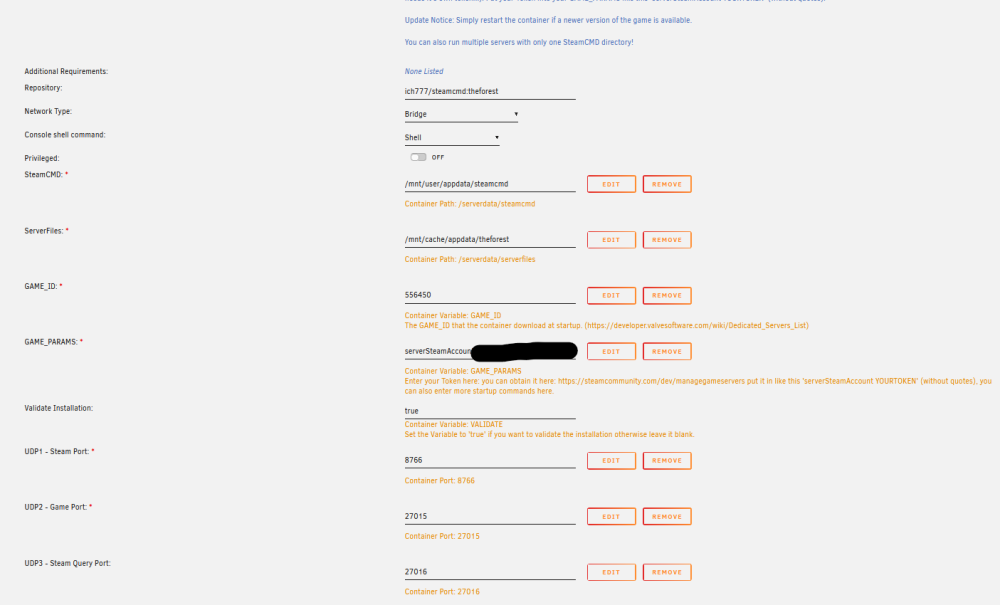
I've turned off validation. So some progress, after resetting the server, the world data has come back, so structures that were build have returned, the next issue we have is that when people disconnect from the server, and connect again, they spawn in the plane with no inventory/armour/etc. So having my appdata set to Prefer: Cache, is this setting okay?
-
Hi Ich, My app data is set to Prefer: Cache. And here is my template
-
Has anyone had issues with The Forest and game saves not working ? The world has completely reset, as have all characters. auto save was set to 30 mins, and initType is set to Continue and not new. There are some reports of this happening as far back as 3-4 years ago but wandering if there’s been a fix figured out with the docker ?
-
A Ahh. That's okay, I've set up a server for a few friends and my brother who play the game, I don't have it so if there were issues I was just wandering what access I have to game console. I'll get them to buy me a copy of the game as payment for me hosting it, lol. Thanks, - Myles
-
Hi Ich777, Is there a way to connect to a valheim server console through the docker? Or does the game only support console input via the game itself? Thanks, - Myles




