





Skibo
Members
-
Joined
-
Last visited
Everything posted by Skibo
-
Well, it was a good run, but Unraid has been a big epic failure - it was a good run.
-
Sorry jorgeB, the support page talks about the actual open-webui & Ollama configuration when installing it on your system. I have installed ollama and open-webui on my laptop and it works great, however its something do with Unraid effecting the outcome.
-
Hello, I installed the Ollama by joly0 - I have installed the Nvidia drivers for my rig, and everything is working, BUT I can't seem to download the models. I keep getting "Open WebUI: Server Connection Error" looking at the logs i get "INFO: <myinternalIP>:55648 - "POST /ollama/api/pull/0 HTTP/1.1" 500 Internal Server Error. Can someone tell me what I am doing wrong or not seeing what is happening?
-
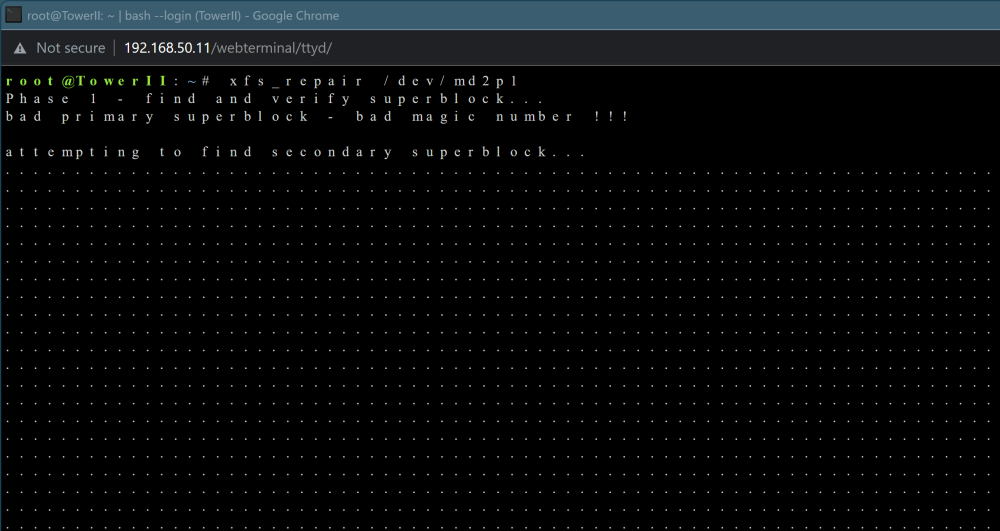
Thanks JorgeB, but the command just keep running see below- The server is currently in Maintenance mode -
-
Hello, Yes its was XFS - I have restarted the system in Maintenance mode and attached the Diag file. Thank you in advance. towerii-diagnostics-20230729-0103.zip
-
I have stopped the array and set the disk2 to auto like instructed, however the issue still there. Attach is the new dia. as requested towerii-diagnostics-20230714-1539.zip
-
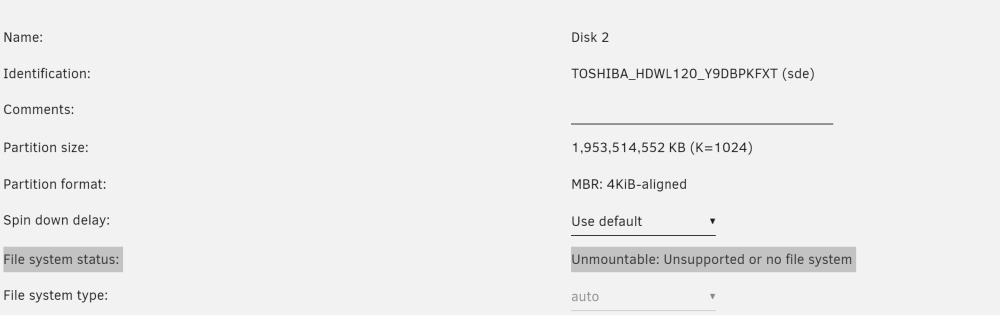
Interesting libvirt.img should not be new and disk2 should be mounted but I am getting: File system status: Unmountable: Unsupported or no file system How can I remount that drive? maybe that file is there once it mounts
-
Thank you for the response attach is my diagnostics - A side note, I been running this server for over 3 years with no issues till this particular upgrade. towerii-diagnostics-20230708-1347.zip
-
Hello, After upgraded to the new version - my Dockers and VMs did not show up, I was able to find my Dockers be restabling my templates, but I am not able to see what I need to do show my VMs can show back up. The system has been on for over 3 days and still they are not showing up. towerii-diagnostics-20230708-1347.zip Thank you in advance.
-
I just upgraded today and my dockers & VMs disappeared, I was able to figure out how to bring them back the dockers by : Goto Docker --> Add Container -->> Select a template, However I am still stuck on how to bring back my VMs? can somebody give me some direction on what I need to do. Thanks in advance. Some additional information: Virtio-win-0.1.229.1.iso Libvirt version: 8.7.0 QEMU version: 7.1.0 text error warn system array login 2023-07-06 00:00:59.668+0000: 4794: info : libvirt version: 8.7.0 2023-07-06 00:00:59.668+0000: 4794: info : hostname: TowerII 2023-07-06 00:00:59.668+0000: 4794: error : virNetSocketReadWire:1791 : End of file while reading data: Input/output error 2023-07-06 00:01:05.398+0000: 4794: error : virNetSocketReadWire:1791 : End of file while reading data: Input/output error 2023-07-06 00:11:06.083+0000: 4794: error : virNetSocketReadWire:1791 : End of file while reading data: Input/output error 2023-07-06 00:21:06.769+0000: 4794: error : virNetSocketReadWire:1791 : End of file while reading data: Input/output error 2023-07-06 00:31:07.602+0000: 4794: error : virNetSocketReadWire:1791 : End of file while reading data: Input/output error 2023-07-06 00:41:08.427+0000: 4794: error : virNetSocketReadWire:1791 : End of file while reading data: Input/output error
-
Thanks for the response but I am getting: "No Docker containers installed" & "No Virtual Machines installed" - I have rebooted several times and No Dice.
-
Hello, I just upgraded to 6.12.2 and I have also lost my VMs and Dockers, can somebody point me to the right direction on fixing my disappearing issues 🙂 Thank you in advance.
-
Son of a GUN this worked, I removed the credentials and it renegotiated it and it worked !!! - Thanks.

