soam
Members
-
Joined
-
Last visited
-
TLDR: Change the APP_ENV variable from "production" to "local". I spun up Ubuntu servers with mariadb databases and followed several different install docs. I ended up documenting this after the 20-25th go around and figured out that using local instead of production in the APP_ENV was the only way to get the web interface to fully load and allow me to register a monica crm username/password. I then replicated this back to the docker container and it started working. https://computingforgeeks.com/install-monica-crm-on-ubuntu-debian/ https://github.com/monicahq/monica/blob/master/docs/installation/faq.md ### ROOT USER ### apt update && apt -y upgrade && apt install -y git php php-intl php-json php-cli php-fpm php-mysql php-zip php-gd php-mbstring php-curl php-xml php-pear php-bcmath php-redis php-gmp && apt install -y composer && apt install -y software-properties-common && apt-key adv --recv-keys --keyserver hkp://keyserver.ubuntu.com:80 0xF1656F24C74CD1D8 && add-apt-repository "deb [arch=amd64,arm64,ppc64el] http://mariadb.mirror.liquidtelecom.com/repo/10.4/ubuntu $(lsb_release -cs) main" && apt update && apt -y install mariadb-server mariadb-client mysql_secure_installation mysql -u root -p ## CREATE USER 'monicaUser' IDENTIFIED by '<PASSWORD>'; CREATE DATABASE IF NOT EXISTS monicahq CHARACTER SET = utf8mb4 COLLATE = utf8mb4_general_ci; GRANT ALL PRIVILEGES ON monicahq.* TO 'monicaUser' IDENTIFIED BY '<PASSWORD>'; FLUSH PRIVILEGES; ## ### NON ROOT ### cd /srv git clone https://github.com/monicahq/monica.git cd monica cp .env.example .env vim .env ## APP_URL=http://IP DB_DATABASE=monicahq DB_USERNAME=monicaUser DB_PASSWORD=<PASSWORD> APP_DISABLE_SIGNUP=false ## composer install --no-interaction --no-suggest --no-dev php artisan key:generate php artisan setup:production php artisan passport:install php artisan schedule:run echo "* * * * * www-data /usr/bin/php /var/www/html/monica/artisan schedule:run" | sudo tee /etc/cron.d/monica ### ROOT ### apt install apache2 libapache2-mod-php a2enmod rewrite systemctl restart apache2 vim /etc/apache2/sites-enabled/monica.conf ## <VirtualHost *:80> ServerName IP ServerAdmin [email protected] DocumentRoot /srv/monica/public <Directory /srv/monica/public> Options Indexes FollowSymLinks AllowOverride All Require all granted </Directory> ErrorLog /var/log/apache2/monica_error.log CustomLog /var/log/apache2/monica_access.log combined </VirtualHost> ## chown -R www-data:www-data /srv/monica chmod -R 775 /srv/monica/storage apachectl -t systemctl restart apache2
-
Thank you for your suggestion, I updated the APP_URL as stated, but ended up with the same results. Right under the text box for APP_UR it states: So im making an assumption HTTPS is required.
-
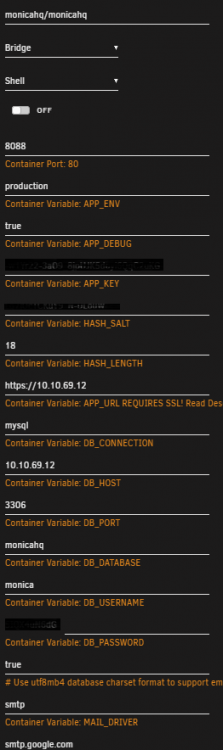
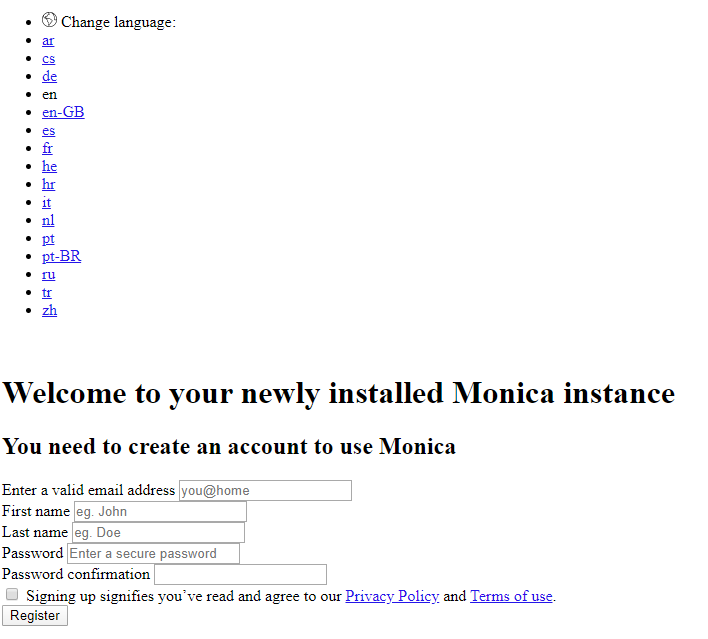
I have been using UnRaid for 15 days now and playing with docker for the same amount of time so I am very green to setting these up. Background: Unraid Server = 10.10.69.12 Workstation Client = 10.10.69.11 MariaDB is setup and accepting connections. phpmyadmin confirmed monicadb database and user access is functional. Monica config: Where im struggling: The webgui is available at http://10.10.69.12:8088/register not https://10.10.69.12:8088/register like it tries to go to when using the "WebUI" button. The first thing I see is that it doesnt look visually the same as the screen shots ive seen: Checking the page source shows that the CSS is being requested via HTTPS so a secure connection is baked in? Checking netstat in the monica container shows only port 80 actively listening: /var/www/monica # netstat -tulpn Active Internet connections (only servers) Proto Recv-Q Send-Q Local Address Foreign Address State PID/Program name tcp 0 0 0.0.0.0:80 0.0.0.0:* LISTEN 41/httpd /var/www/monica # Theres nothing showing up in the Apache access.log or error.log. Docker logs show this when trying to access the https connection: 10.10.69.11 - - [12/Apr/2020:21:40:24 +0000] "GET / HTTP/1.1" 302 378 "-" "Mozilla/5.0 (Windows NT 10.0; Win64; x64) AppleWebKit/537.36 (KHTML, like Gecko) Chrome/80.0.3987.163 Safari/537.36" 10.10.69.11 - - [12/Apr/2020:21:40:24 +0000] "\x16\x03\x01\x02" 400 296 "-" "-" The same log file shows this when accessing the http connection: 10.10.69.11 - - [12/Apr/2020:21:40:32 +0000] "GET /register HTTP/1.1" 200 14978 "-" "Mozilla/5.0 (Windows NT 10.0; Win64; x64) AppleWebKit/537.36 (KHTML, like Gecko) Chrome/80.0.3987.163 Safari/537.36" 10.10.69.11 - - [12/Apr/2020:21:40:33 +0000] "\x16\x03\x01\x02" 400 296 "-" "-" 10.10.69.11 - - [12/Apr/2020:21:40:33 +0000] "\x16\x03\x01\x02" 400 296 "-" "-" 10.10.69.11 - - [12/Apr/2020:21:40:33 +0000] "\x16\x03\x01\x02" 400 296 "-" "-" My question is, is this as simple as enabling the https VirtualHost in Apache in the docker container or what I am missing?