SPILIHP
Members
-
Joined
-
Last visited
Everything posted by SPILIHP
-
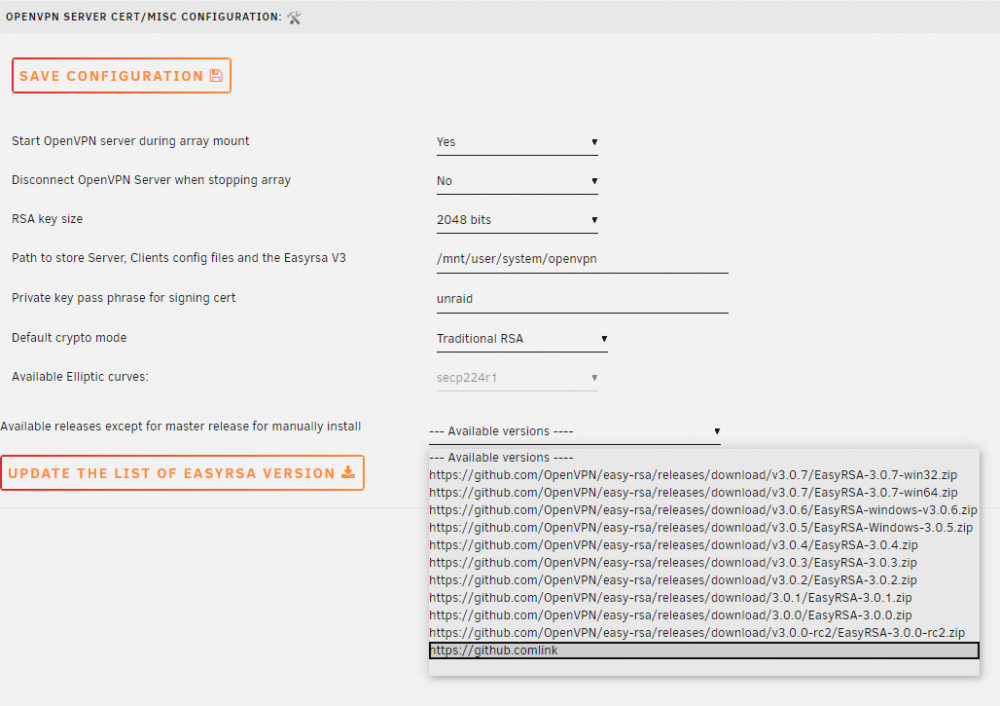
Hi everyone, i have a Problem downloading the EASYRSA Version. I think the release list is the problem, see screenshot. I tried to change easyrsa_version_full_path.txt, unfortunately without success. root@srv:/usr/local/emhttp/plugins/openvpnserver/scripts# rc.openvpnserver download_easy-rsa https://github.comlink master.zip Going to download ....https://github.comlink --2020-04-26 22:13:12-- https://github.comlink/ Resolving github.comlink (github.comlink)... failed: Name or service not known. wget: unable to resolve host address ‘github.comlink’ <190>Apr 26 22:13:12 rc.openvpnserver[11151]: Deleting the client folder and files when new easyrsa are insatlled. Deleting the client folder and files when new easyrsa are insatlled. unzip: cannot find or open master.zip, master.zip.zip or master.zip.ZIP. mv: cannot stat 'easy-rsa*': No such file or directory chmod: cannot access 'easy-rsa': No such file or directory https://github.comlink is not a vaild link Thanks for help