phoenixcoder
Members
-
Joined
-
Last visited
-
Weird enough, changing the docker size from 80gb to 100gb and clicking apply caused it to finally start up and do not see any issues. Also all my previous containers were there
-
After a reboot, the docker service doesn't want to start with "Docker Service failed to start" and my syslog is full of these errors Sep 19 23:50:19 Tower kernel: BTRFS info (device loop2): enabling ssd optimizations Sep 19 23:50:19 Tower root: Resize device id 1 (/dev/loop2) from 80.00GiB to max Sep 19 23:50:19 Tower emhttpd: shcmd (101): /etc/rc.d/rc.docker start Sep 19 23:50:19 Tower root: starting dockerd ... Sep 19 23:50:20 Tower avahi-daemon[17577]: Server startup complete. Host name is Tower.local. Local service cookie is 2499527664. Sep 19 23:50:21 Tower avahi-daemon[17577]: Service "Tower" (/services/ssh.service) successfully established. Sep 19 23:50:21 Tower avahi-daemon[17577]: Service "Tower" (/services/smb.service) successfully established. Sep 19 23:50:21 Tower avahi-daemon[17577]: Service "Tower" (/services/sftp-ssh.service) successfully established. Sep 19 23:50:24 Tower unraid-api[14038]: ⚠️ Caught exception: read ECONNRESET Sep 19 23:50:24 Tower unraid-api[14038]: ⚠️ UNRAID API crashed with exit code 1 Sep 19 23:50:30 Tower unraid-api[18980]: ✔️ UNRAID API started successfully! Sep 19 23:50:31 Tower unraid-api[18980]: ⚠️ Caught exception: connect ECONNREFUSED /var/run/docker.sock Sep 19 23:50:31 Tower unraid-api[18980]: ⚠️ UNRAID API crashed with exit code 1 Sep 19 23:50:38 Tower unraid-api[19974]: ✔️ UNRAID API started successfully! Sep 19 23:50:39 Tower unraid-api[19974]: ⚠️ Caught exception: connect ECONNREFUSED /var/run/docker.sock Sep 19 23:50:39 Tower unraid-api[19974]: ⚠️ UNRAID API crashed with exit code 1 Sep 19 23:50:45 Tower unraid-api[20428]: ✔️ UNRAID API started successfully! Sep 19 23:50:46 Tower unraid-api[20428]: ⚠️ Caught exception: connect ECONNREFUSED /var/run/docker.sock Sep 19 23:50:46 Tower unraid-api[20428]: ⚠️ UNRAID API crashed with exit code 1 Sep 19 23:50:50 Tower unraid-api[21021]: ✔️ UNRAID API started successfully! Sep 19 23:50:51 Tower unraid-api[21021]: ⚠️ Caught exception: connect ECONNREFUSED /var/run/docker.sock Sep 19 23:50:51 Tower unraid-api[21021]: ⚠️ UNRAID API crashed with exit code 1 Sep 19 23:50:53 Tower emhttpd: shcmd (103): umount /var/lib/docker Sep 19 23:50:53 Tower kernel: BTRFS info (device loop2): last unmount of filesystem 7ad8a567-ec65-44a7-b27c-b9869d95543a Sep 19 23:50:53 Tower emhttpd: shcmd (116): /usr/local/sbin/mount_image '/mnt/user/system/libvirt/libvirt.img' /etc/libvirt 1 Sep 19 23:50:53 Tower kernel: loop2: detected capacity change from 0 to 2097152 Sep 19 23:50:53 Tower kernel: BTRFS: device fsid a8d682b6-15ea-4736-b055-3e5c4d22793b devid 1 transid 280 /dev/loop2 scanned by mount (21323) Sep 19 23:50:53 Tower kernel: BTRFS info (device loop2): first mount of filesystem a8d682b6-15ea-4736-b055-3e5c4d22793b Sep 19 23:50:53 Tower kernel: BTRFS info (device loop2): using crc32c (crc32c-intel) checksum algorithm Sep 19 23:50:53 Tower kernel: BTRFS info (device loop2): using free space tree Sep 19 23:50:53 Tower kernel: BTRFS info (device loop2): enabling ssd optimizations Sep 19 23:50:53 Tower root: Resize device id 1 (/dev/loop2) from 1.00GiB to max ------------ Any help in fixing my docker image and being able to get it started again?
-
oh wow! I feel dumb, that fixed it. I should have found that option sooner Thank you
-
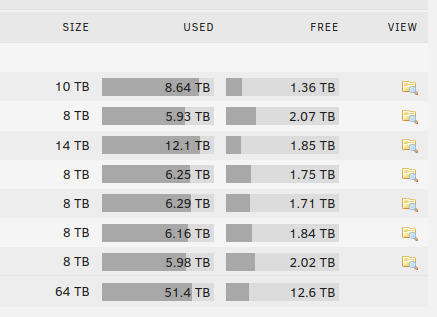
I recently had to reinstall unraid, was able to get my old array back up but now the used and free stats are showing grey like seen below. The array is started and parity is valid but it's not showing me the green/yellow/red indicators Am i missing a configuration? Thank you