Veggies
Members
-
Joined
-
Last visited
-
I totally screw myself. I formatted the drive that was offline and mounted the drive. I lost a lot of data, dang it! I will follow the directions in the link, stay tuned.
-
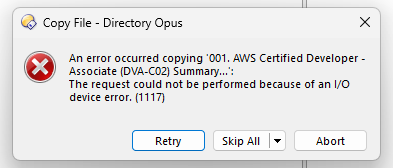
I've searched the forum, went to the "https://wiki.unraid.net/Check_Disk_Filesystems" and the page is under constructin, I cannot write to my shares, both private and public. I did redid the parity and settings/new permission and still get the dreaded "i/o device error (1117). I have attached my diagnostics. Any help would be appreciated. tower-diagnostics-20231026-1659.zip
-
Ah, ok thanks. Just a THANK YOU to those who responded. I'm back up and running with all of my data.
-
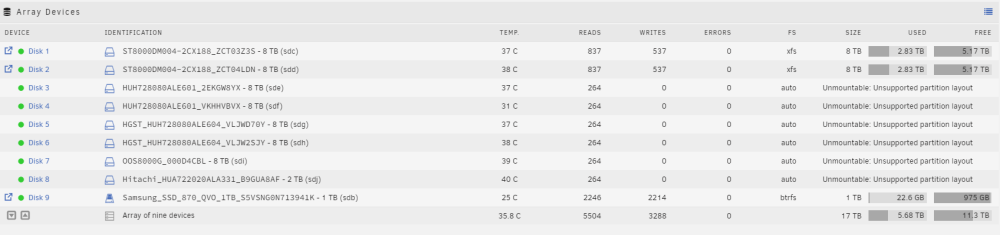
"The Gurus are going to need the Diagnostics file. Post it up in a new post in this thread." I have attached the diagnostics zip file to the post.tower-diagnostics-20230926-1124.zip "You added six more drives. Which ones are they in the screen capture above?" The 1TB, Disk 9, is an SD drive that I used as the cache drive. The two 8 TB drives, Disk 1 & 2, I think were the two data drives The remaining 6 drives, Disks 3-8, one of them was the Parity Drive and the remaining 5 I added. I stand corrected, I added 5 drives to the original 4 drives that were in my Tower. "Did you get a HBA to add more SATA ports? If so, what are the details on it?" Yes, I installed "MZHOU PCIe SATA Controller Card 10 Port with 10 SATA Cables and Low Profile Bracket - 6Gbps SATA 3.0 PCIe Card,Support 10 Port SATA 3.0 Devices" from Amazon. https://www.amazon.com/dp/B08L7W8QFT?ref=ppx_yo2ov_dt_b_product_details&th=1 "EDIT: Did you 'retire' an HBA?" I used the three SATA ports on the mother board and then filled up the SATA ports on the HBA. If the question is asking if a old HBA was replaced with a new one, the answer is, no. This is my first attempt adding more than three drives to this motherboard. "Those errors suggests a RAID controller was in use before or now, see if those disks mount with the UD plugin" I have never configured the drives in any RAID format. I have definitely learned my lesson in marking all the drives before I do anything like this again.
-
I moved my mother board from a mini-tower to a full sized tower and added 6 more drives. In the process, I forgot which drives are my data drives and which one was my parity drive. If found the following in the forum. However, I now have 6 unmountable drives when I only had one parity drive. How do I test to see which one of the six drives is my parity drive? "Any parity drive will not have a mountable file system so if you can identify which drive(s) have unmountable file systems then these are probably your parity drives." It also says, "If you find you have more unmountable drives than you had parity drives then you should ask for help in the Unraid forums."