





Rhodius
Members
-
Joined
-
Last visited
-
Default port for incoming connections. Hi y'all, I've tried searching here but couldn't find anything that answered my questions, if you do, please send me the link. My issue is I have a website that I visited that requires a different port than the default 6881. Periodically, sometimes every day or a few times a day, I have to go into Settings -> Connection -> Port used for incoming connections to set this to a port other than the default 6881. The issue is, I think my Unraid restarts the Binhex-qbittorrent docker, either that or something else, but the default port often reverted back to 6881. Sometimes it lasted a few days, sometimes it's daily, I need to go in and change to something other than 6881. My question is where is the setting to change this to a different port that will hold the value upon restart of the docker. Thanks!
-
Hi, I'm in need of a bit of help. I've read almost every single post from page 1-6, then page 11-12, I'm not sure I understand. Here are my questions: I have RTL8156/B USB-A ethernet NIC Tool -> System Devices shows: 8156 Realtek Semiconductor Corp. USB 10/100/1G/2.5G LAN I bought a pair, one for Unraid, the other on my desktop. My files as shown in MC is r8152-20230709.XXX dated 07/10/2023, Installed Plugins says Up-to-date, I know github has newer versions from two weeks ago. If I were to download, those files, where would they go? Do I then need to reboot? Is there a flag or check I need to do in order for Apps/Plug-ins to realize it's out of date? I had this since last year, I only had time to check now since I'm getting hiccups when watching movies. I realized I set the MTU to 9000, if I set to 1500, less or no hiccup. But at the same time iperf3 no matter what the setting is only showing 950-960 Mbits/s, unless I'm mistaken that's only performance of a 1 G LAN, I had both 2.5 G connected to a 2.5G switch. How can I get full performance out of this setup? Thanks. TLDR: Have 8156/B 2.5 G USB NIC on both desktop and Unraid and only getting 950 Mbits/s iperf3. Driver files are old, but is there a missing config somewhere? It doesn't look 2.5G is "activated".
-
Hi, not sure if you still have this issue, it seems that you set your Plex Media Server to /Transcode and yet the docker refers to /transcode. For Linux based OS, capital is different than lower case.
-
I just want to report back that I solved my own issue. The problem is I couldn't enable dark theme using the Alternate Web UI setting since I upgraded to 4.5.XXX. Not sure if this is a change on Qbit part. The error I had was "Unacceptable file type, only regular file is allowed". After checking on a few forums, I came across posting that the docker may not have access to folder. Since I have added many paths already to the two docker setups, I decided to just duplicate the theme inside the appdata folder. Specifically since my docker /config path already pointed to /appdata/binhex-qbittorrentvpn, I just copied the theme inside that folder. Then I set my alternate Web UI to the following: /config/WebUI/theme (the theme files are inside /WebUI/theme). In case anyone coming across the same issue, that's the solution. It is possible I don't have to dupe the folders by adding yet another path which both dockers can access, but less headache means more to me. Also not sure why this wasn't an issue in the previous release, I've been running this theme folder setup for 18 months until recent upgrade.
-
Alternative WebUI issue I have two qbit dockers running fine until I noticed my Unraid OS is 18 months old since last update (6.9.3). I know I shouldn't be updating unless there is issue, as issues usually show up right after upgrade. This time is really painful. My USB is corrupted thus I lost some of the dockers config and had to re-do the settings. Anywhoo, one of qbit docker is still getting error. The issue is every time I turned on Alternative Web UI to use the dark theme, I'd lost Web UI access with the error "Unacceptable file type, only regular file is allowed.". To be honest the other Qbit docker is running fine with dark theme. What is the problem? Is this Unraid 6.12.3 issue? Every time I tried to enable Alternative WebUI, it gives the error above, what I have to do is to go into qbit config and change that flag to false, save, reboot the qbit docker, and I can then access the Web UI, but otherwise it's a pain. Adding that this is Unraid 6.12.3 and Binhex-QbitVPN 4.5.4. Thanks.
-
I found out that the issue is because I restored from an older version of the USB Flash where the Dockers were not setup, hence it's missing from the Flash. It was still working though, just no Edit. I had to download the app and re-do the Docker setup, which is where the pain is, since I can't see what is in the setting. The USB has been overwritten when I restore from the backup. Yes the real issue is my USB is at the breaking point, the update from 6.9.3 broke its back, so to speak. I had to shutdown the server and repair the USB through Windows. I'll also make sure to have frequent updates of the USB otherwise it's a real pain to type in manual config.
-
I ran into another issue. I had to turn VM back on, Unraid correctly show me all my VM setups. But upon restarting the VM it gave me "unsupported configuratio: Emulator '/usr/local/sbin/qemu' does not support machine type 'pc-i440fx-7.1'". All I had to do was edit the VM and click update, and then the VM restarts without an issue. It's like the config is there but because an older version or Unraid upgrade happened, it forgot where the setting is and it had to be reminded.
-
OK, background story is I had a scare when upgrading from 6.9.3 to what I thought was 6.12.3. After the upgrade to 6.10.3, there seems like a USB issue that prevented Unraid boot up, I had to restore from 9 months USB Backup. It is most likely this USB Backup does not have some of the later Dockers and/or Shares setup. So, Docker tab show 2 instances of the QbittorrentVPN with the correct naming, but the second one has no edit (right below Logs before Remove there should be an Edit option). How do I correct or manually edit all these "changes" that were added to Unraid after this backup was done last year? In this case how do I get edit back? Thanks.
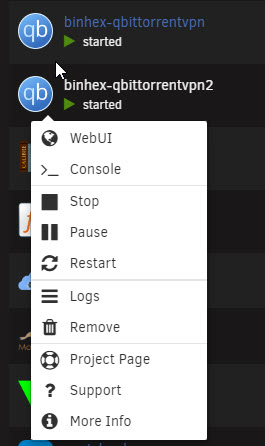
-
Thanks again JorgeB! Happy ending for what was quite a scare. I was looking for screenshot of the array setup when I came across the USB backup from 9 months ago, suffice to say, it's "recent enough" to get my server back up and running again. Without this, I'd have to restart the array following the above link that JorgeB provided. I noticed my Unraid is now 6.10.3, but I thought I was upgrading to 6.12.3? Maybe that question will be for another topic. Adding to the scare, Unraid website was undergoing maintenance when I was having this issue, so if I were to download another version of the OS, I'd have to wait a couple more hours. What a coincidence! Such is life.
-
Thanks JorgeB for the link. There's a warning in red that "All existing data on this device will be OVERWRITTEN when array is Started", how true is this? Assuming I have the arrays in the correct order? What if only one disk is not assigned correctly?
-
I confirm that I have screenshot of the server arrays including the discs' serial no, so theoretically I can put them in the correct order and boot up. But I have previously set encryption, I have to re-enter a key when the array is brought up, is this going to be an issue? I also have various apps and dockers, will those have to be manually re-done? I felt like I bite more than I can chew, mostly because my previous upgrade has not resulted in something like this that I "forgot" the risk of upgrade.
-
I have a 4 year old Unraid server with Pro key installed. This morning feeling I need something to do, don't ask me why, I took the initiative to upgrade when I noticed that my Unraid version is about 12-18 months. This is normal as I don't want to upgrade too soon. After the upgrade, it won't boot, something about the USB drive. Stupidly, I then downloaded 6.12.3 on my Windows PC and use the USB creator to put that on the SAME USB flash. Now I managed to boot up to the login screen, but it's asking for changing my boot password and it's asking for my Unraid key, I also noticed while it listed all my drives, but everything has to be put back in the same order. I realized I probably don't have any backup of the settings somewhere, even worse the settings are probably in those drives. What recourse do I have now? I'm afraid to proceed further perhaps risking do damage all the files sitting in unassigned drives. I may have pics of the drives setup and potentially can put them back in the right order. But what can I do? Thanks.
-
In the QbittorrentVPN container (the container running the VPN): Add the ports removed from the "container to route through VPN". For example I use Flaresolverr and Jackett which use port 8191 and 9117 respectively. So I add under VPN_INPUT_PORTS 8191, 9171 (each removed ports separated by comma). Then I add a configuration (Add another Path, Port, ....) for config type Port, Name FlareSolverr (this is a description, any will do), container port 8191 (this comes from the port that was removed), host port 8192 (the new port that it should be using, I simply use original port+1) and that's it. Add another port for 9172 following the same nomenclature. I think the way it works is, whatever the port from the container to route through VPN it has to go into the container running VPN and then out. So the original port goes into the container running the VPN and out as a new one for it to functions. In my case this is how it's working for my setup for all my containers routing through VPN. Lastly and you probably already know this, open the console on the container to route through VPN and do: curl ifconfig.io, this has to show the same IP address as the container running the VPN, it should be the end point that Qbiittorrent is connecting to. I use PIA, this is the same IP that I'm using as my end point.
-
Not sure if this is a permanent solve, but using Edge I was able to access the option screen and then white-listed the internal IP range that I was using, and then I no longer get asked for user and password whenever I opened the Unraid server URL:XXXX. At the same time now Brave works and no longer gives me Qbittorrent is not reachable message as well as allows me to access the Option screen.
-
I found what I've done previously as far as fixing a VPN end point that I preferred, it was in the FAQ Q28/Q29. This is done through setting the Endpoint in user/appdata/binhex-qbittorrentcpn/wireguard/wg0.conf. I still don't know why Brave wouldn't allow me access to the setting screen, only Edge and Firefox does that. Whenever I clicked on Option using Brave browser, it says "Error: n". Thanks.

