xixuan
Members
-
Joined
-
Last visited
-
Has this issue been resolved in version 6.12.2?
-
-
The pool is offline because I export it
-
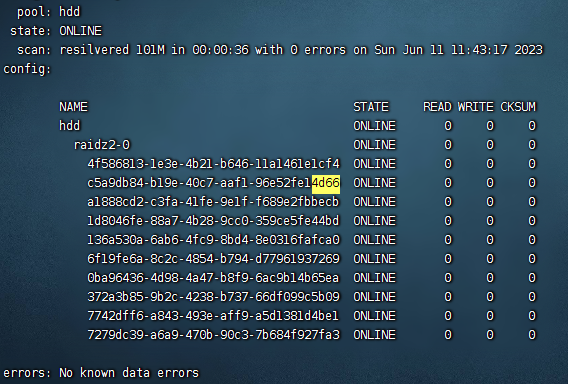
root@unraid:~# zpool status -LP pool: hdd state: ONLINE scan: resilvered 101M in 00:00:36 with 0 errors on Sun Jun 11 11:43:17 2023 config: NAME STATE READ WRITE CKSUM hdd ONLINE 0 0 0 raidz2-0 ONLINE 0 0 0 /dev/sdf2 ONLINE 0 0 0 /dev/sdi2 ONLINE 0 0 0 /dev/sde2 ONLINE 0 0 0 /dev/sdk2 ONLINE 0 0 0 /dev/sdg2 ONLINE 0 0 0 /dev/sdd2 ONLINE 0 0 0 /dev/sdj2 ONLINE 0 0 0 /dev/sdh2 ONLINE 0 0 0 /dev/sdb2 ONLINE 0 0 0 /dev/sdc2 ONLINE 0 0 0 errors: No known data errors Thank you for your reply. This is indeed created by Trueanas
-
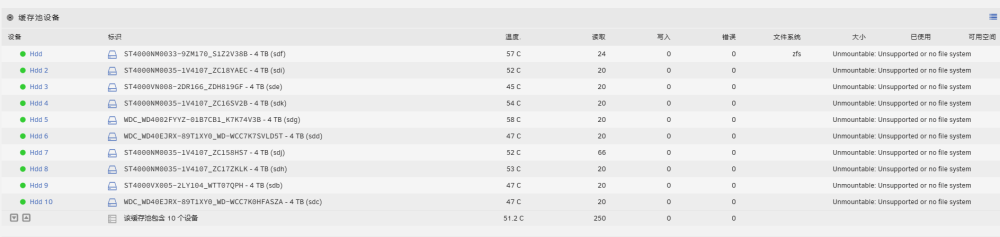
While it is possible to import using the command line with ZFS import, unfortunately the UI is unable to detect , What steps can I take to ensure that ZFS is functioning properly? unraid-diagnostics-20230618-1750.zip