





Propro009
Members
-
Joined
-
Last visited
Everything posted by Propro009
-
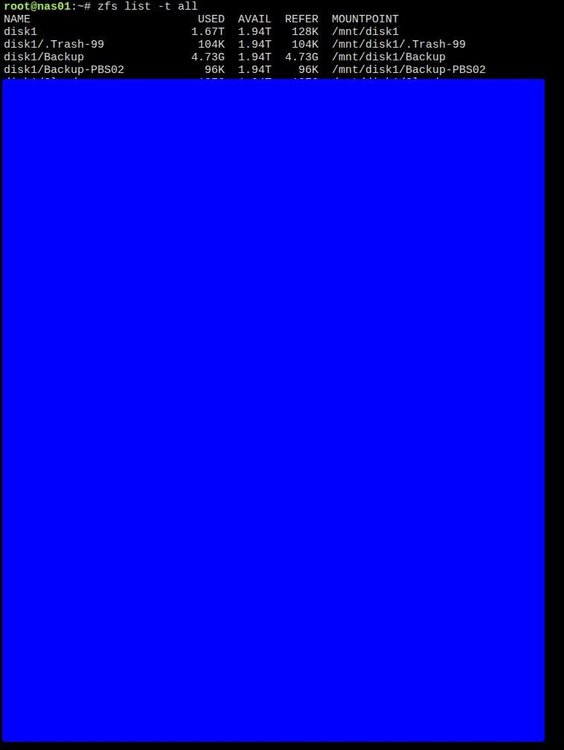
Thank you, yes this worked. I spent days trying to delete this folder and I cant believe how simple it was in the end. Almost feels stupid lol. For anyone else who ends up on this thread, the command that worked as pointed out by JorgeB was: zfs destroy disk1/Backup-PBS02
-
Hi, thank you for the reply. The folder iI want to delete is called "Backup-PBS02" and it is listed when I issued the command you asked. I blanked out the rest as there is no reference to this folder, but my other folders which has personal info in them.
-
Hi, I created a share specifically for use with Proxmox Backup Server and tried to use it with the PBS residing on the Proxmox Server itself. Could NOT get it to work properly so I moved my PBS to bare metal. But the problem now is, no matter what I tried i am unable to remove the folder I created in Unraid for the PBS server. Can you please help with how to go about this? I already tried rm -rf /dir and many other command on different Linux based forums but to no success. Note, when I issue the command rm -rf /dir it just sits there. I sometimes left it running for hours on end and still nothing it just sits there. Many thanks in advance
-
Hi, I have two Unraid servers. Server 1: Used purely as NFS share (storage) for a wmware ESXI VMs Server 2: Used for general purpose and where all the backups go. My question is, as the ESXI is constantly writing/reading to the NFS share, trying to sync the NFS share between the two servers is probably not a good idea. As each time i try sync it will probably try to sync the full VM files rather than just what changed since the last sync. How do people go about this please? How do you backup (or sync) an NFS share where VMs are running? TIA
-
Hi, I have an unraid server (6.11.5) with 15 HDD and 2TB NVME raid 1 cache drives. As its not used that often I have enabled the HDD spin down option and configured it to 15 minutes. When the server is not used for 15 minutes all the HDD powers down which is I want/need. However when I install Plex Server as a docker on the unraid server, for some reason it keeps few of the HDDs powered up and spinning. When I stop the plex server docker for 20 minutes as a test I see all the HDD spin down ok, but as soon as I start the Plex docker, again some of the HDD spin up and stay spinning. To combat this problem I installed Plex server on a VM, which allows all the HDDs to go into spin down, but I am not happy with the VM performance. So i want to move back to the docker install on the Unraid Server, however, the fact the Plex server keeps some of the HDD spinning is what is stopping me. I really prefer to run plex on unraid as a docker. Can anyone suggest a solution to this problem please? Thank you in advance. Addition: The user itimpi has suggested I attach the diagnostic which I agree with and its a good suggestion, unfortunately i uninstalled plex server from unraid before and currently there is no active install of plex on the urnaid server. Its still on a VM machine, but want to do a new install on unraid if i can find a solution to the above problem.
-
Hi, I have an UnRaid server running 6.11.5. It has two interfaces which resides on two separate networks. Lets say 10.1.1.10 and 10.2.2.10. I have some VMs i wanted to run, so thought i could convert the unraid from baremetal to using ESXi. I installed ESXi on the same server but did not get the desired outcome, so i have reverted back to using UnRaid as baremetal. But now I am having a problem. The problem is i am not sure what is/if corrupted but the server is now complaining of having two interfaces on the same subnet when they are not. This causing an issue as my firewall gets confused where the packet is coming from hence randomly blocking packets to the UnRaid. The firewall (Pfsense) works for all else, so i doubt its the firewall. So far, I tried using different NICs, disabling the onboard and using PCIe NICS, backing up the flash drive and restoring it, but it did not help and i am still getting random network errors (firewall blocking packets. I even re-installed the pfsense firewall but still having this problem. Next step, i would like to start with a fresh unraid install but keep the data (naturally). Can you please advice what is the best way to go about this? keeping in mind a back and restore of the current config did not resolve the issue. FYI, I am network engineer. Hence have some knowledge on how this supposed to work. I already checked and made sure its not the firewall nor the switch/VLANs. also, Its not subnet mask nor a network issue. TIA
-
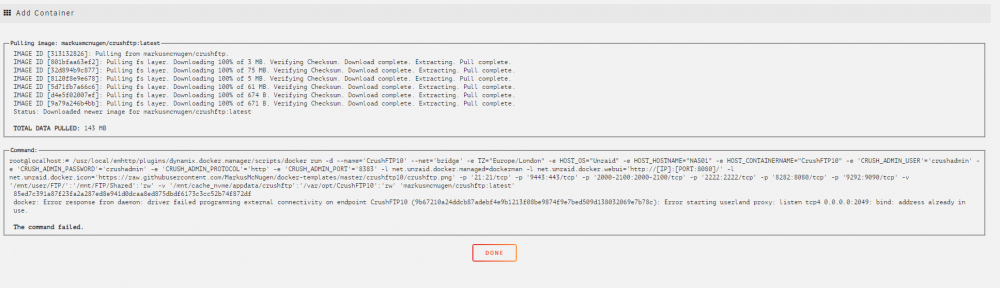
Hi, I am trying to install CrushFTP10 but i keep getting this error. I deleted the folder in appdata and tried again but keep having the same problem. Any advise appreciated.
-
Thank you!!
-
Thank you. will try this over the weekend. Used unbalance and already moved everything in disks 6 and 7 to the other disks. Can you please confirm if these steps are correct? 1. Stop the array 2. Tools --> New Config --> Preserve current assignments = none Yes, I want to do this = ticked --> Apply 3. Main page --> assign all disks except disk 6 and 7 assign cache drives 4. Start the array, it will start without disks 6 and 7 Folders and files will be intact? 5. Check to confirm all there the folders and files etc 6. Stop the array, add disks 6 and 7 as parity drives and start the array again 7. Unraid will build parity drives 8. Install any apps dockers etc Many thanks
-
Hi, due to migrating from Truneas I had to utilise all the HDDs. I created an array with no parity drive thinking once i finish i can remove a HDD from the Array and use it as Parity drive. Once all copying finished i stopped the array unassigned a HDD and tried to start the array but could not, its saying, its missing too many disks. Is there a way to overcome this and remove a HDD form the Array so i can use it as Parity? TIA.

-
Hi, I have used Unraid before and really liked the software. However, due to the hardware i ended up with (36 BAY Supermicro Case and computer and 24 Bay Netapp Case) I originally thought Truenas might actually work better for my setup since i have so many drives/bays, so i moved to Truneas. Now i want to move back to Unraid My current setup: In Truenas I created two vdevs (Raidz2) 14x12TB HDD and another 14x8TB HDD and combined them into a single pool (yeah i know that was a mistake). Also have 20 x 3TB vdev on a separate pool in th 24 bay Netapp case. The first pool is about 230TB with 180TB full and the second pool 55TB with 30TB data. The point i need help with please is, is there a way to move this data form Truenas to UnRaid without losing data and without using some other storage as i dont have that much space anywhere and i dont want to buy so many HDDs just to copy the data. I already have a full UnRaid licence. The plan assuming i can find a way to copy the data is, to have two Unraid instances running. One in the 36 bay case and another in the 24 bay case. any help or pointers appreciated.



