




Skip to content
View in the app

A better way to browse. Learn more.

Unraid

A full-screen app on your home screen with push notifications, badges and more.

To install this app on iOS and iPadOS
  1. Tap the Share icon in Safari
  2. Scroll the menu and tap Add to Home Screen.
  3. Tap Add in the top-right corner.
To install this app on Android
  1. Tap the 3-dot menu (⋮) in the top-right corner of the browser.
  2. Tap Add to Home screen or Install app.
  3. Confirm by tapping Install.

homefloyd

Members
  • Joined

  • Last visited

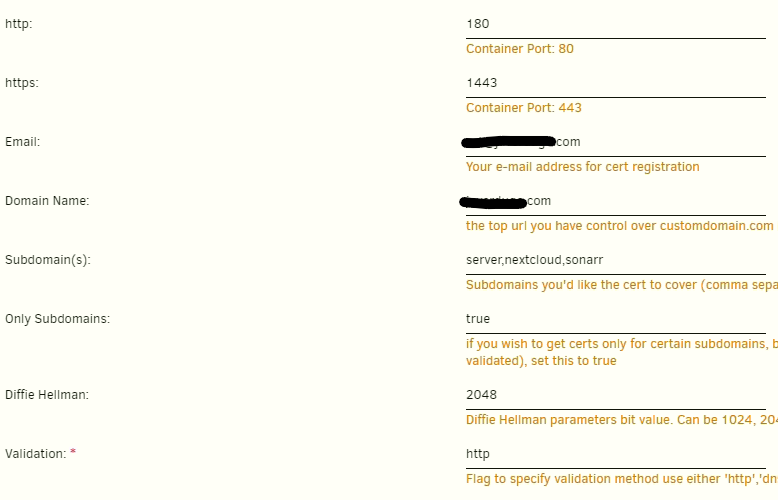
  1. I was following along with the reverse proxy video by spaceinvaderone and that's what he did and it worked, so I figured I shouldn't deviate. Any suggestions on what I might be doing wrong?
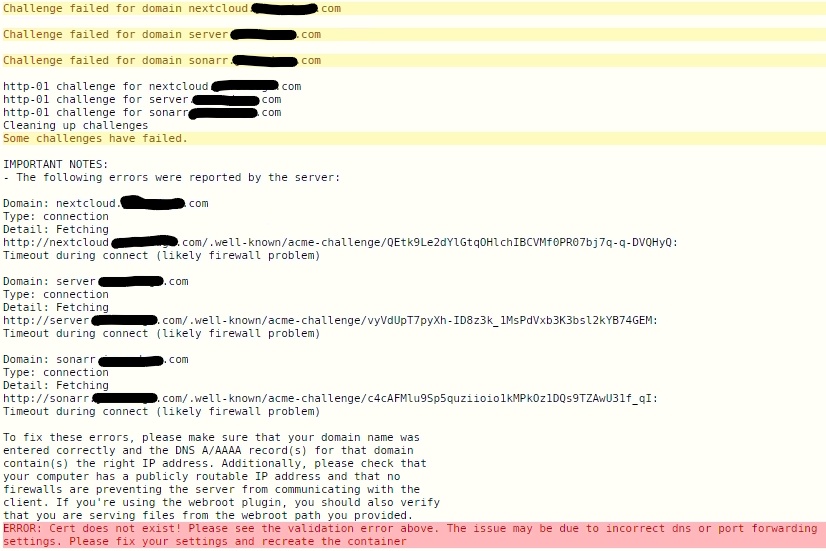
  2. For the life of me I can't figure out what I'm doing wrong. I have 3 duckdns subdomains setup, one for the server, nextcloud, and sonarr, they ping fine and point to my external IP. I use google domains and have 3 CNAME records, server, sonarr, and nextcloud pointed at the server duckdns subdomain. These records seem to be working as well, I can ping them and they resolve to the external IP. I have forwards setup to send the ports 443 and 80 on to 1443 and 180. Hopefully someone can figure out what's wrong, I've gone around in circles and am at wit's end, thank you!
Account

Navigation

Search

Search

Configure browser push notifications

Chrome (Android)
  1. Tap the lock icon next to the address bar.
  2. Tap Permissions → Notifications.
  3. Adjust your preference.
Chrome (Desktop)
  1. Click the padlock icon in the address bar.
  2. Select Site settings.
  3. Find Notifications and adjust your preference.