





Jeffrey Teague
Members
-
Joined
-
Last visited
-
I updated firmware of LSI card and verified it was not a 3.3v issue. Motherboard ultimately didn't support this large of drive at latest BIOS update. I returned the drives and got something smaller that was supported.
-
what is the v3.3 issue? I have attempted direct boot to motherboard sata and I dont see it in the bios. How do I know how large of drive my system will support?
-
I dont think this is related. I am not seeing drive at all.
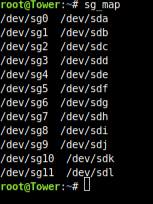
-
upgraded firmware and bios. drive still does not show. Attaching new diagnostics. tower-diagnostics-20220919-2040.zip
-
Do you think upgrading my firmware is the solution here? Do you feel as though the 20TB drive is not showing up due to firmware fix? OR Is this a step in the direction as to help determine next steps? I want to return the drives in the return window if I need to get smaller drives. Do you know the max drive size my system could support? Or where I can find this information?
-
am I reading this correctly, I might only have to switch some setting on drives to get them to show up?
-
did you see the FWVersion int he diagnostic somewhere? I am worried on going this path as I only have the one card and it was expensive, I dont want to mess up anything by upgrading the firmware and then no longer being able to access data or do it wrong and have to buy a new card.
-
attached Drive are connected through PCIe LSI Logic SAS 9207-8i Storage Controller LSI00301 Motherboard is : Intel Corporation DX79SI , Version AAG28808-600, Intel Corp., Version SIX7910J.86A.0650.2014.0307.0138 tower-diagnostics-20220917-2226.zip
-
Seagate IronWolf Pro 20TB NAS Internal Hard Drive HDD – CMR 3.5 Inch SATA 6Gb/s 7200 RPM 256MB Cache for RAID Network Attached Storage, Rescue Services (ST20000NEZ00) I am having issue with unraid seeing the drive. I have tried more then one in the array. It doesnt show in the dropdown list as being an option. I am using Unraid 6.10.3 Stable. Does unraid support this drive? What are some troubleshooting steps I can try to get this working?
