





MattOS
Members
-
Joined
-
Last visited
-
Update, i just had to kill disk 3 and 4 and reconfigure the array, lesson learned.
-
OK im going to just have to lose the data on disk 3. Whats the best way to move forward, go in and delete the files directly off the drive to zero it out then remove from the array with a new config?
-
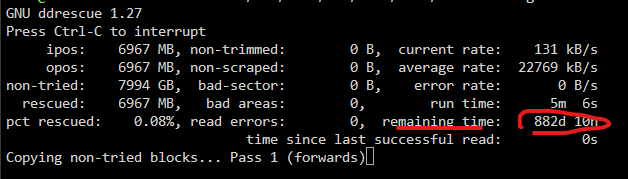
@JorgeB OK here is my last question, if i can't get dd rescue to run because disk 3 is too corrupted, what can i do here to move forward with the least amount of damage, assuming disk 3 is not recoverable and im out of parity with disk 4, (but i have disk 4 intact except for the additional data written to the array)? any options here to force disk 4 back on the array and just lose the new data? Or is my whole array just toast now?? Can I just move forward with 2 failed disk and purge the corrupt data and keep the rest of the array? Thanks!
-
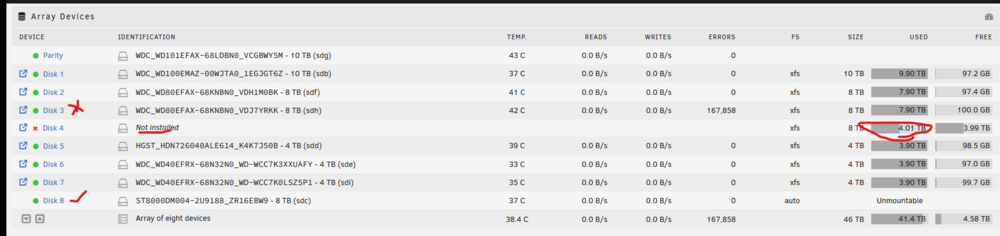
Here is what i don't understand, if disk 4 is now emulated, that means its generated by disk 3 (which is giving lots of errors) then my only option is to try to use ddrescue to recreate disk 3 on a new drive that doesn't have errors. because disk 4 has data written to it after it was emulated i can't just put my old disk 4 back in the array and preserve parity, and i cant create a new parity because disk 3 will throw errors. I feel stuck here an don't want to do more damage than i already did. If i try to use UNbalance to move data off the emulated drive, im assuming the errors on disk 3 will prevent that from working. But just maybe i can run ddrescue on disk 3 hoping the errors are disk related and not data related, but im not sure never been here before.
-
im thinking this is my best option: Copy emulated Disk 4 data manually: While array runs (Disk 4 emulated), use Unbalance plugin or rsync to move files from Disk 4/share to other disks. Then New Config to unassign Disk 4 → shrink array temporarily → add 8TB later.
-
@JorgeB Yes old disk 4 is still intact, but i guess i had new data on the array to disk 4 since it now exceeds 4tb (4.01) really annoying unraid will write new data to an emulated disk. That was my first plan of action was to get the 4tb disk 4 back so i could rebuild disk 3 but that ship sailed. I have an 8th disk connected now, so ill try to use unbalanced to move the data off the bad disk. Or do you think i should just go straight to ddrescue on disk 3? OR should i try to use unbalanced to move the data off disk 4, then i can use parity to rebuild disk 3, is that possible?
-
well, new sata and different sata port did not help. rebuild still not running as expected with errors on the drive. Thinking about it, i don't think ill be able to add a 2nd parity drive either if it can't read the drive, i guess my only option is to try to clone the drive with ddrescue unless there is an alternative.
-
quick smart test on failing drive after replacing sata cable mattos-smart-20251213-1444.zip
-
OK i have a 2nd drive arriving today, i think the best path is to add a 2nd parity drive, then i can emulate both the drive i was trying to replace and the failing drive, then i can rebuild with new drives. would you agree this is the best path for now? once i rebuild on a new drive i can do a preclear/diagnostics on the failing drive and see if i can get it back in service. My biggest concern right now is just to get the array back in good shape. @JorgeB
-
Sata cable replacements arrived today, going to shut her down and change out the cables to see if that helps.
-
Its been running about 24 hours, stuck on 10% mattos-diagnostics-20251213-0947.zipmattos-smart-20251213-0946.zip
-
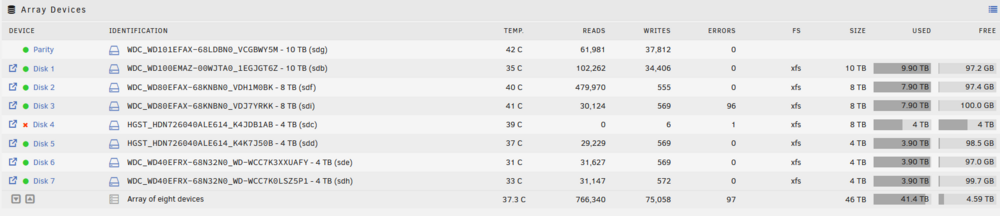
So here is what im thinking, if someone can sanity check this for me. Currently ill leave the 4tb drive as emulated, ill add the new 8TB drive as a new drive, then i can clone the 8TB drive that is failing? Is this possible. I have 1 extra slot (i have 7 drives currently) Then once the failing drive is cloned and replaced i can get a new drive to rebuild the emulated 4tb.
-
WDC_WD80EFAX-68KNBN0_VDJ7YRKK (sdi) is the drive that is giving errors in the rebuild
-
So currently i have replaced the original 4tb drive back in the rig, any ideas how to get it back on the array as it originally was, so i can replace the failing drive?
-
Thanks @JorgeB Attaching Diagnostics mattos-diagnostics-20251211-1330.zip

