geekmay
Members
-
Joined
-
Last visited
Everything posted by geekmay
-
Thanks, but how do I begin to debug it at this moment? I tried running a Linux live USB on the same system and it ran smoothly for over 3 days.
-
Hello, I have been running unraid stable for more than 2 years now. However, recently the server is not able to sustain for more than 24 hours at a stretch, it has become completely unresponsive and is not accessible over the network or using the GUI (Black screen). I tried turning on the syslog server and am attaching it for reference. Things I have tried: - Error check on USB using windows machine (all clear) - Replaced RAM - memtest for 4 passes - all clear - New Config - removed everything and just started 5-6 docker containers and 1 VM (earlier it was more than 25 docker) - Added new PCIe Ethernet card I am attaching diagnostics along with the syslog file as it persists reboots. Please help me out. syslog-192.168.5.5.log mewtwo-diagnostics-20250126-1040.zip
-
I am getting errors while launching any container or downloading new apps with the error no space left. I tried to run the balance command to get this output: root@MewTwo:~# btrfs balance start -dusage=5 /mnt/cache ERROR: error during balancing '/mnt/cache': Read-only file system There may be more info in syslog - try dmesg | tail On running dmesg | tail, root@MewTwo:~# dmesg | tail [ 894.653227] loop: Write error at byte offset 17481728, length 4096. [ 894.653229] blk_print_req_error: 73 callbacks suppressed [ 894.653230] I/O error, dev loop2, sector 2202048 op 0x1:(WRITE) flags 0x100000 phys_seg 1 prio class 2 [ 894.653233] I/O error, dev loop2, sector 34144 op 0x1:(WRITE) flags 0x100000 phys_seg 1 prio class 2 [ 894.653235] btrfs_dev_stat_inc_and_print: 73 callbacks suppressed [ 894.653236] BTRFS error (device loop2: state EA): bdev /dev/loop2 errs: wr 85, rd 0, flush 0, corrupt 1, gen 0 [ 894.653242] I/O error, dev loop2, sector 2272904 op 0x1:(WRITE) flags 0x100000 phys_seg 2 prio class 2 [ 894.653243] BTRFS error (device loop2: state EA): bdev /dev/loop2 errs: wr 86, rd 0, flush 0, corrupt 1, gen 0 [ 2181.508753] elogind-daemon[1305]: Removed session c1. [ 2494.920558] elogind-daemon[1305]: New session c2 of user root. The logs suggest something is wrong with disk5, but SMART is all OK. However, the disk shows only 180KB free while all my shares have "High Water" enabled. Edit: I am not able to do anything with docker now and log shows this error: Aug 29 14:09:08 MewTwo kernel: BTRFS error (device nvme0n1p1: state EA): parent transid verify failed on logical 846885584896 mirror 1 wanted 2286467 found 2286420 Aug 29 14:09:08 MewTwo kernel: BTRFS error (device nvme0n1p1: state EA): parent transid verify failed on logical 846885584896 mirror 1 wanted 2286467 found 2286420 I referred to the issue here: mewtwo-diagnostics-20240829-0949.zip
-
I read that but unfortunately I am behind CGNAT so DDNS won't work for me. I was planning to get openVPN to AWS or any other cloud provider and using that public IP to have unattended access when on vacation.
-
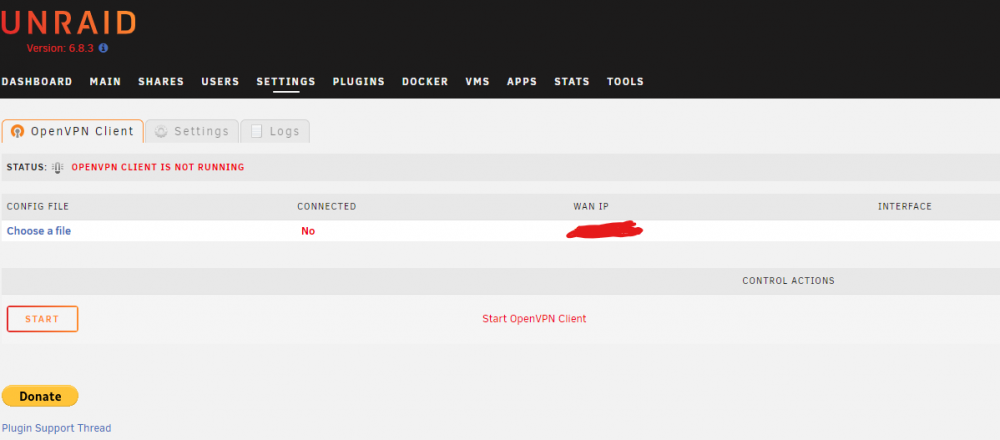
I have Unraid version 6.8.3 and latest plugin version as on 3rd August 2020. I have added the .ovpn file in the /boot/openvpn folder. However, I am still seeing the "Choose a file" in the plugin screen and am not able to connect. I am attaching the details in the screenshot. Any solution to this?