





dapilot1
Members
-
Joined
-
Last visited
-
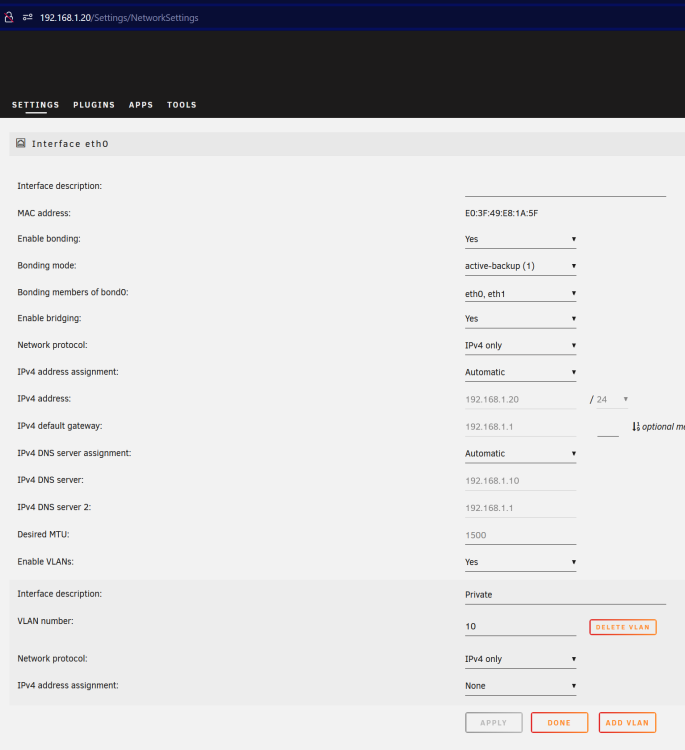
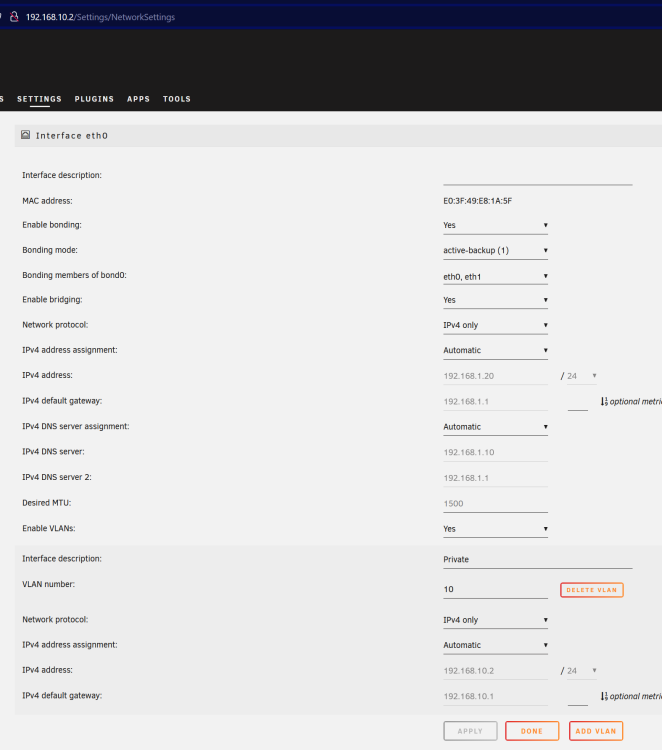
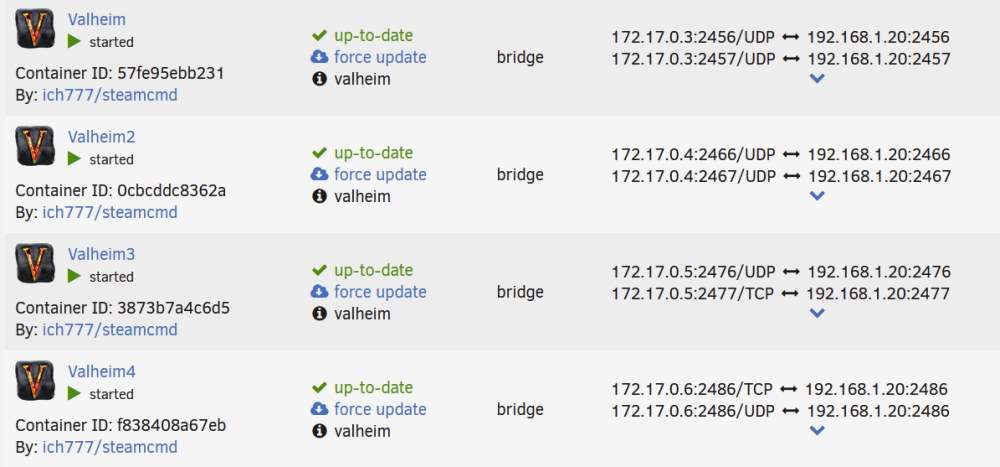
With the VLAN address set to none I am able to connect to the server and thus my docker servers work. But in order to access the SMB shares from the VLAN I need to enable an address. This makes my valheim servers unreachable since they're on the default network, but they appear to start up fine. How can I make SMB available to the VLAN without making the docker and VMs unreachable?
-
I cannot figure out how to share SMB on a VLAN without losing the ability to connect to my Valheim server. So with "Enable VLANs: No" in the network settings, I am able to connect to the Valheim server using dynamic dns, and able to connect to the webportal on the native VLAN, but unable to see any shares, all from a PC on the VLAN. With "Enable VLANS: Yes" and adding the VLAN tag, There is no change. But when I add the address to automatic for the VLAN, I lose the ability to connect to my Valheim server, the webportal is no longer reachable on the native VLAN (moves to tagged VLAN), but I am able to see my SMB shares. I have tried changing the priorities of the gateways in the network settings and unchecking the custom network on interfaces in the docker settings, but I cannot figure out how to have both working at the same time. I have been unable to locate any topics on my issue, as the wording is too similar to what I am not trying to do. https://www.reddit.com/r/unRAID/comments/11tkt3x/unraid_vlan_setup_for_docker/ Out of curiosity, I did give ChatGPT a try. To access SMB shares from a VLAN without severing the connection of the Docker servers on your Unraid server, you'll need to configure the networking properly. Here's a step-by-step guide to help you achieve that: Determine the VLAN ID that you want to access the SMB shares from. Access the management interface of your Unraid server (e.g., web interface). Navigate to the network configuration settings or network interface settings. Locate the network interface that is connected to the trunk port carrying all the VLANs. Assign an IP address from the native VLAN to this network interface, as you mentioned it currently grabs an IP address from the native VLAN. Ensure that the network interface is set to allow traffic for all VLANs (tagged traffic) and not just the native VLAN. Save the network configuration changes. At this point, your Unraid server should have connectivity on the VLAN you want to access the SMB shares from. However, the Docker servers may still not have network access because they are not aware of the VLANs. To resolve this, follow these additional steps: Access the Unraid server's command-line interface (CLI), either through SSH or directly on the console. Find the Docker configuration file, usually located at /boot/config/docker.cfg. Open the Docker configuration file using a text editor (e.g., nano /boot/config/docker.cfg). Look for the DOCKER_OPTS section or a similar configuration option. Add the --bip flag followed by the IP address range for the VLAN you want to access. For example, --bip=192.168.2.1/24 if your VLAN uses the IP range 192.168.2.0/24. Save the Docker configuration file. Restart the Docker service on your Unraid server for the changes to take effect. You can do this by running the command: systemctl restart docker or /etc/rc.d/rc.docker restart. After completing these steps, your Unraid server should have network connectivity on the VLAN you specified, and the Docker containers should be able to communicate as well. You should now be able to access the SMB shares from your Windows PC on the VLAN without affecting the Docker server connections. Note: The specific steps may vary depending on your Unraid server version and configuration. Be sure to consult the relevant documentation or support resources for your specific setup if needed. So after the first set of instructions, I am in the opposite condition than what it states. And I don't know enough to tell if I am setting this up wrong or if it is feeding me BS. I would appreciate any pointers, guides, or even just a better way to articulate the problem I am facing. Thank you in advance.


