Scruffyunraid
Members
-
Joined
-
Last visited
-
JorgeB, I think I love you. You are a genius. The operation has completed successfully. The partition repopulated right away and I'm able to go through the directories!! Without you I would have just figured the drive was broken and chucked it. Bravo
-
Really appreciate the help so far Jorge root@MediaFunTime:~# sfdisk /dev/sdd Welcome to sfdisk (util-linux 2.36). Changes will remain in memory only, until you decide to write them. Be careful before using the write command. Checking that no-one is using this disk right now ... OK Disk /dev/sdd: 7.28 TiB, 8001563222016 bytes, 15628053168 sectors Disk model: ST8000DM004-2CX1 Units: sectors of 1 * 512 = 512 bytes Sector size (logical/physical): 512 bytes / 4096 bytes I/O size (minimum/optimal): 4096 bytes / 4096 bytes Disklabel type: gpt Disk identifier: 59267C8F-29D9-4B01-BDA7-3AFC685A6362 Old situation: Type 'help' to get more information. >>> 64 Created a new GPT disklabel (GUID: 29E65BF6-6552-6B49-A9B4-0BCD79147917). Sector 64 already used. Failed to add #1 partition: Numerical result out of range /dev/sdd1: write New situation: Disklabel type: gpt Disk identifier: 29E65BF6-6552-6B49-A9B4-0BCD79147917 The partition table has been altered. Calling ioctl() to re-read partition table. Syncing disks. Running the xfs repair command resulted in the same failure as before. I obviously didn't add a partition properly, could you recommend another 'sector #' to try or is that just a default value?
-
Could you elaborate on "recreating the partition on the same sector"? I'm feeling like a bit of of noobie here
-
Not looking so great root@MediaFunTime:~# xfs_repair -v /dev/sdd1 /dev/sdd1: No such file or directory /dev/sdd1: No such file or directory fatal error -- couldn't initialize XFS library I snooped through my /dev directory and can find the sdd file but no sdd1. In that same directory I see the other Unassigned Devices such as sdb, sdb1 and sdc, sdc1
-
My mistake, it should be using xfs as the other disks in Unassigned Devices
-
root@MediaFunTime:~# fdisk -l /dev/sdd Disk /dev/sdd: 7.28 TiB, 8001563222016 bytes, 15628053168 sectors Disk model: ST8000DM004-2CX1 Units: sectors of 1 * 512 = 512 bytes Sector size (logical/physical): 512 bytes / 4096 bytes I/O size (minimum/optimal): 4096 bytes / 4096 bytes Disklabel type: gpt Disk identifier: 59267C8F-29D9-4B01-BDA7-3AFC685A6362 root@MediaFunTime:~# blkid /dev/loop0: TYPE="squashfs" /dev/loop1: TYPE="squashfs" /dev/sda1: LABEL_FATBOOT="UNRAID" LABEL="UNRAID" UUID="272C-EBE2" BLOCK_SIZE="512" TYPE="vfat" /dev/nvme0n1p1: UUID="5bfebf65-d3db-4084-bf64-34a082029f82" UUID_SUB="abe7e646-d564-4879-8dba-df9e4d7231d8" BLOCK_SIZE="4096" TYPE="btrfs" /dev/sdc1: UUID="0595ead6-4c55-4db7-8b71-1c0fbe8166b5" BLOCK_SIZE="512" TYPE="xfs" /dev/sdb1: LABEL="Download_Dri" UUID="68549b1d-504a-4dd0-a02a-5a321053b073" BLOCK_SIZE="4096" TYPE="xfs" PARTUUID="bfd29254-c6e1-4b37-a6bf-5e9511428a16" /dev/sde1: UUID="9d0086dd-9ad9-44ed-9c4a-36d9cb0331ee" BLOCK_SIZE="512" TYPE="xfs" PARTUUID="40d9db88-bfb2-4f84-b4bd-8b6c941a1e15" /dev/sdf1: UUID="2d9d8057-1efd-4d4a-a042-20fc665aedfd" BLOCK_SIZE="512" TYPE="xfs" PARTUUID="0e258e4c-ecfa-4945-ade9-62f5be2232e4" /dev/sdj1: UUID="45cb1f28-67ff-4399-b39c-73d183cf3990" BLOCK_SIZE="512" TYPE="xfs" PARTUUID="e4627d19-0d9b-4361-8a90-1bcd230b941b" /dev/sdh1: UUID="26e016ba-4450-4178-b687-0b096388b0be" BLOCK_SIZE="512" TYPE="xfs" PARTUUID="625ed22d-7a1c-45a9-895b-40141da627b9" /dev/sdi1: UUID="49692a33-ddd4-4c6e-8acd-da00d7dc93d7" BLOCK_SIZE="512" TYPE="xfs" PARTUUID="0d24b34f-4295-484d-9536-8efd8f863fa4" /dev/sdg1: UUID="9adf252b-7a5f-4728-b3de-b4fd9ac2c6ea" BLOCK_SIZE="512" TYPE="xfs" PARTUUID="d2c332e1-207c-4544-82ab-a50a9872a0d8" /dev/md1: UUID="26e016ba-4450-4178-b687-0b096388b0be" BLOCK_SIZE="512" TYPE="xfs" /dev/md2: UUID="45cb1f28-67ff-4399-b39c-73d183cf3990" BLOCK_SIZE="512" TYPE="xfs" /dev/md3: UUID="2d9d8057-1efd-4d4a-a042-20fc665aedfd" BLOCK_SIZE="512" TYPE="xfs" /dev/md4: UUID="9adf252b-7a5f-4728-b3de-b4fd9ac2c6ea" BLOCK_SIZE="512" TYPE="xfs" /dev/md5: UUID="9d0086dd-9ad9-44ed-9c4a-36d9cb0331ee" BLOCK_SIZE="512" TYPE="xfs" /dev/loop2: UUID="0ce6aaf2-571f-4355-bac9-2f8fe66782bc" UUID_SUB="afef9faa-e69a-4f4c-8220-57b88ced15cc" BLOCK_SIZE="4096" TYPE="btrfs" /dev/loop3: UUID="ce60ba34-4c35-4284-9788-c21a8e5d24b3" UUID_SUB="80d95368-cec6-4b0f-8c8b-fed4ac50bdc6" BLOCK_SIZE="4096" TYPE="btrfs" /dev/sdd: PTUUID="59267c8f-29d9-4b01-bda7-3afc685a6362" PTTYPE="gpt" Thank you for replying. My /dev/sdd is GPT partition? Isn't that for windows?
-
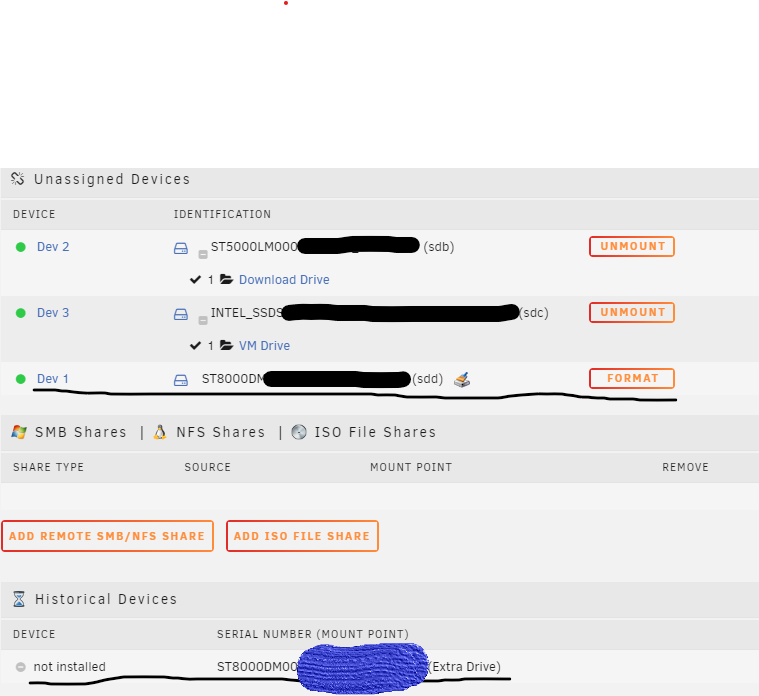
The other week I cleaned out my system which includes removing the drive to make the case lighter. When I booted it back up I noticed my Unassigned Drive which I use for unimportant file was missing but still detected and asking to be formatted/precleared. Oddly enough, I believe the Dev # changed from 3 to 1 as it would have been added last. Having said that, Dev 2 and 3 are working fine (see image below). The disk was part of the array but I replaced it months ago when I noticed SMART errors popping up. I heard the errors weren't that concerning so I figured Id just store things I wanted to keep but wouldn't be hurt if I lost. It has 760 'Reallocated sector count' and 3 'Reported uncorrect'. I've tried swapping out the SATA power and data cables but not luck and I ran an 'SMART extended self-test' overnight and it passed. I can accept the data is gone but I thought the disk would be dead in this sort of scenario. If there is a chance to recover I'd like to try it. If anyone has any suggestions or tips Id appreciate the help! Thanks