



Skip to content
View in the app

A better way to browse. Learn more.

Unraid

A full-screen app on your home screen with push notifications, badges and more.

To install this app on iOS and iPadOS
  1. Tap the Share icon in Safari
  2. Scroll the menu and tap Add to Home Screen.
  3. Tap Add in the top-right corner.
To install this app on Android
  1. Tap the 3-dot menu (⋮) in the top-right corner of the browser.
  2. Tap Add to Home screen or Install app.
  3. Confirm by tapping Install.

PRUnraid

Members
  • Joined

  • Last visited

Everything posted by PRUnraid

  1. Will do and thanks again.
  2. Hello guys, This worked perfectly. Thank you. I removed the mover plugin and it worked just fine. Is there an issue going on with this plugin with Unraid OS 6.12.4?
  3. Checking right now. Will keep you posted.
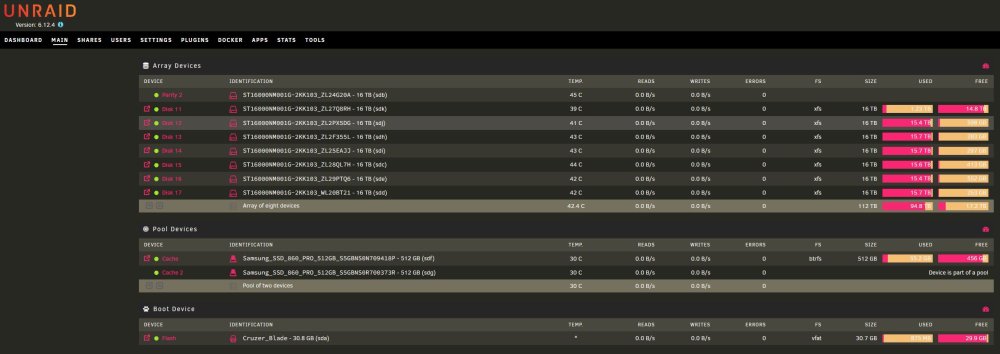
  4. Hello Everyone, This is my first topic on the Unraid forums so bare with me lol. I am having issues with mover not working. As soon as I hit move it doesn't do anything. My OS version is Version: 6.12.4. I have attach some screenshots just in case. Has anyone come across with this issue lately?
Account

Navigation

Search

Search

Configure browser push notifications

Chrome (Android)
  1. Tap the lock icon next to the address bar.
  2. Tap Permissions → Notifications.
  3. Adjust your preference.
Chrome (Desktop)
  1. Click the padlock icon in the address bar.
  2. Select Site settings.
  3. Find Notifications and adjust your preference.