



Skip to content
View in the app

A better way to browse. Learn more.

Unraid

A full-screen app on your home screen with push notifications, badges and more.

To install this app on iOS and iPadOS
  1. Tap the Share icon in Safari
  2. Scroll the menu and tap Add to Home Screen.
  3. Tap Add in the top-right corner.
To install this app on Android
  1. Tap the 3-dot menu (⋮) in the top-right corner of the browser.
  2. Tap Add to Home screen or Install app.
  3. Confirm by tapping Install.

priate

Members
  • Joined

  • Last visited

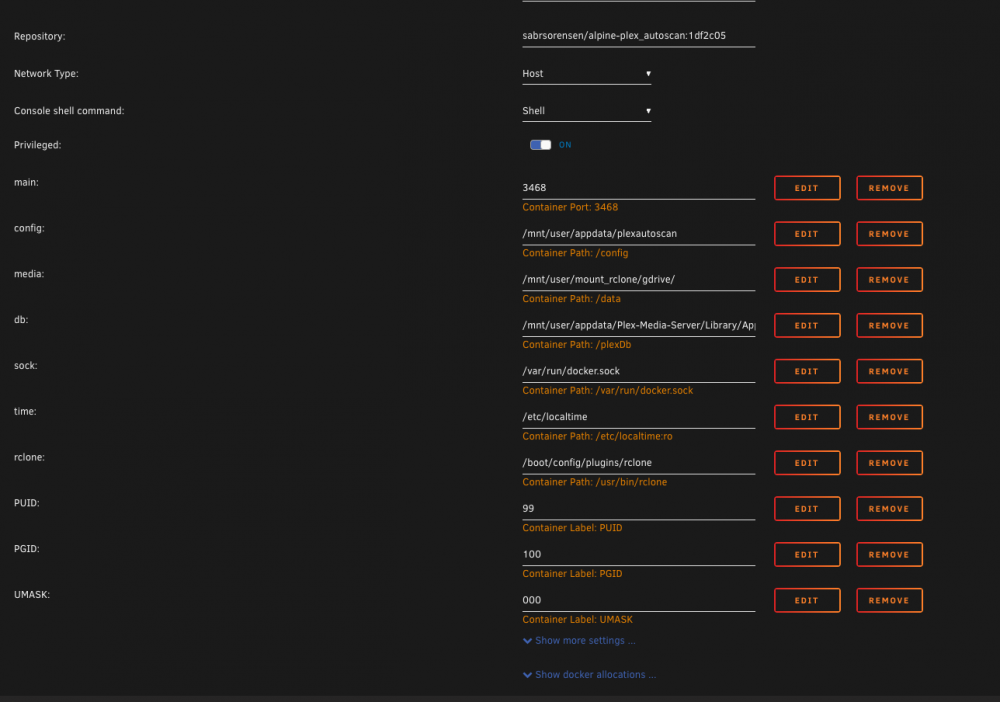
  1. Hey guys i'm trying to get this docker image work sabrsorensen/alpine-plex_autoscan. Everything works but when the image tries to connect to the docker socket it gets denied. `Got permission denied while trying to connect to the Docker daemon socket at unix:///var/run/docker.sock: Get http://%2Fvar%2Frun%2Fdocker.sock/v1.40/containers/Plex-Media-Server/json: dial unix /var/run/docker.sock: connect: permission denied'` I have uploaded a screenshot of my template. I have not modified any groups or users. Everything is as is from a fresh unraid install. Please let me know what I am doing wrong thank you.
Account

Navigation

Search

Search

Configure browser push notifications

Chrome (Android)
  1. Tap the lock icon next to the address bar.
  2. Tap Permissions → Notifications.
  3. Adjust your preference.
Chrome (Desktop)
  1. Click the padlock icon in the address bar.
  2. Select Site settings.
  3. Find Notifications and adjust your preference.