





FishStink
Members
-
Joined
-
Last visited
Everything posted by FishStink
-
Apologies in the delay. Yes, there is no important stuff on the cache. I've gone ahead and removed the Cache from the pool. The result is that everything is working fine now. So what does this tell you? That the Cache drive is defective ? or That there is still something wrong elsewhere (I changed over the power and sata cables ? This motherboard / CPU and RAM is getting a little long in the tooth (likely 13+ years old). Would you advise switching up ?
-
The data on the Cache Drive is unimportant to me. Can you advise me how I can safely remove it from the unread operation.
-
I did as you recommended. When I then ran the "fix Common Problems", I now get a message "Unable to write to Cache". Diagnostics attached. Thanks again for your helpsupernova-diagnostics-20250114-1727.zip.
-
I have gone back 3 times now and checked all of the connections. This box has not been moved physically an inch in 6 months and has been assembled as it is for 18 months. What can I try next ?
-
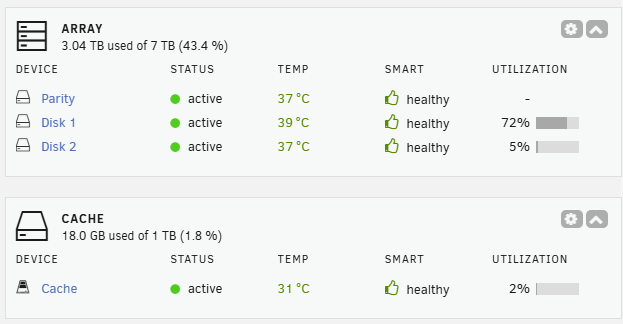
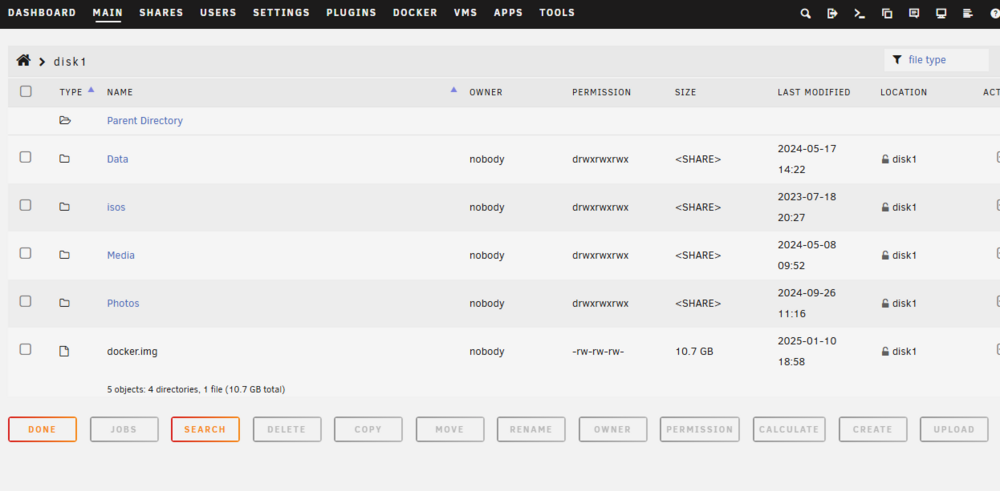
Attached is the new diagnostics. I also note that: 1. Edit: In the "Shares" section, it reads as "There are no exportable user shares" My shares have been deleted 2. Docker service failed to start Edit: 3. the owner in each of the Media shares is now set to be "nobody", see image below Thanks for your help in advance. supernova-diagnostics-20250111-1144.zip
-
I checked the connections. Everything is secure and well connected. The dashboard shows that everything is running ok. Is there anything else that I can do ?
-
Today, I was performing 2 simultaneous 'moves' of files between shares, via my windows PC. The move halted. Edit: the current status is that I cannot write anything to the cache. I ran "Fix Common Problems" with the result being "Unable to write to cache". (Drive mounted read-only or completely full.). In response I updated to V.7.00 from 6.12 (?). no change. I had made no changes to the Unraid system and had had an uptime of over a month prior to the update. Please help. supernova-diagnostics-20250110-1952.zip
-
supernova-diagnostics-20241003-1528 (1).zipsupernova-diagnostics-20241003-1528 (1).zipI have tried a number of troubeshooting options over the past few frustrating hours. I am certain that this is an easy to fix network setup issue, but please help. My setup: 1. Bell Giga Hub (BHH) - 192.168.2.1 2. Google Nest Router (GHR) - WAN: 192.168.2.10 LAN: 192.168.87.1 - Hardwired to BHH ethernet port - acting as DHCP in range of 192.168.87.XXX 3. Switch connected to GHR AND to Google wifi pucks AND Philips Hue AND other hardwired devices (TV's / Nvidia shields etc) AND UNRAID supernova-diagnostics-20241003-1528 (1).zip 4. UNRAID server - 192.168.87.222 I have attached the diagnostics file. Thanks for ending my pain in advance ! Edit: Not quite certain of the series of events that fixed this, but ended in reassigning eth1 = Automatic.
-
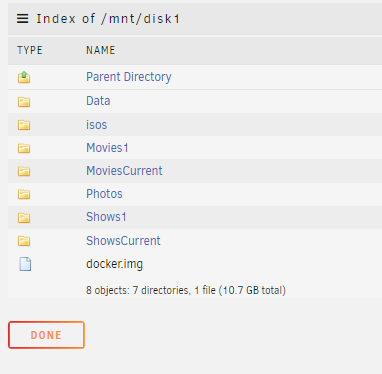
I would like to add a folder "Media" in order to create a structure of: /disk1/media/Movies1 /disk1/media/MoviesCurrent /disk1/media/Shows1 /disk1/media/ShowsCurrent Currently the structure is: I have files and folders within these folders right now. What is the best way to make these changes ? I have a cache drive right now which includes these folders Presumably I would clear the cache first ? Thanks for your help.
-
thanks itimpi !!
-
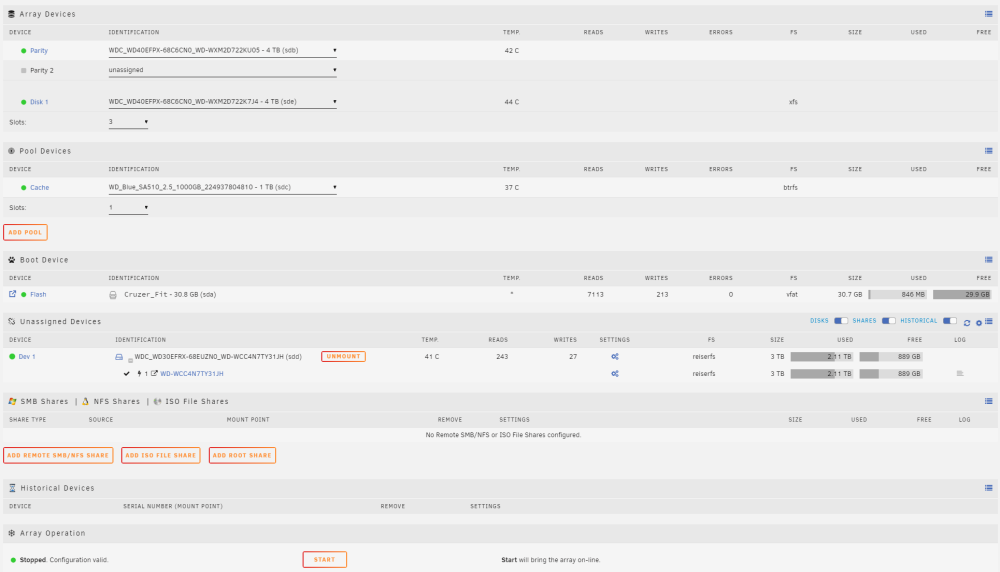
I have a disk (which is the sole survivor of a previous unraid server disaster in which I managed to fry 6 disks with a faulty PSI). The disk does have data on it, which I am happy to scrub in a format. The device is ahown as "Dev 1" below. The current issue is that the option to add this to the array is not present. See screen shot attached. What am I doing wrong ? Thanks.
-
I have a share structure that I want to change to accommodate Plex. Current structure: mnt/user/Movies1 mnt/user/Shows1 mnt/user/Photos Target structure: mnt/user/Media/Movies1 mnt/user/Media/Shows1 mnt/user/Media/Photos I'll then create a share for Plex as: mnt/user/Media How can I effect this ? Is there a plugin to do this ? Or do I have to create the new folder structure in Windows ? Thanks.
-
Thanks again. Very helpful.
-
Thanks.
-
OK. So having given this some more thought: Does this make sense? Parity - WDRED Plus 4TB- 3.5in HDD Cache - WDRED 500GB SA500 2.5in SSD Drive 1 - WDRED Plus 4TB- 3.5in HDD (Older / Archive) Drive 2 - WDRED 1TB SA 2.5in SSD (Current Stuff) - ?? Maybe to sit outside of the array ? Thanks.
-
Thanks for this. Question: Would it be sufficient to repair the Parity drive ? Could I then rebuild the data in new drives, without repairing the old data drives ? This really would be a temporary situation...a few weeks; until I can get some breathing room.
-
TLDR; I burnt out the logic boards on 4 out of the 5 hard drives, including the parity. Complete loss. (Make sure you have a big enough PSU - don't keep switching it off and on). Devastated. Looking to rebuild. I don't have oodles of cash to spend on a drive array that has no data. I figured that I would buy new drives as and when I need them / when they come on sale. My data storage needs have been reset to zero. Data needs; Photo's: < 1TB Shows and Movies over the next year: approx 2TB Other Stuff: <500GB Practical Needs => Serve up Shows and Movies to Kodi. Want to ensure that there is little to no lag (snappy and responsive) I am thinking about this drive config and would like some feedback: Parity: 6 TB WD Red Plus Cache: 64GB SSD (Reusing old drive) Drive for Current TV Shows : 60 GB SSD (Reusing old drive) Drive for Unwatched Movies: 60 GB SSD (Reusing old drive) Drive for then storing Watched TV shows and Movies, Photo's and Other Stuff : 6TB WD Red Plus Hardware: Old i3 CPU + 8 GB RAM + Gigiabyte H77N MB (all 12 years old) If I lose the 60GB SSD's then no sweat.
-
Continuing to try building temporary unraid server after main one failed. Using same GUID flash drive. I have tried to read up on this error message with no much luck; Read the hpa threads; although I have a gigabyte motherboard, I can't find any options as those described. My current setup; Parity -250gb hdd Disk 1 - 60gb SSD Disk 2 - 60gb SSD Previous setup; Parity - 6tb red Disk 1 - 3tb red Disk 2 - 4tb red Disk 3 - 3tb red Seems like it is reading the old array ... Can you please lead this horse to water !
-
I did have a backup of the flash drive. I'll give it a go. Thanks
-
In trying to obtain a trial license key. In trying to obtain the radiation key, I am receiving a message that the GUID is already registered with another user. Context: I am a long time unraid user. My motherboard failed yesterday... I need to source a new motherboard, CPU and RAM; an event I wasn't prepared for. As a temporary measure, I am using an old box on which I'm attempting to install unraid. This may be a box that many many years ago had been running unraid, I'm not certain. Any ideas ?
-
I often experience large variabilities of file transfer to my unraid server. Attached is a video showing a file transfer; the speed starts off at 90 MB/s then dips down to 3 MB/s, going back up to the 30's then 50's then back down again. Sometimes it can grind to a complete stop then run at less than 1 MB/s for sometime. Can I address this without adding a cache drive ? Hard Drives: Parity: WD60 EFZX 2 X : WD30 EFRX 1 X : WD60 EFRX Thanks for any help.
-
OK... I solved the issue myself.... =>> opened the flash drive on my pc =>> edited \config\network.cfg =>> changed IP address and default gateway to 192.168.87.XXX
-
My unraid server has been up and running for years and years. Fantastic system. I use it for hosting my Kodi media system. From time to time, I have received the message ""Connection timed out" when I try to read a media directory, but with a bit of patience, it would finally connect. Currently, this is a persisitent and unending state of affairs. When I try to connect via the browser, I receive the message "This site can’t be reached". I checked the cables and the switch. I had recently switched ISP to Bell. There may be some complications arising from resolving subnets / IP address ? The UNRAID server has a fixed IP address in the range 192.168.86.XXX The PC that I am using to psot this has a dynamic address, currently reading as 192.168.87.XXX I thought to change the IP address of the Unraid to 192.168.87.XXX, thinking that I could do this via the USB flash drive, but for the life of me, I can't remeber how to do this ? What are my next steps in resolving this issue? Thanks.
-
-
Thanks. I read through the parity swap procedure. I think that I get it


