





extinct_waffle
Members
-
Joined
-
Last visited
-
Hi, I don't know what I'm doing wrong, the last diag that I uploaded was literally from the minute after the NVME dropped out. I restarted, wrote some data, it dropped, then I created the Diag. I looked in the syslog and it does show the dropout, albeit with a lot of noise.
-
As I'm now using XFS, this is the error in the syslog I'm getting Jul 15 17:32:08 Tower kernel: nvme0n1p1: writeback error on inode 136, offset 163577856, sector 80011328
-
Glad it's using them, but no, it's made no difference. Any data written just crashes it out.
-
New Diag. Logs, Hopefully something in there sheds some light? tower-diagnostics-20250715-1731.zip
-
Let me restart, wait for it to fail, and dump some more logs in here
-
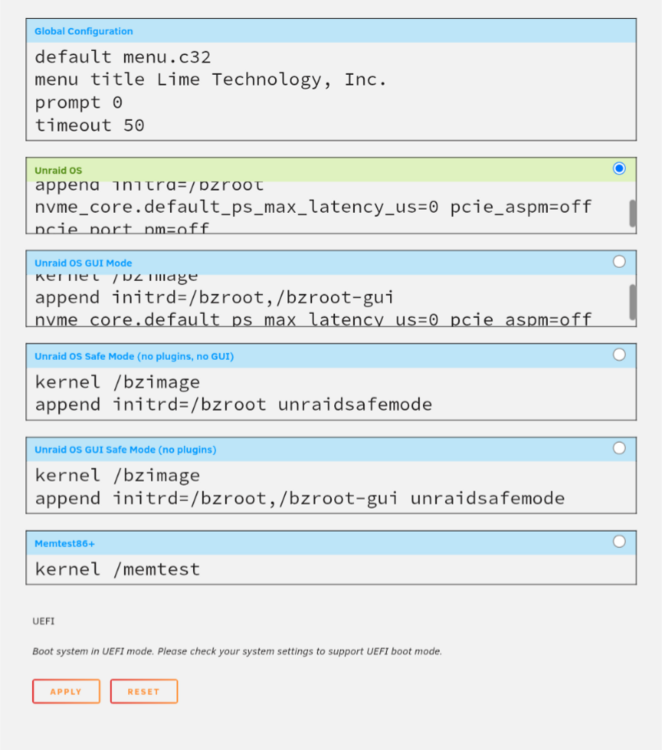
Sorry it's hard to tell, they are actually on the same lines. I'll try and get a better screen capture later but essentially it's this kernel /bzimage append initrd=/bzroot nvme_core.default_ps_max_latency_us=0 pcie_aspm=off pcie_port_pm=off
-
Apologies, the "Menu View" wasn't showing properly This should show it better (sorry I'm on mobile)
-
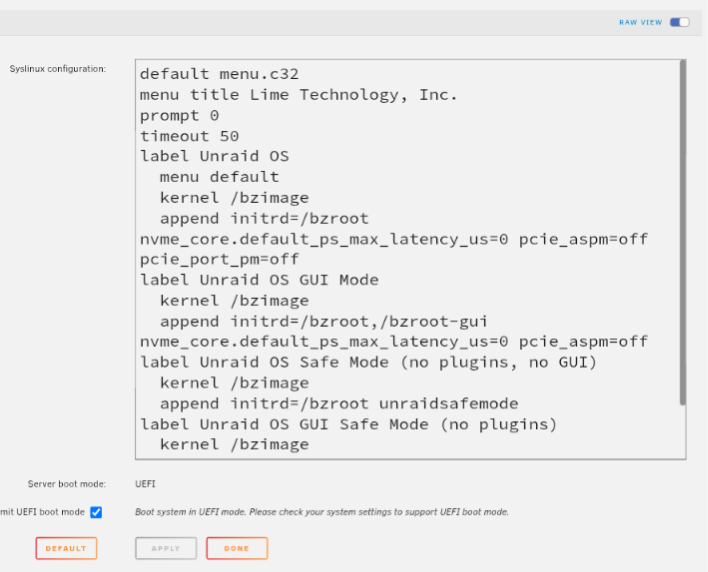
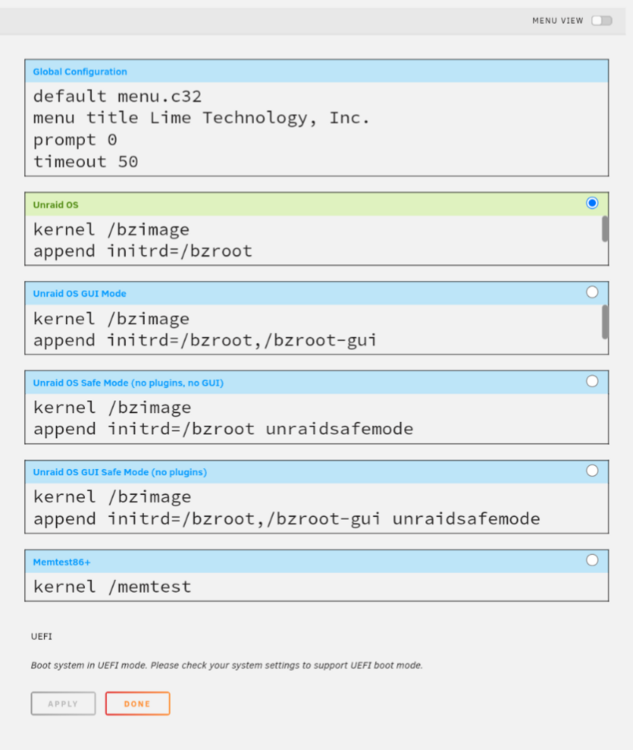
Interesting, I added it using the RAW view, but it doesn't seem to have taken correctly? Anyway, here is the screenshots, thank you!
-
Hi, I've been running unraid now for a few years with absolutely no issues, but recently upgraded all my hardware, including adding an NVME cache drive. This worked absolutely great for about a month, but after this, my NVME keeps dropping out with the "Input/Output" error. It only happens when I actually write data too it, it'll happily sit there mounted and attached all day if I don't write anything, but as soon as something uses it, it drops out. Steps I've taken to troubleshoot Booted the hardware to Ubuntu, ran multiple gig file transfers. Worked fine and stayed stable. Tried a different m.2 slot Tried another NVME, different brand, different model. In both slots Checked and turned off all power management for NVMEs within the motherboard BIOS Swapped from BTRFS to XFS for the FileSystem Appended nvme_core. default_ps_max_latency_us=0 pcie_aspm=off and separately tried: nvme_core. default_ps_max_latency_us=0 pcie_aspm=off pci=nommconf to my Boot Config At this stage I'm thinking it's not hardware, as I initially thought, as it used to work, I've tried it with multiple NVMEs and it works on Ubuntu. This only leaves Unraid as the issue. I'm tearing my hair out with this one, so absolutely any advice/directions would be appreciated. I've attached my diagnostics after one of these dropout events. tower-diagnostics-20210811-0946.zip Thanks
-
Has anybody got CastSponsorSkip working as a docker/template yet?
-
This is exactly where I am now! I even changed the location for the MEDIA_URL and the STATIC_URL within the "/home/wger/src/settings.py" to point to the locations, "/home/wger/media" and "/home/wger/static" respectively, and copied the files over from the "/home/wger/src/wger/core/" for the media and the static folders into the above new locations. And then 777'd everything, lol. Still getting errors, even though the location it's not pointing at both exists, and has the files in. e.g. From the Logs WARNING 2024-01-09 09:26:30,740 log Not Found: /home/wger/static/images/icons/flags/sv.svg [09/Jan/2024 09:26:30] "GET /home/wger/static/images/icons/flags/sv.svg HTTP/1.1" 404 2933 WARNING 2024-01-09 09:26:30,745 log Not Found: /home/wger/static/images/icons/flags/tr.svg [09/Jan/2024 09:26:30] "GET /home/wger/static/images/icons/flags/tr.svg HTTP/1.1" 404 2933 WARNING 2024-01-09 09:26:30,749 log Not Found: /home/wger/static/images/icons/flags/zh-hans.svg [09/Jan/2024 09:26:30] "GET /home/wger/static/images/icons/flags/zh-hans.svg HTTP/1.1" 404 2933 WARNING 2024-01-09 09:26:30,753 log Not Found: /home/wger/static/images/icons/flags/uk.svg From terminal wger@b4ce7cdcf286:~/static/images/icons/flags$ pwd /home/wger/static/images/icons/flags wger@b4ce7cdcf286:~/static/images/icons/flags$ ls ar.svg bg.svg cs.svg el.svg en-gb.svg eo.svg es-co.svg es-ni.svg es-ve.svg fr.svg hr.svg it.svg nl.svg pt-br.svg ru.svg tr.svg zh-hans.svg az.svg ca.svg de.svg en-au.svg en.svg es-ar.svg es-mx.svg es.svg fa.svg he.svg id.svg nb.svg pl.svg pt.svg sv.svg uk.svg wger@b4ce7cdcf286:~/static/images/icons/flags$
-
So, after a few restarts, I am now getting this error when refreshing the web GUI yeah. (along with a bunch of WARNINGS about logs not found) I tried to chown the static folder, but I can't use SUDO and su just asks for a password that I don't have, lol
-
So yes you're right, I went back in and created a proper postgres database and user. I assigned the user full admin rights in the end as I was coming across the same permissions error (I know this might not be the best security wise, but I'm only going to host wger on this postgres container. So I'm not at the stage where I can "access" the web gui, but it still errors. The error I'm getting now on the web gui is, "An error occurred There was an error on the server while processing your request. Try refreshing your browser and if that doesn't help, please try again at a later time. If the problem persists, you can seek help in ways listed below:" And from within the logfiles of the container I'm getting some errors (lol), such as, [09/Jan/2024 07:37:17] "GET / HTTP/1.1" 302 0 [09/Jan/2024 07:37:17] "GET /en-gb/ HTTP/1.1" 302 0 ERROR 2024-01-09 07:37:18,073 log Internal Server Error: /en-gb/software/features Traceback (most recent call last): File "/usr/local/lib/python3.10/dist-packages/requests/models.py", line 971, in json return complexjson.loads(self.text, **kwargs) File "/usr/lib/python3.10/json/__init__.py", line 346, in loads return _default_decoder.decode(s) File "/usr/lib/python3.10/json/decoder.py", line 337, in decode obj, end = self.raw_decode(s, idx=_w(s, 0).end()) File "/usr/lib/python3.10/json/decoder.py", line 355, in raw_decode raise JSONDecodeError("Expecting value", s, err.value) from None json.decoder.JSONDecodeError: Expecting value: line 1 column 1 (char 0) and, During handling of the above exception, another exception occurred: Traceback (most recent call last): File "/usr/local/lib/python3.10/dist-packages/django/core/handlers/exception.py", line 55, in inner response = get_response(request) File "/usr/local/lib/python3.10/dist-packages/django/core/handlers/base.py", line 197, in _get_response response = wrapped_callback(request, *callback_args, **callback_kwargs) File "/home/wger/src/wger/software/views.py", line 48, in features result_github_api = requests.get('https://api.github.com/repos/wger-project/wger').json() File "/usr/local/lib/python3.10/dist-packages/requests/models.py", line 975, in json raise RequestsJSONDecodeError(e.msg, e.doc, e.pos) requests.exceptions.JSONDecodeError: Expecting value: line 1 column 1 (char 0) They seem to be the related to each other, but I have no idea how or why it's throwing them
-
Sorry to hichjack this thread, I've switched over to postgres container now, and got somewhat further. But not it's erroring in the actual database not the connection, "django.db.utils.ProgrammingError: relation "exercises_exercisebase" does not exist LINE 1: ...LECT "exercises_exercisebase"."id" AS "col1" FROM "exercises..."
-
Sorry I can't help, but did you manage to find an answer? New year, new workout goals and I'm trying to get wger to work, with absolutely no success. I created a database in my mariaDB container, plugged all the details into the wger container, and keep getting the error, "django.core.exceptions.ImproperlyConfigured: Error loading MySQLdb module." I've tried different ports, the same as my other containers, but still no luck at all

