




Skip to content
View in the app

A better way to browse. Learn more.

Unraid

A full-screen app on your home screen with push notifications, badges and more.

To install this app on iOS and iPadOS
  1. Tap the Share icon in Safari
  2. Scroll the menu and tap Add to Home Screen.
  3. Tap Add in the top-right corner.
To install this app on Android
  1. Tap the 3-dot menu (⋮) in the top-right corner of the browser.
  2. Tap Add to Home screen or Install app.
  3. Confirm by tapping Install.

Brandonien

Members
  • Joined

  • Last visited

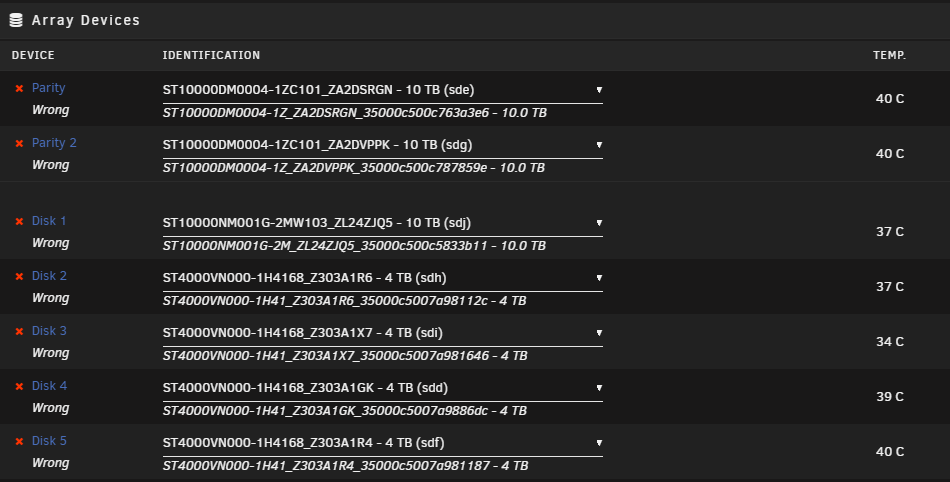
  1. My setup is 2 Parity drives and 5 array drives, when I perform ANY update to the OS it changes all of my drive names (adds a bunch of characters to the original names). Because the first part is the same I can place them in their appropriate slots through the dropdown, but they all show as wrong. I can rollback the OS version and its all fine, this has been the case for multiple versions I've attempted updating to. Please help? Pic attached for context.
Account

Navigation

Search

Search

Configure browser push notifications

Chrome (Android)
  1. Tap the lock icon next to the address bar.
  2. Tap Permissions → Notifications.
  3. Adjust your preference.
Chrome (Desktop)
  1. Click the padlock icon in the address bar.
  2. Select Site settings.
  3. Find Notifications and adjust your preference.