





TheSystemAdmin
Members
-
Joined
-
Last visited
-
May have posted too soon... that MAC came back into my ARP table. The only other item I'm running is a Home Assistant VPN which has a MAC Address given to it.
-
Ahh! I've spent a few days troubleshooting a network issue issue and finally narrowed it down to unRAID. I'll probably include way more in this than necessary so accept this TL;DR: My ARP table was picking up a macvlan network on my unRAID server and causing IP conflicts and unicast flooding (killing my network). I believe I fixed it by doing the commands below. I've seen a lot of people talk about ipvlan/macvlan but not really all that much on flipping between the two (which I can't currently do as ipvlan is greyed out). I setup my unRAID server back in the early v6 days and she's been a champ moving between 3 different iterations of server. I used to have a full UniFi setup which I think was smart enough to hide this issue. I got a pretty nice pfSense Netgate box which had way more juice than my UDM-P which when I added some more security cameras started to get rather sluggish. Almost immediately, the pfSense didn't like my unRAID setup. I had a DHCP reservation on the pfSense for my unRAID host IP and MAC address. However, when my switches booted up, they had a conflict because another MAC address picked up my unRAID IP. I blocked the device on the switches and thought nothing more of it. A few weeks later, I notice my WiFi go down but not any wired devices. My backups only run for a few minutes every day, so it took me a bit to realize it was a traffic issue. Running iperf3 from my desktop to unRAID caused my access points to clog up and go offline. Spent days trying to figure out why my computer having a clear connection to unRAID was causing my network to shout at all active switch ports. Since my desktop is 2.5GbE, enough traffic was coming back to overload my 1GbE access points (and the wired connections had just enough Mbps to do their things). I finally figured it out! In pfSense, when I checked the ARP table, it reported a different MAC for my unRAID box. I deleted the entry, ran a ping to unRAID from the pfSense and it scooped up the correct MAC and now I can push 2.5Gb all day to unRAID and the rest of my devices are in harmony... for ~10 minutes when the ARP table updated and scooped up that incorrect MAC. I did the following: I ran docker network ls and 'eth0' came back as the only macvlan network (the rest of the entries are bridge or host). I ran docker network inspect eth0 and it came back with my unRAID host address as the AuxillaryAddress and no containers associated with it. I ran ip addr show | grep "02:23:5a:74:98:ad which returned "link/ether 02:23:5a:74:98:ad brd ff:ff:ff:ff:ff:ff" I ran docker network rm eth0 I'm posting this for a few reasons. I have little hair left; I was ripping it out trying to figure this issue out. The fact that I did had me doing a very nauseating happy dance! I'm an idiot, but I couldn't find similar sounding issues on forums (bear in mind, unRAID itself wasn't even on my radar as a suspect for a lot of troubleshooting). This post hopefully will help someone down the line. Also going to be updating my STH and Reddit posts to reflect the solution. Is what I did the accurate way to close this saga, or should I look into what caused it to happen to begin with? unRAID v7.2.3
-
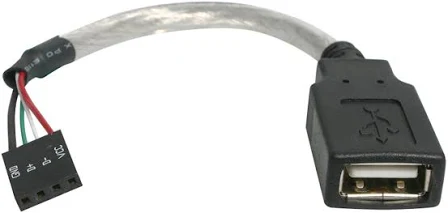
Migrated from a SanDisk Ultra 16GB drive to a Samsung Bar Plus 64GB drive. I had been using one of these: Have now moved the USB to the rear of the motherboard in a 2.0 slot. --- I ran a chkdsk on the old (now blacklisted) USB drive and it came back clean so either that header or cable was giving up on me (or something else entirely).
-
Hey Jorge, I’m on a 2.0 header on the mobo, I haven’t seen any other alerts of the USB dropping but I did reseat it after the second partial failure. I was debating on running a chkdsk on it if it happened again. Not concerned with saving it (I have a Samsung Bar heading my way) but I do want to confirm it is a/the problem for peace of mind. Thanks!
-
Now that the day is winding down, I started digging into this. I shut the server down and did a physical inspection of everything. Cleaned some dust off components and reseated the USB drive as well as the internal header it's plugged into. Booted the server up and ran the included memtestx86 which came back clean (1 pass). I exited out and let it post normally and it came back normally (theme was restored and it let me in with my normal root password). Looking at the log, I'm feel like my USB drive is giving up the ghost... Sep 5 19:06:00 TSA-NAS01 root: Fix Common Problems Version 2024.07.18 Sep 5 19:52:52 TSA-NAS01 kernel: usb 1-7: USB disconnect, device number 3 Sep 5 19:52:53 TSA-NAS01 kernel: usb 1-7: new high-speed USB device number 5 using xhci_hcd Sep 5 19:52:53 TSA-NAS01 emhttpd: Unregistered Flash device error (ENOFLASH3) Sep 5 19:52:53 TSA-NAS01 emhttpd: error: put_config_idx, 610: No such file or directory (2): fopen: /boot/config/shares/appdata.cfg Sep 5 19:52:53 TSA-NAS01 kernel: FAT-fs (sda1): Directory bread(block 29768) failed Sep 5 19:52:53 TSA-NAS01 kernel: FAT-fs (sda1): Directory bread(block 29769) failed Sep 5 19:52:53 TSA-NAS01 kernel: FAT-fs (sda1): Directory bread(block 29770) failed Sep 5 19:52:53 TSA-NAS01 kernel: FAT-fs (sda1): Directory bread(block 29771) failed Sep 5 19:52:53 TSA-NAS01 kernel: FAT-fs (sda1): Directory bread(block 29772) failed Sep 5 19:52:53 TSA-NAS01 kernel: FAT-fs (sda1): Directory bread(block 29773) failed Sep 5 19:52:53 TSA-NAS01 kernel: FAT-fs (sda1): Directory bread(block 29774) failed Sep 5 19:52:53 TSA-NAS01 kernel: FAT-fs (sda1): Directory bread(block 29775) failed Sep 5 19:52:53 TSA-NAS01 kernel: FAT-fs (sda1): Directory bread(block 29776) failed Sep 5 19:52:53 TSA-NAS01 kernel: FAT-fs (sda1): Directory bread(block 29777) failed Sep 5 19:52:53 TSA-NAS01 emhttpd: error: put_config_idx, 610: No such file or directory (2): fopen: /boot/config/shares/cloudsync.cfg Sep 5 19:52:53 TSA-NAS01 emhttpd: error: put_config_idx, 610: No such file or directory (2): fopen: /boot/config/shares/domains.cfg Sep 5 19:52:53 TSA-NAS01 emhttpd: error: put_config_idx, 610: No such file or directory (2): fopen: /boot/config/shares/isos.cfg Sep 5 19:52:53 TSA-NAS01 emhttpd: error: put_config_idx, 610: No such file or directory (2): fopen: /boot/config/shares/media.cfg Sep 5 19:52:53 TSA-NAS01 emhttpd: error: put_config_idx, 610: No such file or directory (2): fopen: /boot/config/shares/playground.cfg Sep 5 19:52:53 TSA-NAS01 emhttpd: error: put_config_idx, 610: No such file or directory (2): fopen: /boot/config/shares/system.cfg Sep 5 19:52:53 TSA-NAS01 emhttpd: Starting services... Sep 5 19:52:53 TSA-NAS01 emhttpd: shcmd (109): /etc/rc.d/rc.samba restart Sep 5 19:52:53 TSA-NAS01 winbindd[5460]: [2024/09/05 19:52:53.191730, 0] ../../source3/winbindd/winbindd_dual.c:1950(winbindd_sig_term_handler) Sep 5 19:52:53 TSA-NAS01 winbindd[5460]: Got sig[15] terminate (is_parent=1) Sep 5 19:52:53 TSA-NAS01 winbindd[5462]: [2024/09/05 19:52:53.191747, 0] ../../source3/winbindd/winbindd_dual.c:1950(winbindd_sig_term_handler) Sep 5 19:52:53 TSA-NAS01 winbindd[5462]: Got sig[15] terminate (is_parent=0) Sep 5 19:52:53 TSA-NAS01 winbindd[10457]: [2024/09/05 19:52:53.192503, 0] ../../source3/winbindd/winbindd_dual.c:1950(winbindd_sig_term_handler) Sep 5 19:52:53 TSA-NAS01 winbindd[10457]: Got sig[15] terminate (is_parent=0) Sep 5 19:52:53 TSA-NAS01 root: cp: cannot create regular file '/boot/config': Input/output error Sep 5 19:52:53 TSA-NAS01 kernel: usb-storage 1-7:1.0: USB Mass Storage device detected Sep 5 19:52:53 TSA-NAS01 kernel: scsi host10: usb-storage 1-7:1.0 Sep 5 19:52:54 TSA-NAS01 kernel: scsi 10:0:0:0: Direct-Access SanDisk Ultra 1.00 PQ: 0 ANSI: 6 Sep 5 19:52:54 TSA-NAS01 kernel: sd 10:0:0:0: Attached scsi generic sg0 type 0 Sep 5 19:52:54 TSA-NAS01 kernel: sd 10:0:0:0: [sdl] 30464000 512-byte logical blocks: (15.6 GB/14.5 GiB) Sep 5 19:52:54 TSA-NAS01 kernel: sd 10:0:0:0: [sdl] Write Protect is off Sep 5 19:52:54 TSA-NAS01 kernel: sd 10:0:0:0: [sdl] Mode Sense: 43 00 00 00 Sep 5 19:52:54 TSA-NAS01 kernel: sd 10:0:0:0: [sdl] Write cache: disabled, read cache: enabled, doesn't support DPO or FUA Sep 5 19:52:54 TSA-NAS01 kernel: sdl: sdl1 Sep 5 19:52:54 TSA-NAS01 kernel: sd 10:0:0:0: [sdl] Attached SCSI removable disk Sep 5 19:52:55 TSA-NAS01 root: Starting Samba: /usr/sbin/smbd -D Sep 5 19:52:55 TSA-NAS01 smbd[2209]: [2024/09/05 19:52:55.251557, 0] ../../source3/smbd/server.c:1741(main) (Sorry to ping you @itimpi but hoping you can help when you have a moment!) Syslog ballooned up to 109MB writing 1.1 millions of lines of what looks like the same looping process. It started a new log that's already at 36MB so she's unhappy about things. I grabbed a random snippet (1000 lines) and have it here: https://pastebin.com/UYSPPPf7. I've also attached current diagnostics. Thanks! tsa-nas01-diagnostics-20240906-1734.zip
-
Unfortunate development... It locked up again a few hours after my post, this time the console was still sitting on the login line (wasn't accepting input), no spam. I rebooted and everything was back up and running. This morning, the server is working, but the webGUI won't accept any login information and appears to have lost my theme settings. I had it in dark mode but when I go to my GUI now, it's white. Won't accept root or my other admin passwords. The files/docker containers are all alive, however. It still reflects the NAS name & description. Went to KVM, typed "root", hit enter and it froze. Content is still available but it's just sitting on "TSA-NAS01 login: root". Won't accept any input. I'm hesitant to reboot it again since things are technically working. --- An item I failed to mention in my post from yesterday, when I reset the server, it booted into the BIOS instead of to the USB. The USB wasn't listed in the boot options from the BIOS. When I shut the server down and booted it up, it booted off the USB. Hopefully, someone can help me unravel this gremlin! I'm feeling like I have a hardware issue somewhere that's upsetting unRAID.
-
Hey-o, Resurrecting this thread... she fell down again. I had a monitor hooked up and it was frozen on this error being spammed: php-fpm[3697]: [WARNING] [pool www] child 28570 exited on signal 7 (SIGBUS) after 11.016010 seconds from start The only differences in the line spam was 28570 and 11.016010 were changing. This time I had syslogging working but it doesn't seem to have caught what happened... Sep 3 00:02:39 TSA-NAS01 root: /mnt/cache: 81.1 GiB (87082639360 bytes) trimmed on /dev/sdh1 Sep 3 00:02:40 TSA-NAS01 root: /var/lib/docker: 6 GiB (6394716160 bytes) trimmed on /dev/loop2 Sep 3 00:02:40 TSA-NAS01 root: /etc/libvirt: 23.6 MiB (24797184 bytes) trimmed on /dev/loop3 Sep 3 06:49:25 TSA-NAS01 kernel: hrtimer: interrupt took 12001 ns Sep 3 12:26:12 TSA-NAS01 flash_backup: adding task: /usr/local/emhttp/plugins/dynamix.my.servers/scripts/UpdateFlashBackup update Sep 3 12:27:12 TSA-NAS01 flash_backup: adding task: /usr/local/emhttp/plugins/dynamix.my.servers/scripts/UpdateFlashBackup update Sep 4 00:02:37 TSA-NAS01 root: /mnt/cache: 454.6 GiB (488163549184 bytes) trimmed on /dev/sdh1 Sep 4 00:02:38 TSA-NAS01 root: /var/lib/docker: 5.9 GiB (6386167808 bytes) trimmed on /dev/loop2 Sep 4 00:02:38 TSA-NAS01 root: /etc/libvirt: 23.6 MiB (24797184 bytes) trimmed on /dev/loop3 Sep 5 00:02:35 TSA-NAS01 root: /mnt/cache: 144.7 GiB (155374804992 bytes) trimmed on /dev/sdh1 Sep 5 00:02:36 TSA-NAS01 root: /var/lib/docker: 5.9 GiB (6375436288 bytes) trimmed on /dev/loop2 Sep 5 00:02:36 TSA-NAS01 root: /etc/libvirt: 23.6 MiB (24797184 bytes) trimmed on /dev/loop3 Sep 5 10:07:58 TSA-NAS01 webGUI: Successful login user root from 10.10.10.90 Sep 5 18:56:22 TSA-NAS01 root: Delaying execution of fix common problems scan for 10 minutes Sep 5 18:56:22 TSA-NAS01 emhttpd: /usr/local/emhttp/plugins/user.scripts/backgroundScript.sh "/tmp/user.scripts/tmpScripts/delay_vm_startup/script" >/dev/null 2>&1/usr/local/emhttp/plugins/user.scripts/backgroundScript.sh "/tmp/user.scripts/tmpScripts/unlock_nvidia_gpu/script" >/dev/null 2>&1 Sep 5 18:56:22 TSA-NAS01 emhttpd: Starting services... Sep 5 18:56:22 TSA-NAS01 emhttpd: shcmd (72): /etc/rc.d/rc.samba restart Sep 5 18:56:22 TSA-NAS01 winbindd[3643]: [2024/09/05 18:56:22.930270, 0] ../../source3/winbindd/winbindd_dual.c:1950(winbindd_sig_term_handler) Sep 5 18:56:22 TSA-NAS01 winbindd[3641]: [2024/09/05 18:56:22.930285, 0] ../../source3/winbindd/winbindd_dual.c:1950(winbindd_sig_term_handler) I had logged in at 10:07 but didn't make any changes or do anything before closing the tab a few minutes later. I got a notice at 18:15 that the backup target for my Veeam workstation backup wasn't available and alerted to the server being locked up at 18:44. I eventually restarted it and the logs resume at 18:56 with it coming back online. --- I did some searching through the forum but didn't see any outright solutions (posts were from 2018-2021). Searching abroad has a few others with this error but no replies. My docker network type is macvlan and to my knowledge, has been since I set this up years ago. This crash and the one I posted originally have been my only instability. The main change made since my last post is I'm now on unRAID v6.12.13. Thoughts? Thanks!
-
Gorgeous, it's working now! Hopefully this never happens again but at least if it does I'll have an idea.
-
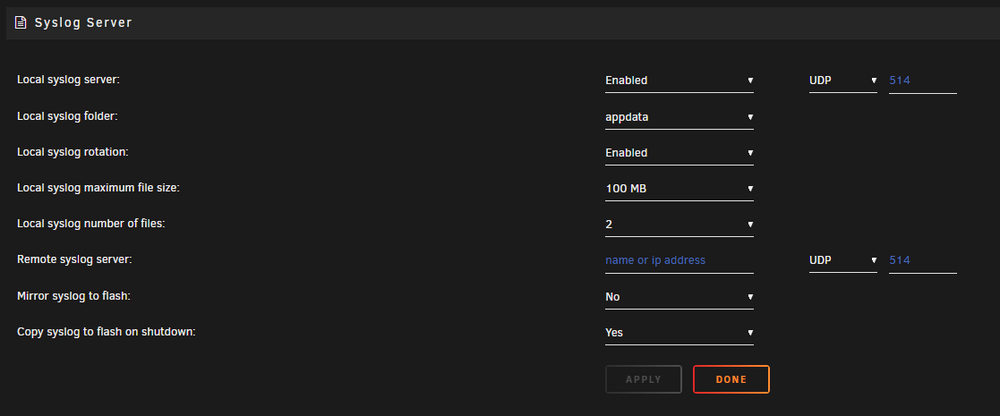
Hey itimpi, Went to go enable this only to find I already had it on. The above were my settings pre my OG post. The con is there isn't any data in my 'appdata' share related to syslog. I switched to a different share just in case it had some issue with appdata but any thoughts you could lend would be helpful. Thank you!
-
Hey-o folks! I got an odd one that just occurred. I handled it poorly and I'm hoping I didn't sacrifice logs to determine what exactly happened. unRAID v6.12.8 Situation: - Received a text from someone that they were getting Error 1033 (Cloudflare). - Attempted to login to investigate only to find the Dashboard wasn't reachable. - Physically, the server looked okay (i.e. LEDs were lit/flashing as if the drives were working, what little RGB it has was on, fans were going, the works). - My screw up... I hit the power button (not long press) and after a few minutes, the server shuts down. - Hit the power again, it booted up, but the Dashboard still wasn't reachable. - I *finally* hooked up a KVM, and it's in the BIOS. I figured that I lost something big if it couldn't find my boot device AND the server went dark. - I hit the reset button just to see if it'll show what step it fails at. - Shows me my HBA which reports all drives are there... cool. - Shows the unRAID pre-boot interface... well okay, so my flash drive is there. - Boots all the way up and the server is chugging along. - Currently running a parity check but not giving me any indication that anything is 'wrong'. I'm quite confident it's a hardware issue but would love to have some type of focal point before chasing ghosts. I generate logs, but they all are from when I booted up the server and nothing from before. Based on the Read Me, I'm most likely SoL on what happened. So! 2 questions... 1) Is there a way to capture logs that persist reboots but don't bloat up? (I did find this but it seems like an 'if this happens again' item.) 2) Can someone smarter than me see if anything stands out in the good ol' logs attached? Thank you! tsa-nas01-diagnostics-20240717-1423.zip
-
Understood! Here we go for another 25 hour rebuild! Haha Actually, I will just leave it alone and start building backwards. Seems cosmetic and not a big deal. Was I correct in disk gaps not being acceptable? If I build back down to disk 1, and then add a disk 7 I would be okay so long as disk 1-6 are populated?
-
Hello! I searched the forums and only found posts that were years old or not making a ton of sense for my thick skull. My unRAID server had 6 data disks and 2 parity disks. I removed 4 small disks which left "disk 5" and "disk 6". I then rebuilt parity with only two disks in the array. That was all well, but I would like to move 5/6 to 1/2 and add another disk for 3. It sounds like I can do this, but my second parity disk will not fly and need to be rebuilt again. My question is this, on unRAID 6.9.2, can I move those disks to 1/2 and be 100% fine with checking "parity is valid"? Or do I need to unassign Parity 2, do my drive reconfiguration (along with adding the third disk), start up the array and then stop the array to re-add Parity 2 and have it rebuild. The disk arrangement is strictly OCD, if this isn't possible with how I explained above without reinventing the wheel I will just add the third disk as "disk 4" as it seems gapping drives is a no-go. Thanks!
-
Since my "system" share is on the cache and I lost both drives, unRAID just ran with what it had on the array? Would that account for data not reflecting, performance being terrible and VMs missing?
-
Reboot appears to have resolved it, data is back, containers started up and VMs are reflecting. Will definitely consider replacing the board if this issue occurs a second time. Been debating on switching to Intel but the wife won't approve any more tech spending for a few months. Haha
-
True, I have been debating on plugging an external drive in and having it backup to that for a local copy but the data footprint is so small that pulling from the cloud wouldn't take more than an hour or two.

