aaron25656
Members
-
Joined
-
Last visited
-
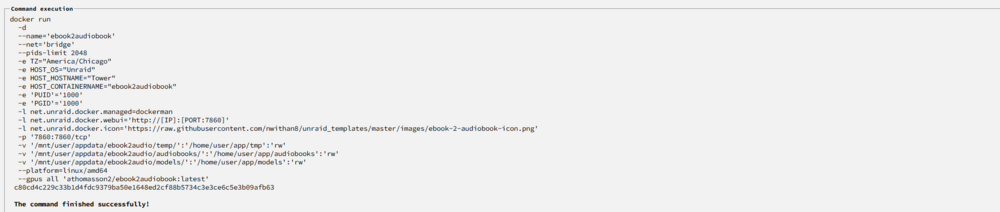
I was able to figure the solution after alot of research. For some reason out of the box when you download the docker the docker map pathing is set to host container /home/user/app/ this config isn't correct and its also restricted , seems the correct host container info is /app/user/ only this isn't restricted and once i changed that data started showing up in my appdata folder that it was mapped to.
-
Hello i'm having a issue with this app that i spent over 24 hours trying everything under the sun to attempt to fix. I been trying my best to move the temp / models / audiobooks output to my appdata instead of writing it to my docker image. Every time i check it send its to /home/user/app which isn't accessible it seems on unraid. My current settings are /home/user/app/tmp > /mnt/user/appdata/ebook2audiobook/tmp/ /home/user/app/audiobooks > /mnt/user/appdata/ebook2audiobook/audiobooks/ /home/user/app/models > /mnt/user/appdata/ebook2audiobook/models/ I have tried everything from /mnt/user/appdata/ebook2audiobook/tmp/ - /mnt/user/appdata/ebook2audiobook/tmp/ /mnt/user/appdata/ebook2audiobook/audiobooks/ - /mnt/user/appdata/ebook2audiobook/audiobooks/ /mnt/user/appdata/ebook2audiobook/models/ - /mnt/user/appdata/ebook2audiobook/models/ to /tmp/ - /mnt/user/appdata/ebook2audiobook/tmp/ /audiobooks/ - /mnt/user/appdata/ebook2audiobook/audiobooks/ models/ - /mnt/user/appdata/ebook2audiobook/models/ Nothing seems to work output always saved inside the docker to home/user/app/audiobook Thank you in advance for any assistance.