





rhodo
Members
-
Joined
-
Last visited
-
FINAL UPDATE: It was a hardware problem! The server crashed within a day on the minimal loadout. I then started running a variety of hardware stress tests, and got errors on prime95 FFT -- indicating a CPU problem. I replaced my good ol' Ryzen 5 3600 with a Ryzen 9 5900XT. I then ran prime95 again to ensure no more errors. It was clean, so I fired up Unraid, loaded all my dockers and a VM and it's been stable for over a day. Big thanks to JorgeB and MowMdown for their helpful advice and insight. ASIDE: I found the system-rescue.org disk to be super helpful for running hardware stress tests. I have used other rescue disks in the past, and this was my first time using system-rescue. It did everything I needed and was super easy to use. Definitely recommended if anyone needs to do hardware troubleshooting on an Unraid system.
-
Update: I ran unraid in safe mode for 3 days without any crashes. Yesterday I booted into normal mode and enabled all the dockers except P-StreamRec, and it crashed in less than a day. I noticed that the kernel dump this time specifically mentions navidrome, which was installed along side subwave. The kernel dump also mentions OOT modules. All the google results for OOT modules appear to deal with software radio -- which is what subwave is. So, now I suspect subwave is the offending program. Currently, I have enabled only a few essential dockers (duplicati, plex, and photoprism). If there are no crashes after a few days I will enable others. phil-diagnostics-20260821-0841.zip
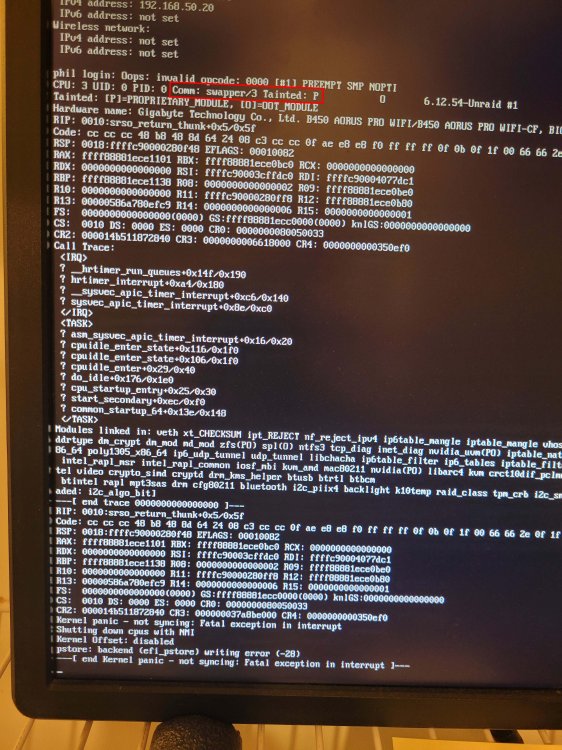
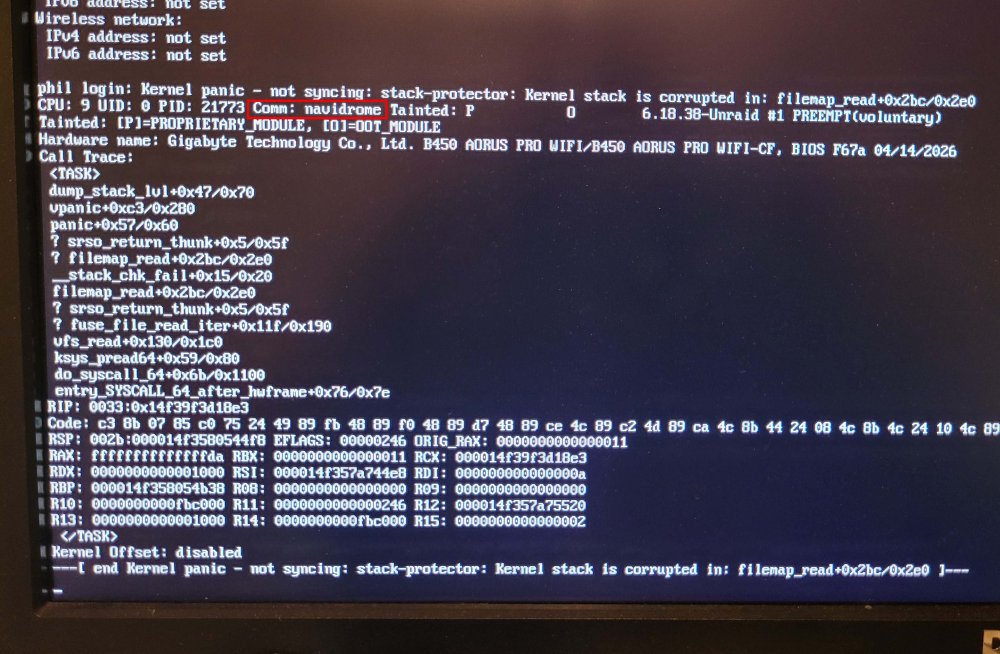
-
Just had another kernel panic. Things I have done since the last crash: Updated to the latest version of Unraid Updated BIOS Disabled global C-states The syslog server running for some time due to some prior issues. As requested, I am attaching both the diagnostics and the syslog output. I installed 2 dockers shortly before experiencing these crashes: P-StreamRec and Subwave. So, for now, I am leaving P-StreamRec off to see if that resolves the problem. Please let me know if you have any other advice or see something in the logs that might point to the culprit. Thanks! syslog.zip phil-diagnostics-20260816-1644.zip
-
After running memtest (no errors after 2 passes) and starting the array, the dockers were present. After the earlier crash today (and one several days ago) they were missing and I needed to reinstall all of them. Weird... Here is the updated diagnostics. TIA! phil-diagnostics-20260812-1448.zip
-
Thanks for your help. Currently running a couple cycles of memtest, but no errors so far. Question: I lose all my dockers when unraid crashes, but they can be easily reinstalled with their data preserved. Should I reinstall my dockers prior to updating unraid to avoid data loss? Thanks again for your assistance!
-
My unraid server has experienced 2 kernel panics within the past day. I have not made any recent changes to the system. A screenshot of the console reveals that an invalid opcode 'PREEMPT SMP NOPTI' may have triggered the panic. I am attaching the screenshot in case this info helps. I am running Unraid 7.2.4, and wondering whether updating to the latest version might help. Thanks! phil-diagnostics-20260812-1101.zip
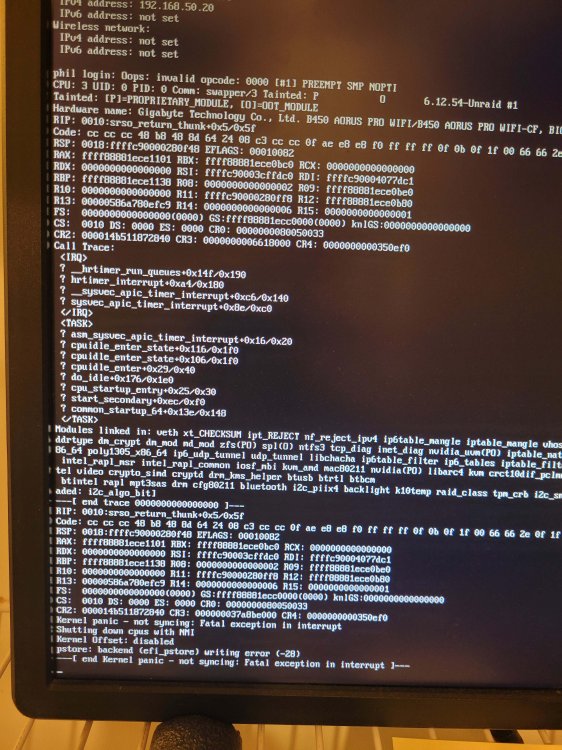
-
Marking this topic solved. I discovered that the reason the cache drive filled up is because I recently installed a docker that was dumping a bunch of video files on the cache. The mover problem had been a longstanding (but unrecognized) issue caused by misconfigured mover settings of the docker/VM folders (appdata, domains, system). In case this helps anyone with cache drive issues, below is what I did to resolve this situation. STEP 1: CHECK --readonly -- This confirmed the data corruption on the cache drive -- This may have been caused by me attempting to manually delete files off the cache drive while it was in a self-imposed read-only state -- I since learned that btrfs will put itself into a read-only state to prevent further data corruption STEP 2: CREATE BACKUP OF CACHE DRIVE -- mkdir /temp -- mount -o rescue=all,ro /dev/sdX1 /temp (replace "X" with your drive letter) STEP 3: TRY SCRUB -- System in maintenance mode -- btrfs scrub start -Bd /mnt/cache -- Fails because file system is read-only STEP 4: CHECK WITH REPAIR -- Finds and repairs errors -- Takes file system out of read-only mode STEP 5: REBOOT STEP 6: SCRUB -- Confirms errors have been repaired and cache drive is now happy STEP 7: CORRECTLY CONFIGURE OFFENDING DOCKER -- The offending docker was p-streamrec. By default all its recording are placed in its appdata folder on the cache -- Enable docker -- Set data folder to reside on array -- Disable docker -- Use midnight commander to move its data off cache STEP 8: CORRECTLY CONFIGURE MOVER SETTINGS -- Set cache as primary and array as secondary for the appdata, domains and system folders -- Run mover
-
Thank you, JorgeB. I have successfully repaired the cache drive, and scrub is no longer reporting errors. However, the mover still refuses to move. It is still unhappy about these VM images on the cache. MOVER LOG Jun 8 08:22:50 phil move: mover: started Jun 8 08:22:50 phil move: move: /mnt/cache/domains/Windows 10/2025-05-03--generate.running No such file or directory Jun 8 08:22:50 phil move: move: /mnt/cache/domains/Windows 10/memory2025-05-03--generate.mem No such file or directory Jun 8 08:22:50 phil move: move: /mnt/cache/domains/Windows 10/vdisk1.2025-05-03--generateqcow2 No such file or directory Jun 8 08:22:50 phil move: move: /mnt/cache/domains/Windows 10/vdisk1.img No such file or directory Jun 8 08:22:50 phil move: move: /mnt/cache/domains/Windows 10/2025-06-07--generate.running No such file or directory Jun 8 08:22:50 phil move: move: /mnt/cache/domains/Windows 10/vdisk1.2025-06-07--generateqcow2 No such file or directory Jun 8 08:22:50 phil move: move: /mnt/cache/domains/Ubuntu 24.04/2025-06-07--generate.running No such file or directory Jun 8 08:22:50 phil move: mover: finished NOTE: I was previously able to manually delete all of the Ubuntu VM files except the "--generate.running" one from the cache drive. The system is configured such that the domains folder should not exist on the cache drive. So I am puzzled as to why these files are on the cache to start with. Is it ok to simply delete these files now that the cache is not stuck in read-only mode? Alternatively, I am ok with simply removing and reinstalling these VMs if that will solve the problem.

-
I noticed recently that my cache drive was at 100% capacity. Mover would not move any files. I uninstalled Mover Tuning and mover still failed. The mover log indicated that the problem seemed to be related to VM images that were residing on both the cache drive and the array. I disabled VMs and was unsuccessful in my attempts to delete the images from the cache drive because they were read-only -- even after chmod-ing them to 755. In maintenance mode I check the file system of the cache drive and the output is below. [1/8] checking log skipped (none written) [2/8] checking root items [3/8] checking extents data extent[328848568320, 20480] referencer count mismatch (root 257 owner 260 offset 1215193088) wanted 0 have 1 data extent[328848568320, 20480] bytenr mimsmatch, extent item bytenr 328848568320 file item bytenr 0 data extent[328848568320, 20480] referencer count mismatch (root 321 owner 260 offset 1215193088) wanted 1 have 0 backpointer mismatch on [328848568320 20480] ERROR: errors found in extent allocation tree or chunk allocation [4/8] checking free space tree [5/8] checking fs roots [6/8] checking only csums items (without verifying data) [7/8] checking root refs [8/8] checking quota groups skipped (not enabled on this FS) Opening filesystem to check... Checking filesystem on /dev/sdg1 UUID: f296ff39-0784-48e7-a757-99d0ffd864d2 found 949109067776 bytes used, error(s) found total csum bytes: 837853060 total tree bytes: 1728331776 total fs tree bytes: 709705728 total extent tree bytes: 107560960 btree space waste bytes: 212508862 file data blocks allocated: 1332012232704 referenced 930064150528 After all of this, my Plex docker has stopped working. It's logs show the following: PMS: failure detected. Read/write access is required for path: /config/Library/Application Support/Plex Media Server Unraid version: 7.2.4 Thanks in advance! phil-diagnostics-20260607-1608.zip
-
Posting this here in case it might help someone. After getting my dockers back up I noticed that Plex refused to play several random video files through my Roku that played fine through the Plex web interface. Nothing seemed to help and there did not seem to be any pattern as to which files were affected. I even replaced the affected video files with fresh copies and they still didn't play through the Roku. All I got was the dreaded "Playback Error: Playback has stopped due to multiple playback errors. Please check your connection and try again". Out of desperation I consulted ChatGTP which came up with the below solution. The codec files in the Plex "Library/Application Support/Plex Media Server/Codecs" folder (located on the Unraid cache pool) may have been corrupted during the cache pool failure that I suffered. Recovering my cache pool and Plex docker did not detect/replace the corrupt codec files. After (1) stopping the Plex docker, (2) deleting all files in the Codec folder, and (3) restarting Plex (which automatically downloaded fresh codecs) everything worked normally again.
-
Using the GUI, I deleted the docker.img from the Docker settings and the libvirt.img from VM settings. That resulted in the Docker service starting. I was then able to restore the dockers from Apps > Previous Apps. I have not yet rebooted to see if the BTRFS errors are still showing up, but I have my dockers back, so, at least for now, I'm happy.
-
Scrub ended without errors: UUID: f296ff39-0784-48e7-a757-99d0ffd864d2 Scrub started: Thu May 22 14:05:55 2025 Status: finished Duration: 0:13:04 Total to scrub: 387.43GiB Rate: 506.03MiB/s Error summary: no errors foundI noticed that the Docker service has failed to start. Found this in the syslog: May 22 15:13:01 phil root: mount: /var/lib/docker: can't read superblock on /dev/loop2. May 22 15:13:01 phil root: dmesg(1) may have more information after failed mount system call. May 22 15:13:01 phil root: mount error May 22 15:13:01 phil kernel: BTRFS error (device loop2): open_ctree failed: -5 phil-diagnostics-20250522-1513.zip
-
Awesome! This brought my cache drive back. Is it now safe to recreate my dockers and VMs? I tried to recreate my Plex docker while the RAM was still corrupt, so that may be a goner. I understand I may need to reinstall Plex from scratch. I am hoping I can do a reinstall of the other dockers and preserve the data I had. Can the VMs be recovered? I had snapshots. If not, no biggie. Thanks again!!! phil-diagnostics-20250522-1352.zip
-
Diagnostics attached. Appreciate your assistance with this. phil-diagnostics-20250522-1336.zip
-
I have added new RAM, booted into Unraid and started the array. The cache drive is listed as "Unmountable: Wrong or no filesystem". Please let me know what would be the next steps to get thing up and running again. Thanks.



