182mhb
Members
-
Joined
-
Last visited
Everything posted by 182mhb
-
Awesome, thank you very much for that, I'll look into it.
-
Thank you so incredibly much for your help. I'll figure out how to move forward from here.
-
Thank y'all very much for the replies. I pretty much verified I made a horrible mistake when the drives didn't come back. "This is where I think I may have made a fatal mistake," is what I had mentioned in my original post. But moving past that now... would anyone be aware of anyway to access the data on the drives? The drives are booting, as mentioned in my original post as well, I could plug the drives in to a windows computer and get disk management to come up asking me for to select MBR or GPT, at which point I gently ejected them trough software and unplugged them. As well as being able to plug them into the server with a USB-to-SATA adapter and seeing "VirtualDisk_E12027XXXXXXXXXX" come up under unassigned devices. Therefore they are unrecognizable at the moment, but they are booting.
-
Thank you for your fast reply. The first four "old" drives had been in my unRAID servers for years with their pins taped as per the instructions of the "terabyte-acholic" himself. The pins are still taped, and they were also taped while plugged into the USB-to-SATA adapter as well too. Even then when the old drive comes up with the USB adapter unRAID doesn't recognize it and lists it as "VirtualDisk_E12027XXXXXXXXXX" in Unassigned devices. And that's what's interesting, I can use a specific set SATA power and data cables and boot up one of the new drives (pin taped as well), and then use that same exact set of SATA power and data cables and the old drive is not coming up (pin taped). it is making absolutely no sense to me whatsoever. I have the two servers in the same location currently, and I even took a donor power supply (same spec'd power supply, RM650, from the second unRAID server, that I have not even touched yet because of this issue) and the same thing happens, I can see a new drive but not an "old" drive that has been running in my unRAID server for years. Something, I think, happened when I took the SilverStone SATA power cable and the system would not POST, the fans would spin for ~2 seconds and the system would shut back down. I thought I killed the drive (does SilverStone and Corsair have different electrical mapping from the 6-pin power supply connector to the SATA power cables?), but I am seeing the drives come up when I use a USB-to-SATA adapter. The 3.3v pin is taped in all instances.
-
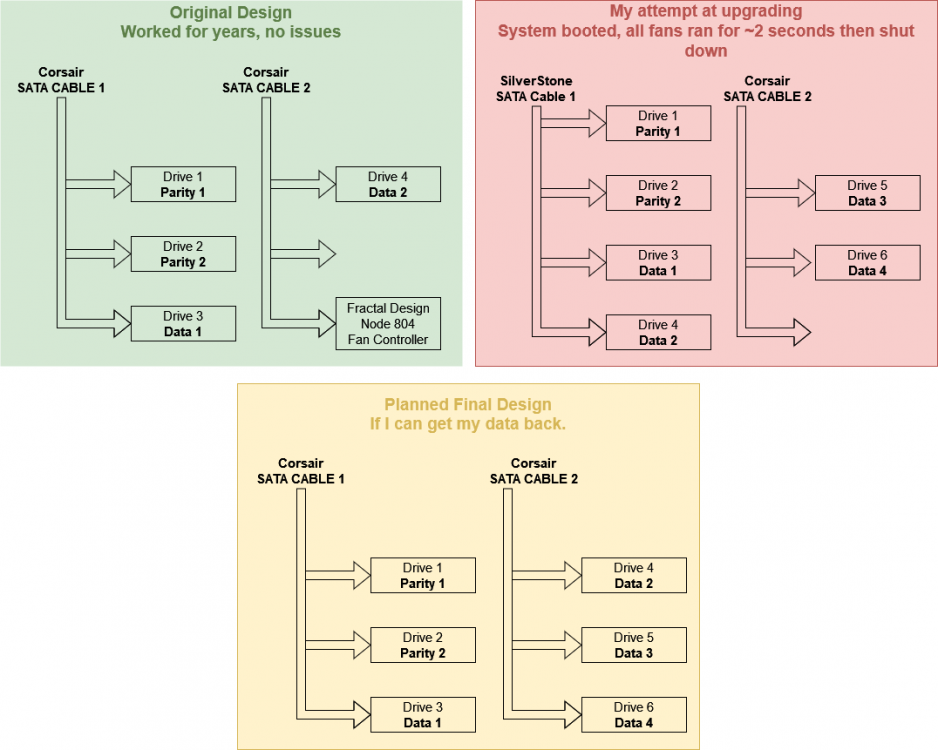
Drives are not showing back up, and any help is greatly appreciated. First and foremost, thank you so much to everyone who spends any time helping me with this. I'm kind of getting to that freaking out stage and just hoping there is something small I am overlooking. TL;DR I plugged my "old" shucked WD white label drives into my Corsair RM650 using a SilverStone 4-way SATA power splitter during a server upgrade, and now they are not showing back up in unRAID or in the motherboard IPMI screen. If I use a USB-to-SATA, one of the 14TB white label WD drive shows up under unassigned devices as "VirtualDisk_E12027XXXXXXXXXX" with a size of "0 B." what can I do to bring them back, or how bad is it? In detail I have two identically spec'd unRAID servers (4 drives in each – 2 parity drives, 2 data drives – all 14TB WD white-label shucked drives), one server I keep at my house and one that stays at my brother's house (portrayed in the green block in the diagram). They occasionally get backed up to a USB hard drive that stays in a safe, but everyone knows how well/consistent that goes. So, it was time (after some saving up) to upgrade the FIRST system and add two more shucked WD hard drives to each system, so the 2 unRAID servers could start cross backing up to each other on a schedule. So, I added two more shucked WD White label drives to the first system, bringing the total number of drives in the system to 6 (2 parity, 2 data, 2 data to backup remote server). The case just so happens to be a Fractal Design Node 804, which has 2 drive cages that each hold 4 drives. The "problem" (in jest) is that the Corsair RM650 power supply in the system has two SATA power cables that only have 3 SATA power plugs each. So, being the novice that I feel like now, I put my 4 original drives in one drive cage and took a 4-way SilverStone SATA power cable from my brother's computer (this is where I think I may have made a fatal mistake) to power the four "old" drives in the first cage, and then I could use the Corsair 3-way SATA power cable to power my 2 new drives with an extra SATA power for future expansion (portrayed in the red block on the diagram). I powered on the system, the systems POSTs, the fans run for about 2 seconds, and the system shuts back down. I flipped the switch on the power supply, checked all my connections in the system, turned the system on again, and tried again to get the same result. I took a break, and after coming back a few hours later, I tried just hooking up 3 drives to the system using one of the Corsair 3-way power cables (1 "old" drive and the 2 new drives). I boot up the server, and the 2 new drives show up, but the 1 "old" drive does not (verified in the IPMI of the motherboard and unRAID). So, I unplug that SATA power cable (system powered down, and up, etc.), and plug in my other Corsair 3-way power cable with the other 3 "old" drives, turn the system on again, and none of those “old” drives come up (verified in the IPMI and unRAID). Freaking out now, I take my USB-to-SATA adapter (NOT the custom-made PCB from the shucked enclosures) and plugin one of the "old" drives to my Windows 10 computer (to eliminate all the variables of the unRAID computer) just to see if I've completely killed that drive. In windows disk management, the drive comes up, and windows ask if I want to boot the drive in MBR or GPT. Not wanting to harm the data on the drive, I eject it from my Windows computer. So, I verified the drive is not dead. So, I plugged the drive in (via the same USB) to my unRAID machine, and instead of coming up as "WDC_WD140XXXX-S/NxS/NxS/N" the 14TB hard drive showed up under unassigned devices as "VirtualDisk_E12027XXXXXXXXXX" with a size of "0 B." Question: So, the question I am trying to get to is: what happened to these drives, at what point did I mess up, and most importantly, does anyone think the data is recoverable from these drives? In conclusion: I'm sorry this post was so long-winded. I normally feel knowledgeable enough about computers, but I may be looking at data loss on this one, and I want to make sure I don't leave out any details in the process. Again, thank you to anyone who can help me. I greatly appreciate any help.