



Skip to content
View in the app

A better way to browse. Learn more.

Unraid

A full-screen app on your home screen with push notifications, badges and more.

To install this app on iOS and iPadOS
  1. Tap the Share icon in Safari
  2. Scroll the menu and tap Add to Home Screen.
  3. Tap Add in the top-right corner.
To install this app on Android
  1. Tap the 3-dot menu (⋮) in the top-right corner of the browser.
  2. Tap Add to Home screen or Install app.
  3. Confirm by tapping Install.

ExtremeToast

Members
  • Joined

  • Last visited

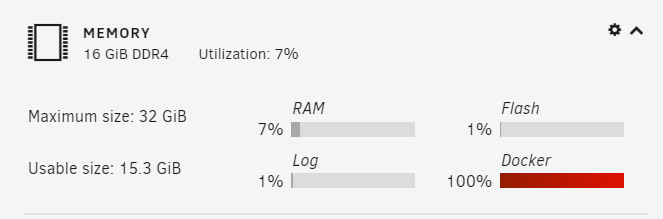
  1. Hi, I restarted my server today, and after it booted back up the Docker service will not start. The docker service is reporting 100% memory usage on the dashboard. I downloaded the diagnostic logs and I can see the following error message from docker.txt log time="2021-08-28T18:53:25.369834801+12:00" level=error msg="garbage collection failed" error="write /var/lib/docker/containerd/daemon/io.containerd.metadata.v1.bolt/meta.db: no space left on device" panic: runtime error: invalid memory address or nil pointer dereference [signal SIGSEGV: segmentation violation code=0x1 addr=0x10 pc=0x9e7605] Which I suspect is what is causing the docker service to start. What should I try to resolve this?
Account

Navigation

Search

Search

Configure browser push notifications

Chrome (Android)
  1. Tap the lock icon next to the address bar.
  2. Tap Permissions → Notifications.
  3. Adjust your preference.
Chrome (Desktop)
  1. Click the padlock icon in the address bar.
  2. Select Site settings.
  3. Find Notifications and adjust your preference.