



Skip to content
View in the app

A better way to browse. Learn more.

Unraid

A full-screen app on your home screen with push notifications, badges and more.

To install this app on iOS and iPadOS
  1. Tap the Share icon in Safari
  2. Scroll the menu and tap Add to Home Screen.
  3. Tap Add in the top-right corner.
To install this app on Android
  1. Tap the 3-dot menu (⋮) in the top-right corner of the browser.
  2. Tap Add to Home screen or Install app.
  3. Confirm by tapping Install.

cbalders

Members
  • Joined

  • Last visited

  1. Found my issue - had the following in the log: Feb 26 13:07:12 Mega emhttpd: shcmd (88): /usr/local/sbin/shfs /mnt/user -disks 255 -o default_permissions,allow_other,noatime -o remember=NO |& logger Feb 26 13:07:12 Mega shfs: fuse: invalid parameter in option `remember=NO' Feb 26 13:07:12 Mega shfs: fuse_main exit: 3 Looks like I had an invalid config for NFS shares - removed the setting and I'm back to normal.
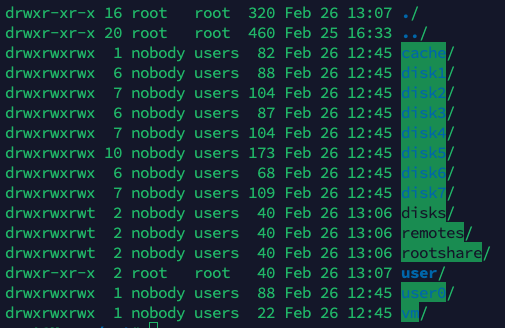
  2. Shares don't show up in the GUI - think is has to do with incorrect permissions in /mnt/user - have tried to chown chmod it back, but doesn't persist after reboot mega-diagnostics-20230226-1308.zip
Account

Navigation

Search

Search

Configure browser push notifications

Chrome (Android)
  1. Tap the lock icon next to the address bar.
  2. Tap Permissions → Notifications.
  3. Adjust your preference.
Chrome (Desktop)
  1. Click the padlock icon in the address bar.
  2. Select Site settings.
  3. Find Notifications and adjust your preference.