





Gunny
Members
-
Joined
-
Last visited
-
I'm trying to find duplicate files between my cache and array (basically where mover wrote the file to the array but didn't successfully remove it from the cache so now its on both cache and array), by default it doesn't seem to do this. it looks like -D should do what I want, but it seems to be broken root@UnraidHost:/mnt/user/Media# ./unRAIDFindDuplicates.sh -v -D /mnt/cache_unprotected ============= STARTING unRAIDFIndDuplicates.sh =================== Included disks: /mnt/disk/mnt/cache_unprotected /mnt/disk1 /mnt/disk2 /mnt/disk3 /mnt/disk4 /mnt/disk5 /mnt/disk6 /mnt/disk7 /mnt/disk8 /mnt/disk9 /mnt/disk10 /mnt/disk11 /mnt/disk12 /mnt/disk13 /mnt/disks Included shares: Backup CommunityApplicationsAppdataBackup LibVirtBackup Media ... List duplicate files ./unRAIDFindDuplicates.sh: line 373: verbose_to_bpth: command not found ./unRAIDFindDuplicates.sh: line 404: cd: /mnt/disk/mnt/cache_unprotected: No such file or directory checking /mnt/disk/mnt/cache_unprotected Backup ^C root@UnraidHost:/mnt/user/Media# it seems to concat /mnt/disk onto the path specified by -D which seems incorrect? if I let it run it seems to list every file in the array as duplicate after it gives an error on line 404.
-
I get your intent, but from a different perspective, why would the state of the HDD spin up/down matter when looking at temperature? If the CPU is running hot, we want the fans to increase; if the HDDs are hot, we want the fans to increase; if they both are hot we want the one that is higher up on its temperature curve to be controlling the speed. And if both are cool, we still want the one higher up on its fan curve to be the one controlling the fan speed. By giving both sensors their own threshold, you get rid of your issue where the CPU temp is causing fans to increase regardless of whether or not the hdds are spun up or down. And by doing so, you make it more flexible all around, keeping the state of the HDD spin in the mix with separate thresholds just makes it a worse feature for no real reason.
-
The problem @spl147 is running into is that a reasonable High temperature threshold for a HDD is very different than for a CPU. CPUs can run well into the 90C range and be fine, but HDDs really shouldn't go above 50C or so, so trying to use the same threshold for both sensors is a compromise in one way or the other. @SimonF I think I see what you were going with for the secondary HDD Spundown Temperature sensor, but I think what @spl147 needs and would be more flexible, would be to allow 2 sensors to be active at the same time, both with separate thresholds (they can probably share the same min/max speed setting), then the plugin does the fan speed calculation for both sensors and picks whatever value is higher. You could in theory make it N sensors, but that would probably require a re-write of the frontend design to support such a thing, I think being able to configure 2 sensors and unique thresholds for each is sufficient for basically anyone.
-
If you're able to control each fan individually via the IPMI-RAW commands, then yes you can create a separate profile for each. Reading this comment by me might help you get it working by building a custom config out with the plugin installed, the executable ipmi-raw should be on your path and so you should be able to send raw ipmi commands from your terminal
-
You'll have to reach out to Gigabyte support and ask them for the IPMI commands to control the fans on the system and what their values are if that is not already documented in their manual. Once you get that, then yeah you can get this plugin to work.
-
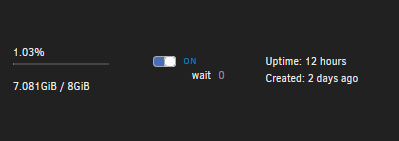
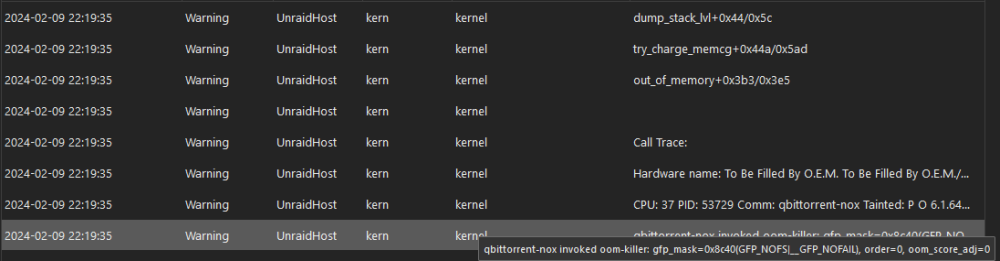
@H2O_King89 if you're still getting this, it looks like its a docker container OOM error, so one of your containers has an nginx process, and that container hit its memory limit so the system started killing the process with the largest memory usage in that container, you your case its nginx. You can tell because of the gfp_mask, it has value GFP_NOFAIL
-
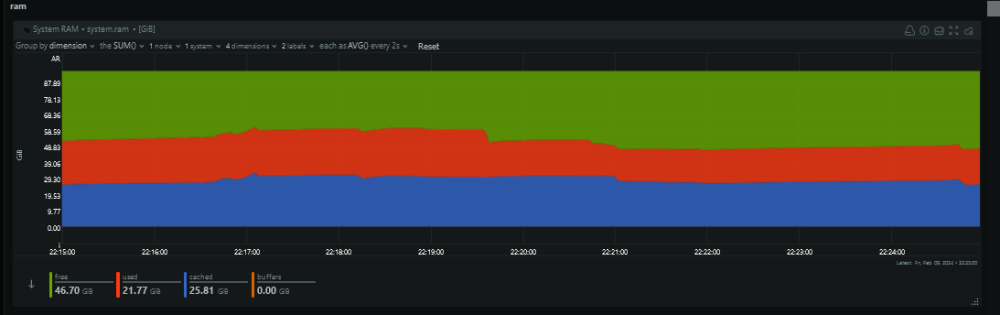
It looks like when you assign a docker container a memory limit and it violates that limit, FCP sees that as an OOM error for the entire system, which is incorrect. I would like to see system level OOM errors be a separate alert from container limit violation OOM error with the docker limit set to be a warning and system level remain as an error as it currently is. Plenty of memory available during the timeframe of the issue it looks like a difference you can key off of is the gfp_mask, it has NOFAIL for docker kills, but total system OOM gives something like GFP_KERNEL

-
No, this is primarily a tool to control fan speed via IPMI. It does install some ipmi functions onto the path, but you could do the same thing with nerdtools. https://www.intel.com/content/www/us/en/support/articles/000055688/server-products.html https://www.servethehome.com/reset-supermicro-ipmi-password-default-lost-login/
-
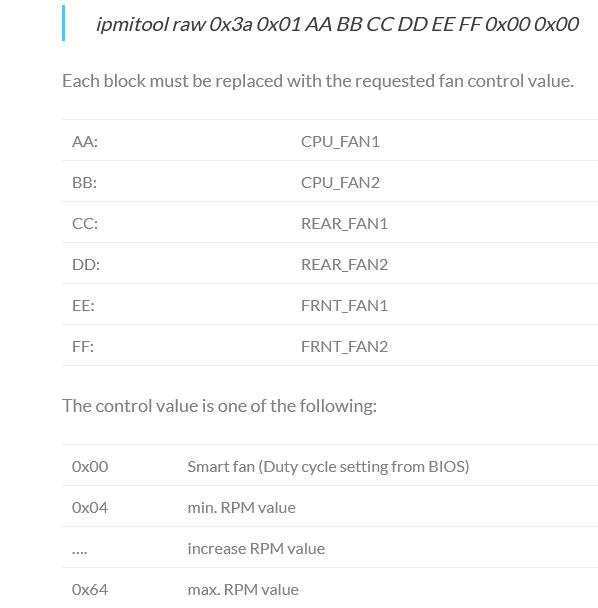
https://blog.chaospixel.com/linux/2016/09/Fan-control-on-Asrock-C2750D4I-C2550D4I-board.html seems to have ipmi-raw commands for your motherboard. based on that, this json file might work for you: { "ASRock": { "raw": "00 3a 01", "auto": "00 00 00 00 00 00 00 00", "full": "64 64 64 64 64 64 00 00", "fans": { "CPU_FAN1": "01", "CPU_FAN2": "01", "REAR_FAN1": "01", "REAR_FAN2": "01", "FRNT_FAN1": "01", "FRNT_FAN2": "01", "FAN_POS7": "01", "FAN_POS8": "01" } } } Just in case that blog article ever gets removed, here is the pertinent information: ipmitool raw 0x3a 0x01 AA BB CC DD EE FF 0x00 0x00 Each block must be replaced with the requested fan control value. AA : CPU_FAN1 BB : CPU_FAN2 CC : REAR_FAN1 DD : REAR_FAN2 EE : FRNT_FAN1 FF : FRNT_FAN2 The control value is one of the following: 0x00 Smart fan (Duty cycle setting from BIOS) 0x04 min. RPM value …. increase RPM value 0x64 max. RPM value
-
root@UnraidHost:~# /usr/bin/lscpu | grep 'Socket(s):' | awk '{print $2}' 2 Which is expected since its a dual socket motherboard. Just the IPMI fan setup for the board only needs 1 IPMI command to set all fans. I guess other boards split the fans by socket?
-
Something I ran into today was that "Comma seperated list of file types:" doesn't match just the end of the filepath (i.e. just the extension/type) it also matches anywhere in the file path. So if you are trying to not move a file that ends in .part, that will also match files with .part elsewhere in the path. e.g. /mnt/user/tv/show1/s1/episode1.part1.mkv and /mnt/user/tv/the.partition.showname/s1/episode1.mkv will match.
-
Looking at the line that threw the error, I was able to fake it out by adding a 2nd board with no fans on it: { "ASRockRack": { "raw": "00 3a 01", "auto": "00 00 00 00 00 00 00 00", "full": "01 64 64 64 64 64 00 00", "fans": { "CPU1_FAN1": "01", "CPU2_FAN1": "01", "REAR_FAN1": "01", "FAN_POS4": "01", "FRNT_FAN1": "01", "FAN_POS6": "01", "FAN_POS7": "01", "FAN_POS8": "01" } }, "fake": { "raw": "00 3a 01", "auto": "00 00 00 00 00 00 00 00", "full": "01 64 64 64 64 64 00 00", "fans": { } } } I think the issue is fundamentally the code makes assumptions about board functionality in the code itself, and doesn't utilize the config files as the source of truth for what to do. Like in the ipmi_settings_fan.php where $cmd_count gets set, instead of counting the sections in the board.json to determine how many ipmi commands need to get run, it assumes it needs to send a command for each cpu socket on ASRock boards.
-
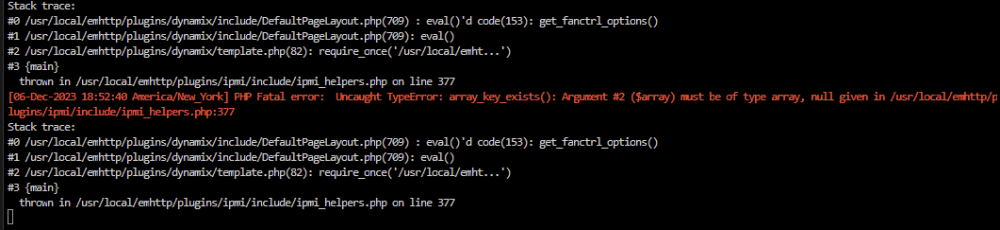
Ah, I was wondering if there was a place for php logs thanks for the tip [06-Dec-2023 18:52:40 America/New_York] PHP Fatal error: Uncaught TypeError: array_key_exists(): Argument #2 ($array) must be of type array, null given in /usr/local/emhttp/plugins/ipmi/include/ipmi_helpers.php:377 Stack trace: #0 /usr/local/emhttp/plugins/dynamix/include/DefaultPageLayout.php(709) : eval()'d code(153): get_fanctrl_options() #1 /usr/local/emhttp/plugins/dynamix/include/DefaultPageLayout.php(709): eval() #2 /usr/local/emhttp/plugins/dynamix/template.php(82): require_once('/usr/local/emht...') #3 {main} thrown in /usr/local/emhttp/plugins/ipmi/include/ipmi_helpers.php on line 377 Section 2_ATX+5VSB ## Possible values: Yes/No Enable_All_Event_Messages Yes ## Possible values: Yes/No Enable_Scanning_On_This_Sensor Yes ## Possible values: Yes/No Enable_Assertion_Event_Lower_Critical_Going_Low Yes ## Possible values: Yes/No Enable_Assertion_Event_Lower_Non_Recoverable_Going_Low Yes ## Possible values: Yes/No Enable_Assertion_Event_Upper_Critical_Going_High Yes ## Possible values: Yes/No Enable_Assertion_Event_Upper_Non_Recoverable_Going_High Yes ## Possible values: Yes/No Enable_Deassertion_Event_Lower_Critical_Going_Low Yes ## Possible values: Yes/No Enable_Deassertion_Event_Lower_Non_Recoverable_Going_Low Yes ## Possible values: Yes/No Enable_Deassertion_Event_Upper_Critical_Going_High Yes ## Possible values: Yes/No Enable_Deassertion_Event_Upper_Non_Recoverable_Going_High Yes ## Give valid input for sensor type = Voltage; units = Volts Lower_Critical_Threshold 4.710000 ## Give valid input for sensor type = Voltage; units = Volts Lower_Non_Recoverable_Threshold 4.230000 ## Give valid input for sensor type = Voltage; units = Volts Upper_Critical_Threshold 5.550000 ## Give valid input for sensor type = Voltage; units = Volts Upper_Non_Recoverable_Threshold 5.610000 ## Give valid input for sensor type = Voltage; units = Volts; 'None' to not use hysteresis Positive_Going_Threshold_Hysteresis None ## Give valid input for sensor type = Voltage; units = Volts; 'None' to not use hysteresis Negative_Going_Threshold_Hysteresis None EndSection Section 3_+3.3VSB ## Possible values: Yes/No Enable_All_Event_Messages Yes ## Possible values: Yes/No Enable_Scanning_On_This_Sensor Yes ## Possible values: Yes/No Enable_Assertion_Event_Lower_Critical_Going_Low Yes ## Possible values: Yes/No Enable_Assertion_Event_Lower_Non_Recoverable_Going_Low Yes ## Possible values: Yes/No Enable_Assertion_Event_Upper_Critical_Going_High Yes ## Possible values: Yes/No Enable_Assertion_Event_Upper_Non_Recoverable_Going_High Yes ## Possible values: Yes/No Enable_Deassertion_Event_Lower_Critical_Going_Low Yes ## Possible values: Yes/No Enable_Deassertion_Event_Lower_Non_Recoverable_Going_Low Yes ## Possible values: Yes/No Enable_Deassertion_Event_Upper_Critical_Going_High Yes ## Possible values: Yes/No Enable_Deassertion_Event_Upper_Non_Recoverable_Going_High Yes ## Give valid input for sensor type = Voltage; units = Volts Lower_Critical_Threshold 2.820000 ## Give valid input for sensor type = Voltage; units = Volts Lower_Non_Recoverable_Threshold 2.780000 ## Give valid input for sensor type = Voltage; units = Volts Upper_Critical_Threshold 3.660000 ## Give valid input for sensor type = Voltage; units = Volts Upper_Non_Recoverable_Threshold 3.680000 ## Give valid input for sensor type = Voltage; units = Volts; 'None' to not use hysteresis Positive_Going_Threshold_Hysteresis None ## Give valid input for sensor type = Voltage; units = Volts; 'None' to not use hysteresis Negative_Going_Threshold_Hysteresis None EndSection Section 4_CPU1_VIN ## Possible values: Yes/No Enable_All_Event_Messages Yes ## Possible values: Yes/No Enable_Scanning_On_This_Sensor Yes ## Possible values: Yes/No Enable_Assertion_Event_Lower_Critical_Going_Low Yes ## Possible values: Yes/No Enable_Assertion_Event_Lower_Non_Recoverable_Going_Low Yes ## Possible values: Yes/No Enable_Assertion_Event_Upper_Critical_Going_High Yes ## Possible values: Yes/No Enable_Assertion_Event_Upper_Non_Recoverable_Going_High Yes ## Possible values: Yes/No Enable_Deassertion_Event_Lower_Critical_Going_Low Yes ## Possible values: Yes/No Enable_Deassertion_Event_Lower_Non_Recoverable_Going_Low Yes ## Possible values: Yes/No Enable_Deassertion_Event_Upper_Critical_Going_High Yes ## Possible values: Yes/No Enable_Deassertion_Event_Upper_Non_Recoverable_Going_High Yes ## Give valid input for sensor type = Voltage; units = Volts Lower_Critical_Threshold 1.260000 ## Give valid input for sensor type = Voltage; units = Volts Lower_Non_Recoverable_Threshold 1.240000 ## Give valid input for sensor type = Voltage; units = Volts Upper_Critical_Threshold 2.090000 ## Give valid input for sensor type = Voltage; units = Volts Upper_Non_Recoverable_Threshold 2.100000 ## Give valid input for sensor type = Voltage; units = Volts; 'None' to not use hysteresis Positive_Going_Threshold_Hysteresis None ## Give valid input for sensor type = Voltage; units = Volts; 'None' to not use hysteresis Negative_Going_Threshold_Hysteresis None EndSection Section 5_VCCM_AB ## Possible values: Yes/No Enable_All_Event_Messages Yes ## Possible values: Yes/No Enable_Scanning_On_This_Sensor Yes ## Possible values: Yes/No Enable_Assertion_Event_Lower_Non_Critical_Going_Low Yes ## Possible values: Yes/No Enable_Assertion_Event_Lower_Critical_Going_Low Yes ## Possible values: Yes/No Enable_Assertion_Event_Lower_Non_Recoverable_Going_Low Yes ## Possible values: Yes/No Enable_Assertion_Event_Upper_Non_Critical_Going_High Yes ## Possible values: Yes/No Enable_Assertion_Event_Upper_Critical_Going_High Yes ## Possible values: Yes/No Enable_Assertion_Event_Upper_Non_Recoverable_Going_High Yes ## Possible values: Yes/No Enable_Deassertion_Event_Lower_Non_Critical_Going_Low Yes ## Possible values: Yes/No Enable_Deassertion_Event_Lower_Critical_Going_Low Yes ## Possible values: Yes/No Enable_Deassertion_Event_Lower_Non_Recoverable_Going_Low Yes ## Possible values: Yes/No Enable_Deassertion_Event_Upper_Non_Critical_Going_High Yes ## Possible values: Yes/No Enable_Deassertion_Event_Upper_Critical_Going_High Yes ## Possible values: Yes/No Enable_Deassertion_Event_Upper_Non_Recoverable_Going_High Yes ## Give valid input for sensor type = Voltage; units = Volts Lower_Non_Critical_Threshold 1.080000 ## Give valid input for sensor type = Voltage; units = Volts Lower_Critical_Threshold 1.020000 ## Give valid input for sensor type = Voltage; units = Volts Lower_Non_Recoverable_Threshold 0.960000 ## Give valid input for sensor type = Voltage; units = Volts Upper_Non_Critical_Threshold 1.320000 ## Give valid input for sensor type = Voltage; units = Volts Upper_Critical_Threshold 1.380000 ## Give valid input for sensor type = Voltage; units = Volts Upper_Non_Recoverable_Threshold 1.440000 ## Give valid input for sensor type = Voltage; units = Volts; 'None' to not use hysteresis Positive_Going_Threshold_Hysteresis None ## Give valid input for sensor type = Voltage; units = Volts; 'None' to not use hysteresis Negative_Going_Threshold_Hysteresis None EndSection Section 6_+1.05_PCH ## Possible values: Yes/No Enable_All_Event_Messages Yes ## Possible values: Yes/No Enable_Scanning_On_This_Sensor Yes ## Possible values: Yes/No Enable_Assertion_Event_Lower_Critical_Going_Low Yes ## Possible values: Yes/No Enable_Assertion_Event_Lower_Non_Recoverable_Going_Low Yes ## Possible values: Yes/No Enable_Assertion_Event_Upper_Critical_Going_High Yes ## Possible values: Yes/No Enable_Assertion_Event_Upper_Non_Recoverable_Going_High Yes ## Possible values: Yes/No Enable_Deassertion_Event_Lower_Critical_Going_Low Yes ## Possible values: Yes/No Enable_Deassertion_Event_Lower_Non_Recoverable_Going_Low Yes ## Possible values: Yes/No Enable_Deassertion_Event_Upper_Critical_Going_High Yes ## Possible values: Yes/No Enable_Deassertion_Event_Upper_Non_Recoverable_Going_High Yes ## Give valid input for sensor type = Voltage; units = Volts Lower_Critical_Threshold 0.900000 ## Give valid input for sensor type = Voltage; units = Volts Lower_Non_Recoverable_Threshold 0.870000 ## Give valid input for sensor type = Voltage; units = Volts Upper_Critical_Threshold 1.220000 ## Give valid input for sensor type = Voltage; units = Volts Upper_Non_Recoverable_Threshold 1.250000 ## Give valid input for sensor type = Voltage; units = Volts; 'None' to not use hysteresis Positive_Going_Threshold_Hysteresis None ## Give valid input for sensor type = Voltage; units = Volts; 'None' to not use hysteresis Negative_Going_Threshold_Hysteresis None EndSection Section 7_+1.50_PCH ## Possible values: Yes/No Enable_All_Event_Messages Yes ## Possible values: Yes/No Enable_Scanning_On_This_Sensor Yes ## Possible values: Yes/No Enable_Assertion_Event_Lower_Non_Critical_Going_Low Yes ## Possible values: Yes/No Enable_Assertion_Event_Lower_Critical_Going_Low Yes ## Possible values: Yes/No Enable_Assertion_Event_Lower_Non_Recoverable_Going_Low Yes ## Possible values: Yes/No Enable_Assertion_Event_Upper_Non_Critical_Going_High Yes ## Possible values: Yes/No Enable_Assertion_Event_Upper_Critical_Going_High Yes ## Possible values: Yes/No Enable_Assertion_Event_Upper_Non_Recoverable_Going_High Yes ## Possible values: Yes/No Enable_Deassertion_Event_Lower_Non_Critical_Going_Low Yes ## Possible values: Yes/No Enable_Deassertion_Event_Lower_Critical_Going_Low Yes ## Possible values: Yes/No Enable_Deassertion_Event_Lower_Non_Recoverable_Going_Low Yes ## Possible values: Yes/No Enable_Deassertion_Event_Upper_Non_Critical_Going_High Yes ## Possible values: Yes/No Enable_Deassertion_Event_Upper_Critical_Going_High Yes ## Possible values: Yes/No Enable_Deassertion_Event_Upper_Non_Recoverable_Going_High Yes ## Give valid input for sensor type = Voltage; units = Volts Lower_Non_Critical_Threshold 1.350000 ## Give valid input for sensor type = Voltage; units = Volts Lower_Critical_Threshold 1.270000 ## Give valid input for sensor type = Voltage; units = Volts Lower_Non_Recoverable_Threshold 1.200000 ## Give valid input for sensor type = Voltage; units = Volts Upper_Non_Critical_Threshold 1.650000 ## Give valid input for sensor type = Voltage; units = Volts Upper_Critical_Threshold 1.720000 ## Give valid input for sensor type = Voltage; units = Volts Upper_Non_Recoverable_Threshold 1.800000 ## Give valid input for sensor type = Voltage; units = Volts; 'None' to not use hysteresis Positive_Going_Threshold_Hysteresis None ## Give valid input for sensor type = Voltage; units = Volts; 'None' to not use hysteresis Negative_Going_Threshold_Hysteresis None EndSection Section 8_BAT ## Possible values: Yes/No Enable_All_Event_Messages Yes ## Possible values: Yes/No Enable_Scanning_On_This_Sensor Yes ## Possible values: Yes/No Enable_Assertion_Event_Lower_Critical_Going_Low Yes ## Possible values: Yes/No Enable_Assertion_Event_Lower_Non_Recoverable_Going_Low Yes ## Possible values: Yes/No Enable_Assertion_Event_Upper_Critical_Going_High Yes ## Possible values: Yes/No Enable_Assertion_Event_Upper_Non_Recoverable_Going_High Yes ## Possible values: Yes/No Enable_Deassertion_Event_Lower_Critical_Going_Low Yes ## Possible values: Yes/No Enable_Deassertion_Event_Lower_Non_Recoverable_Going_Low Yes ## Possible values: Yes/No Enable_Deassertion_Event_Upper_Critical_Going_High Yes ## Possible values: Yes/No Enable_Deassertion_Event_Upper_Non_Recoverable_Going_High Yes ## Give valid input for sensor type = Voltage; units = Volts Lower_Critical_Threshold 2.500000 ## Give valid input for sensor type = Voltage; units = Volts Lower_Non_Recoverable_Threshold 2.380000 ## Give valid input for sensor type = Voltage; units = Volts Upper_Critical_Threshold 3.580000 ## Give valid input for sensor type = Voltage; units = Volts Upper_Non_Recoverable_Threshold 3.680000 ## Give valid input for sensor type = Voltage; units = Volts; 'None' to not use hysteresis Positive_Going_Threshold_Hysteresis None ## Give valid input for sensor type = Voltage; units = Volts; 'None' to not use hysteresis Negative_Going_Threshold_Hysteresis None EndSection Section 9_CPU1_FAN1 ## Possible values: Yes/No Enable_All_Event_Messages Yes ## Possible values: Yes/No Enable_Scanning_On_This_Sensor Yes ## Possible values: Yes/No Enable_Assertion_Event_Lower_Non_Critical_Going_Low Yes ## Possible values: Yes/No Enable_Deassertion_Event_Lower_Non_Critical_Going_Low Yes ## Give valid input for sensor type = Fan; units = RPM Lower_Non_Critical_Threshold 100.000000 ## Give valid input for sensor type = Fan; units = RPM; 'None' to not use hysteresis Positive_Going_Threshold_Hysteresis None ## Give valid input for sensor type = Fan; units = RPM; 'None' to not use hysteresis Negative_Going_Threshold_Hysteresis None EndSection Section 10_CPU2_FAN1 ## Possible values: Yes/No Enable_All_Event_Messages Yes ## Possible values: Yes/No Enable_Scanning_On_This_Sensor Yes ## Possible values: Yes/No Enable_Assertion_Event_Lower_Non_Critical_Going_Low Yes ## Possible values: Yes/No Enable_Deassertion_Event_Lower_Non_Critical_Going_Low Yes ## Give valid input for sensor type = Fan; units = RPM Lower_Non_Critical_Threshold 100.000000 ## Give valid input for sensor type = Fan; units = RPM; 'None' to not use hysteresis Positive_Going_Threshold_Hysteresis None ## Give valid input for sensor type = Fan; units = RPM; 'None' to not use hysteresis Negative_Going_Threshold_Hysteresis None EndSection Section 11_REAR_FAN1 ## Possible values: Yes/No Enable_All_Event_Messages Yes ## Possible values: Yes/No Enable_Scanning_On_This_Sensor Yes ## Possible values: Yes/No Enable_Assertion_Event_Lower_Non_Critical_Going_Low Yes ## Possible values: Yes/No Enable_Deassertion_Event_Lower_Non_Critical_Going_Low Yes ## Give valid input for sensor type = Fan; units = RPM Lower_Non_Critical_Threshold 100.000000 ## Give valid input for sensor type = Fan; units = RPM; 'None' to not use hysteresis Positive_Going_Threshold_Hysteresis None ## Give valid input for sensor type = Fan; units = RPM; 'None' to not use hysteresis Negative_Going_Threshold_Hysteresis None EndSection Section 12_FRNT_FAN1 ## Possible values: Yes/No Enable_All_Event_Messages Yes ## Possible values: Yes/No Enable_Scanning_On_This_Sensor Yes ## Possible values: Yes/No Enable_Assertion_Event_Lower_Non_Critical_Going_Low Yes ## Possible values: Yes/No Enable_Deassertion_Event_Lower_Non_Critical_Going_Low Yes ## Give valid input for sensor type = Fan; units = RPM Lower_Non_Critical_Threshold 100.000000 ## Give valid input for sensor type = Fan; units = RPM; 'None' to not use hysteresis Positive_Going_Threshold_Hysteresis None ## Give valid input for sensor type = Fan; units = RPM; 'None' to not use hysteresis Negative_Going_Threshold_Hysteresis None EndSection Section 13_FRNT_FAN2 ## Possible values: Yes/No Enable_All_Event_Messages Yes ## Possible values: Yes/No Enable_Scanning_On_This_Sensor Yes ## Possible values: Yes/No Enable_Assertion_Event_Lower_Non_Critical_Going_Low Yes ## Possible values: Yes/No Enable_Deassertion_Event_Lower_Non_Critical_Going_Low Yes ## Give valid input for sensor type = Fan; units = RPM Lower_Non_Critical_Threshold 100.000000 ## Give valid input for sensor type = Fan; units = RPM; 'None' to not use hysteresis Positive_Going_Threshold_Hysteresis None ## Give valid input for sensor type = Fan; units = RPM; 'None' to not use hysteresis Negative_Going_Threshold_Hysteresis None EndSection Section 14_FRNT_FAN3 ## Possible values: Yes/No Enable_All_Event_Messages Yes ## Possible values: Yes/No Enable_Scanning_On_This_Sensor Yes ## Possible values: Yes/No Enable_Assertion_Event_Lower_Non_Critical_Going_Low Yes ## Possible values: Yes/No Enable_Deassertion_Event_Lower_Non_Critical_Going_Low Yes ## Give valid input for sensor type = Fan; units = RPM Lower_Non_Critical_Threshold 100.000000 ## Give valid input for sensor type = Fan; units = RPM; 'None' to not use hysteresis Positive_Going_Threshold_Hysteresis None ## Give valid input for sensor type = Fan; units = RPM; 'None' to not use hysteresis Negative_Going_Threshold_Hysteresis None EndSection Section 15_FRNT_FAN4 ## Possible values: Yes/No Enable_All_Event_Messages Yes ## Possible values: Yes/No Enable_Scanning_On_This_Sensor Yes ## Possible values: Yes/No Enable_Assertion_Event_Lower_Non_Critical_Going_Low Yes ## Possible values: Yes/No Enable_Deassertion_Event_Lower_Non_Critical_Going_Low Yes ## Give valid input for sensor type = Fan; units = RPM Lower_Non_Critical_Threshold 100.000000 ## Give valid input for sensor type = Fan; units = RPM; 'None' to not use hysteresis Positive_Going_Threshold_Hysteresis None ## Give valid input for sensor type = Fan; units = RPM; 'None' to not use hysteresis Negative_Going_Threshold_Hysteresis None EndSection Section 16_+3.3V ## Possible values: Yes/No Enable_All_Event_Messages Yes ## Possible values: Yes/No Enable_Scanning_On_This_Sensor Yes ## Possible values: Yes/No Enable_Assertion_Event_Lower_Critical_Going_Low Yes ## Possible values: Yes/No Enable_Assertion_Event_Lower_Non_Recoverable_Going_Low Yes ## Possible values: Yes/No Enable_Assertion_Event_Upper_Critical_Going_High Yes ## Possible values: Yes/No Enable_Assertion_Event_Upper_Non_Recoverable_Going_High Yes ## Possible values: Yes/No Enable_Deassertion_Event_Lower_Critical_Going_Low Yes ## Possible values: Yes/No Enable_Deassertion_Event_Lower_Non_Recoverable_Going_Low Yes ## Possible values: Yes/No Enable_Deassertion_Event_Upper_Critical_Going_High Yes ## Possible values: Yes/No Enable_Deassertion_Event_Upper_Non_Recoverable_Going_High Yes ## Give valid input for sensor type = Voltage; units = Volts Lower_Critical_Threshold 2.820000 ## Give valid input for sensor type = Voltage; units = Volts Lower_Non_Recoverable_Threshold 2.780000 ## Give valid input for sensor type = Voltage; units = Volts Upper_Critical_Threshold 3.660000 ## Give valid input for sensor type = Voltage; units = Volts Upper_Non_Recoverable_Threshold 3.680000 ## Give valid input for sensor type = Voltage; units = Volts; 'None' to not use hysteresis Positive_Going_Threshold_Hysteresis None ## Give valid input for sensor type = Voltage; units = Volts; 'None' to not use hysteresis Negative_Going_Threshold_Hysteresis None EndSection Section 17_+12V ## Possible values: Yes/No Enable_All_Event_Messages Yes ## Possible values: Yes/No Enable_Scanning_On_This_Sensor Yes ## Possible values: Yes/No Enable_Assertion_Event_Lower_Critical_Going_Low Yes ## Possible values: Yes/No Enable_Assertion_Event_Lower_Non_Recoverable_Going_Low Yes ## Possible values: Yes/No Enable_Assertion_Event_Upper_Critical_Going_High Yes ## Possible values: Yes/No Enable_Assertion_Event_Upper_Non_Recoverable_Going_High Yes ## Possible values: Yes/No Enable_Deassertion_Event_Lower_Critical_Going_Low Yes ## Possible values: Yes/No Enable_Deassertion_Event_Lower_Non_Recoverable_Going_Low Yes ## Possible values: Yes/No Enable_Deassertion_Event_Upper_Critical_Going_High Yes ## Possible values: Yes/No Enable_Deassertion_Event_Upper_Non_Recoverable_Going_High Yes ## Give valid input for sensor type = Voltage; units = Volts Lower_Critical_Threshold 10.300000 ## Give valid input for sensor type = Voltage; units = Volts Lower_Non_Recoverable_Threshold 10.100000 ## Give valid input for sensor type = Voltage; units = Volts Upper_Critical_Threshold 13.300000 ## Give valid input for sensor type = Voltage; units = Volts Upper_Non_Recoverable_Threshold 13.400000 ## Give valid input for sensor type = Voltage; units = Volts; 'None' to not use hysteresis Positive_Going_Threshold_Hysteresis None ## Give valid input for sensor type = Voltage; units = Volts; 'None' to not use hysteresis Negative_Going_Threshold_Hysteresis None EndSection Section 18_+5V ## Possible values: Yes/No Enable_All_Event_Messages Yes ## Possible values: Yes/No Enable_Scanning_On_This_Sensor Yes ## Possible values: Yes/No Enable_Assertion_Event_Lower_Critical_Going_Low Yes ## Possible values: Yes/No Enable_Assertion_Event_Lower_Non_Recoverable_Going_Low Yes ## Possible values: Yes/No Enable_Assertion_Event_Upper_Critical_Going_High Yes ## Possible values: Yes/No Enable_Assertion_Event_Upper_Non_Recoverable_Going_High Yes ## Possible values: Yes/No Enable_Deassertion_Event_Lower_Critical_Going_Low Yes ## Possible values: Yes/No Enable_Deassertion_Event_Lower_Non_Recoverable_Going_Low Yes ## Possible values: Yes/No Enable_Deassertion_Event_Upper_Critical_Going_High Yes ## Possible values: Yes/No Enable_Deassertion_Event_Upper_Non_Recoverable_Going_High Yes ## Give valid input for sensor type = Voltage; units = Volts Lower_Critical_Threshold 4.710000 ## Give valid input for sensor type = Voltage; units = Volts Lower_Non_Recoverable_Threshold 4.230000 ## Give valid input for sensor type = Voltage; units = Volts Upper_Critical_Threshold 5.550000 ## Give valid input for sensor type = Voltage; units = Volts Upper_Non_Recoverable_Threshold 5.610000 ## Give valid input for sensor type = Voltage; units = Volts; 'None' to not use hysteresis Positive_Going_Threshold_Hysteresis None ## Give valid input for sensor type = Voltage; units = Volts; 'None' to not use hysteresis Negative_Going_Threshold_Hysteresis None EndSection Section 20_CPU1_Temp ## Possible values: Yes/No Enable_All_Event_Messages Yes ## Possible values: Yes/No Enable_Scanning_On_This_Sensor Yes ## Possible values: Yes/No Enable_Assertion_Event_Upper_Non_Critical_Going_High Yes ## Possible values: Yes/No Enable_Deassertion_Event_Upper_Non_Critical_Going_High Yes ## Give valid input for sensor type = Temperature; units = degrees C Upper_Non_Critical_Threshold 91.000000 ## Give valid input for sensor type = Temperature; units = degrees C; 'None' to not use hysteresis Positive_Going_Threshold_Hysteresis 1.000000 ## Give valid input for sensor type = Temperature; units = degrees C; 'None' to not use hysteresis Negative_Going_Threshold_Hysteresis 1.000000 EndSection Section 21_CPU2_Temp ## Possible values: Yes/No Enable_All_Event_Messages Yes ## Possible values: Yes/No Enable_Scanning_On_This_Sensor Yes ## Possible values: Yes/No Enable_Assertion_Event_Upper_Non_Critical_Going_High Yes ## Possible values: Yes/No Enable_Deassertion_Event_Upper_Non_Critical_Going_High Yes ## Give valid input for sensor type = Temperature; units = degrees C Upper_Non_Critical_Threshold 91.000000 ## Give valid input for sensor type = Temperature; units = degrees C; 'None' to not use hysteresis Positive_Going_Threshold_Hysteresis 1.000000 ## Give valid input for sensor type = Temperature; units = degrees C; 'None' to not use hysteresis Negative_Going_Threshold_Hysteresis 1.000000 EndSection Section 22_CPU2_VIN ## Possible values: Yes/No Enable_All_Event_Messages Yes ## Possible values: Yes/No Enable_Scanning_On_This_Sensor Yes ## Possible values: Yes/No Enable_Assertion_Event_Lower_Critical_Going_Low Yes ## Possible values: Yes/No Enable_Assertion_Event_Lower_Non_Recoverable_Going_Low Yes ## Possible values: Yes/No Enable_Assertion_Event_Upper_Critical_Going_High Yes ## Possible values: Yes/No Enable_Assertion_Event_Upper_Non_Recoverable_Going_High Yes ## Possible values: Yes/No Enable_Deassertion_Event_Lower_Critical_Going_Low Yes ## Possible values: Yes/No Enable_Deassertion_Event_Lower_Non_Recoverable_Going_Low Yes ## Possible values: Yes/No Enable_Deassertion_Event_Upper_Critical_Going_High Yes ## Possible values: Yes/No Enable_Deassertion_Event_Upper_Non_Recoverable_Going_High Yes ## Give valid input for sensor type = Voltage; units = Volts Lower_Critical_Threshold 1.260000 ## Give valid input for sensor type = Voltage; units = Volts Lower_Non_Recoverable_Threshold 1.240000 ## Give valid input for sensor type = Voltage; units = Volts Upper_Critical_Threshold 2.090000 ## Give valid input for sensor type = Voltage; units = Volts Upper_Non_Recoverable_Threshold 2.100000 ## Give valid input for sensor type = Voltage; units = Volts; 'None' to not use hysteresis Positive_Going_Threshold_Hysteresis None ## Give valid input for sensor type = Voltage; units = Volts; 'None' to not use hysteresis Negative_Going_Threshold_Hysteresis None EndSection Section 23_VCCM_CD ## Possible values: Yes/No Enable_All_Event_Messages Yes ## Possible values: Yes/No Enable_Scanning_On_This_Sensor Yes ## Possible values: Yes/No Enable_Assertion_Event_Lower_Non_Critical_Going_Low Yes ## Possible values: Yes/No Enable_Assertion_Event_Lower_Critical_Going_Low Yes ## Possible values: Yes/No Enable_Assertion_Event_Lower_Non_Recoverable_Going_Low Yes ## Possible values: Yes/No Enable_Assertion_Event_Upper_Non_Critical_Going_High Yes ## Possible values: Yes/No Enable_Assertion_Event_Upper_Critical_Going_High Yes ## Possible values: Yes/No Enable_Assertion_Event_Upper_Non_Recoverable_Going_High Yes ## Possible values: Yes/No Enable_Deassertion_Event_Lower_Non_Critical_Going_Low Yes ## Possible values: Yes/No Enable_Deassertion_Event_Lower_Critical_Going_Low Yes ## Possible values: Yes/No Enable_Deassertion_Event_Lower_Non_Recoverable_Going_Low Yes ## Possible values: Yes/No Enable_Deassertion_Event_Upper_Non_Critical_Going_High Yes ## Possible values: Yes/No Enable_Deassertion_Event_Upper_Critical_Going_High Yes ## Possible values: Yes/No Enable_Deassertion_Event_Upper_Non_Recoverable_Going_High Yes ## Give valid input for sensor type = Voltage; units = Volts Lower_Non_Critical_Threshold 1.080000 ## Give valid input for sensor type = Voltage; units = Volts Lower_Critical_Threshold 1.020000 ## Give valid input for sensor type = Voltage; units = Volts Lower_Non_Recoverable_Threshold 0.960000 ## Give valid input for sensor type = Voltage; units = Volts Upper_Non_Critical_Threshold 1.320000 ## Give valid input for sensor type = Voltage; units = Volts Upper_Critical_Threshold 1.380000 ## Give valid input for sensor type = Voltage; units = Volts Upper_Non_Recoverable_Threshold 1.440000 ## Give valid input for sensor type = Voltage; units = Volts; 'None' to not use hysteresis Positive_Going_Threshold_Hysteresis None ## Give valid input for sensor type = Voltage; units = Volts; 'None' to not use hysteresis Negative_Going_Threshold_Hysteresis None EndSection Section 24_VCCM_EF ## Possible values: Yes/No Enable_All_Event_Messages Yes ## Possible values: Yes/No Enable_Scanning_On_This_Sensor Yes ## Possible values: Yes/No Enable_Assertion_Event_Lower_Non_Critical_Going_Low Yes ## Possible values: Yes/No Enable_Assertion_Event_Lower_Critical_Going_Low Yes ## Possible values: Yes/No Enable_Assertion_Event_Lower_Non_Recoverable_Going_Low Yes ## Possible values: Yes/No Enable_Assertion_Event_Upper_Non_Critical_Going_High Yes ## Possible values: Yes/No Enable_Assertion_Event_Upper_Critical_Going_High Yes ## Possible values: Yes/No Enable_Assertion_Event_Upper_Non_Recoverable_Going_High Yes ## Possible values: Yes/No Enable_Deassertion_Event_Lower_Non_Critical_Going_Low Yes ## Possible values: Yes/No Enable_Deassertion_Event_Lower_Critical_Going_Low Yes ## Possible values: Yes/No Enable_Deassertion_Event_Lower_Non_Recoverable_Going_Low Yes ## Possible values: Yes/No Enable_Deassertion_Event_Upper_Non_Critical_Going_High Yes ## Possible values: Yes/No Enable_Deassertion_Event_Upper_Critical_Going_High Yes ## Possible values: Yes/No Enable_Deassertion_Event_Upper_Non_Recoverable_Going_High Yes ## Give valid input for sensor type = Voltage; units = Volts Lower_Non_Critical_Threshold 1.080000 ## Give valid input for sensor type = Voltage; units = Volts Lower_Critical_Threshold 1.020000 ## Give valid input for sensor type = Voltage; units = Volts Lower_Non_Recoverable_Threshold 0.960000 ## Give valid input for sensor type = Voltage; units = Volts Upper_Non_Critical_Threshold 1.320000 ## Give valid input for sensor type = Voltage; units = Volts Upper_Critical_Threshold 1.380000 ## Give valid input for sensor type = Voltage; units = Volts Upper_Non_Recoverable_Threshold 1.440000 ## Give valid input for sensor type = Voltage; units = Volts; 'None' to not use hysteresis Positive_Going_Threshold_Hysteresis None ## Give valid input for sensor type = Voltage; units = Volts; 'None' to not use hysteresis Negative_Going_Threshold_Hysteresis None EndSection Section 25_VCCM_GH ## Possible values: Yes/No Enable_All_Event_Messages Yes ## Possible values: Yes/No Enable_Scanning_On_This_Sensor Yes ## Possible values: Yes/No Enable_Assertion_Event_Lower_Non_Critical_Going_Low Yes ## Possible values: Yes/No Enable_Assertion_Event_Lower_Critical_Going_Low Yes ## Possible values: Yes/No Enable_Assertion_Event_Lower_Non_Recoverable_Going_Low Yes ## Possible values: Yes/No Enable_Assertion_Event_Upper_Non_Critical_Going_High Yes ## Possible values: Yes/No Enable_Assertion_Event_Upper_Critical_Going_High Yes ## Possible values: Yes/No Enable_Assertion_Event_Upper_Non_Recoverable_Going_High Yes ## Possible values: Yes/No Enable_Deassertion_Event_Lower_Non_Critical_Going_Low Yes ## Possible values: Yes/No Enable_Deassertion_Event_Lower_Critical_Going_Low Yes ## Possible values: Yes/No Enable_Deassertion_Event_Lower_Non_Recoverable_Going_Low Yes ## Possible values: Yes/No Enable_Deassertion_Event_Upper_Non_Critical_Going_High Yes ## Possible values: Yes/No Enable_Deassertion_Event_Upper_Critical_Going_High Yes ## Possible values: Yes/No Enable_Deassertion_Event_Upper_Non_Recoverable_Going_High Yes ## Give valid input for sensor type = Voltage; units = Volts Lower_Non_Critical_Threshold 1.080000 ## Give valid input for sensor type = Voltage; units = Volts Lower_Critical_Threshold 1.020000 ## Give valid input for sensor type = Voltage; units = Volts Lower_Non_Recoverable_Threshold 0.960000 ## Give valid input for sensor type = Voltage; units = Volts Upper_Non_Critical_Threshold 1.320000 ## Give valid input for sensor type = Voltage; units = Volts Upper_Critical_Threshold 1.380000 ## Give valid input for sensor type = Voltage; units = Volts Upper_Non_Recoverable_Threshold 1.440000 ## Give valid input for sensor type = Voltage; units = Volts; 'None' to not use hysteresis Positive_Going_Threshold_Hysteresis None ## Give valid input for sensor type = Voltage; units = Volts; 'None' to not use hysteresis Negative_Going_Threshold_Hysteresis None EndSection Section 26_Case_Open ## Possible values: Yes/No Enable_All_Event_Messages Yes ## Possible values: Yes/No Enable_Scanning_On_This_Sensor Yes ## Possible values: Yes/No Enable_Assertion_Event_General_Chassis_Intrusion Yes ## Possible values: Yes/No Enable_Deassertion_Event_General_Chassis_Intrusion Yes EndSection Section 27_CPU1_PROCHOT ## Possible values: Yes/No Enable_All_Event_Messages Yes ## Possible values: Yes/No Enable_Scanning_On_This_Sensor Yes EndSection Section 28_CPU2_PROCHOT ## Possible values: Yes/No Enable_All_Event_Messages Yes ## Possible values: Yes/No Enable_Scanning_On_This_Sensor Yes EndSection Section 29_CPU1_THERMTRIP ## Possible values: Yes/No Enable_All_Event_Messages Yes ## Possible values: Yes/No Enable_Scanning_On_This_Sensor Yes ## Possible values: Yes/No Enable_Assertion_Event_FRB1_BIST_failure Yes ## Possible values: Yes/No Enable_Assertion_Event_FRB3_Processor_Startup_Initialization_Failure Yes ## Possible values: Yes/No Enable_Assertion_Event_Configuration_Error Yes EndSection Section 30_CPU2_THERMTRIP ## Possible values: Yes/No Enable_All_Event_Messages Yes ## Possible values: Yes/No Enable_Scanning_On_This_Sensor Yes ## Possible values: Yes/No Enable_Assertion_Event_FRB1_BIST_failure Yes ## Possible values: Yes/No Enable_Assertion_Event_FRB3_Processor_Startup_Initialization_Failure Yes ## Possible values: Yes/No Enable_Assertion_Event_Configuration_Error Yes EndSection Section 31_MB_Temp ## Possible values: Yes/No Enable_All_Event_Messages Yes ## Possible values: Yes/No Enable_Scanning_On_This_Sensor Yes ## Possible values: Yes/No Enable_Assertion_Event_Upper_Non_Critical_Going_High Yes ## Possible values: Yes/No Enable_Deassertion_Event_Upper_Non_Critical_Going_High Yes ## Give valid input for sensor type = Temperature; units = degrees C Upper_Non_Critical_Threshold 50.000000 ## Give valid input for sensor type = Temperature; units = degrees C; 'None' to not use hysteresis Positive_Going_Threshold_Hysteresis None ## Give valid input for sensor type = Temperature; units = degrees C; 'None' to not use hysteresis Negative_Going_Threshold_Hysteresis None EndSection Section 32_Card_Side_Temp ## Possible values: Yes/No Enable_All_Event_Messages Yes ## Possible values: Yes/No Enable_Scanning_On_This_Sensor Yes ## Possible values: Yes/No Enable_Assertion_Event_Upper_Non_Critical_Going_High Yes ## Possible values: Yes/No Enable_Deassertion_Event_Upper_Non_Critical_Going_High Yes ## Give valid input for sensor type = Temperature; units = degrees C Upper_Non_Critical_Threshold 80.000000 ## Give valid input for sensor type = Temperature; units = degrees C; 'None' to not use hysteresis Positive_Going_Threshold_Hysteresis None ## Give valid input for sensor type = Temperature; units = degrees C; 'None' to not use hysteresis Negative_Going_Threshold_Hysteresis None EndSection Section 33_TR1_Temp ## Possible values: Yes/No Enable_All_Event_Messages Yes ## Possible values: Yes/No Enable_Scanning_On_This_Sensor Yes ## Possible values: Yes/No Enable_Assertion_Event_Upper_Non_Critical_Going_High Yes ## Possible values: Yes/No Enable_Deassertion_Event_Upper_Non_Critical_Going_High Yes ## Give valid input for sensor type = Temperature; units = degrees C Upper_Non_Critical_Threshold 80.000000 ## Give valid input for sensor type = Temperature; units = degrees C; 'None' to not use hysteresis Positive_Going_Threshold_Hysteresis None ## Give valid input for sensor type = Temperature; units = degrees C; 'None' to not use hysteresis Negative_Going_Threshold_Hysteresis None EndSection Section 34_PS1_Status ## Possible values: Yes/No Enable_All_Event_Messages Yes ## Possible values: Yes/No Enable_Scanning_On_This_Sensor Yes EndSection Section 35_PS2_Status ## Possible values: Yes/No Enable_All_Event_Messages Yes ## Possible values: Yes/No Enable_Scanning_On_This_Sensor Yes EndSection Section 44_DDR4_E_Temp ## Possible values: Yes/No Enable_All_Event_Messages Yes ## Possible values: Yes/No Enable_Scanning_On_This_Sensor Yes ## Give valid input for sensor type = Temperature; units = degrees C; 'None' to not use hysteresis Positive_Going_Threshold_Hysteresis 1.000000 ## Give valid input for sensor type = Temperature; units = degrees C; 'None' to not use hysteresis Negative_Going_Threshold_Hysteresis 1.000000 EndSection Section 45_DDR4_C_Temp ## Possible values: Yes/No Enable_All_Event_Messages Yes ## Possible values: Yes/No Enable_Scanning_On_This_Sensor Yes ## Give valid input for sensor type = Temperature; units = degrees C; 'None' to not use hysteresis Positive_Going_Threshold_Hysteresis 1.000000 ## Give valid input for sensor type = Temperature; units = degrees C; 'None' to not use hysteresis Negative_Going_Threshold_Hysteresis 1.000000 EndSection Section 46_DDR4_D_Temp ## Possible values: Yes/No Enable_All_Event_Messages Yes ## Possible values: Yes/No Enable_Scanning_On_This_Sensor Yes ## Give valid input for sensor type = Temperature; units = degrees C; 'None' to not use hysteresis Positive_Going_Threshold_Hysteresis 1.000000 ## Give valid input for sensor type = Temperature; units = degrees C; 'None' to not use hysteresis Negative_Going_Threshold_Hysteresis 1.000000 EndSection Section 47_DDR4_H_Temp ## Possible values: Yes/No Enable_All_Event_Messages Yes ## Possible values: Yes/No Enable_Scanning_On_This_Sensor Yes ## Give valid input for sensor type = Temperature; units = degrees C; 'None' to not use hysteresis Positive_Going_Threshold_Hysteresis 1.000000 ## Give valid input for sensor type = Temperature; units = degrees C; 'None' to not use hysteresis Negative_Going_Threshold_Hysteresis 1.000000 EndSection Section 48_DDR4_A_Temp ## Possible values: Yes/No Enable_All_Event_Messages Yes ## Possible values: Yes/No Enable_Scanning_On_This_Sensor Yes ## Give valid input for sensor type = Temperature; units = degrees C; 'None' to not use hysteresis Positive_Going_Threshold_Hysteresis 1.000000 ## Give valid input for sensor type = Temperature; units = degrees C; 'None' to not use hysteresis Negative_Going_Threshold_Hysteresis 1.000000 EndSection Section 49_DDR4_G_Temp ## Possible values: Yes/No Enable_All_Event_Messages Yes ## Possible values: Yes/No Enable_Scanning_On_This_Sensor Yes ## Give valid input for sensor type = Temperature; units = degrees C; 'None' to not use hysteresis Positive_Going_Threshold_Hysteresis 1.000000 ## Give valid input for sensor type = Temperature; units = degrees C; 'None' to not use hysteresis Negative_Going_Threshold_Hysteresis 1.000000 EndSection Section 50_DDR4_B_Temp ## Possible values: Yes/No Enable_All_Event_Messages Yes ## Possible values: Yes/No Enable_Scanning_On_This_Sensor Yes ## Give valid input for sensor type = Temperature; units = degrees C; 'None' to not use hysteresis Positive_Going_Threshold_Hysteresis 1.000000 ## Give valid input for sensor type = Temperature; units = degrees C; 'None' to not use hysteresis Negative_Going_Threshold_Hysteresis 1.000000 EndSection Section 51_DDR4_F_Temp ## Possible values: Yes/No Enable_All_Event_Messages Yes ## Possible values: Yes/No Enable_Scanning_On_This_Sensor Yes ## Give valid input for sensor type = Temperature; units = degrees C; 'None' to not use hysteresis Positive_Going_Threshold_Hysteresis 1.000000 ## Give valid input for sensor type = Temperature; units = degrees C; 'None' to not use hysteresis Negative_Going_Threshold_Hysteresis 1.000000 EndSection Section 52_PSU1_AC_Lost ## Possible values: Yes/No Enable_All_Event_Messages Yes ## Possible values: Yes/No Enable_Scanning_On_This_Sensor Yes EndSection Section 53_PSU2_AC_Lost ## Possible values: Yes/No Enable_All_Event_Messages Yes ## Possible values: Yes/No Enable_Scanning_On_This_Sensor Yes EndSection
-
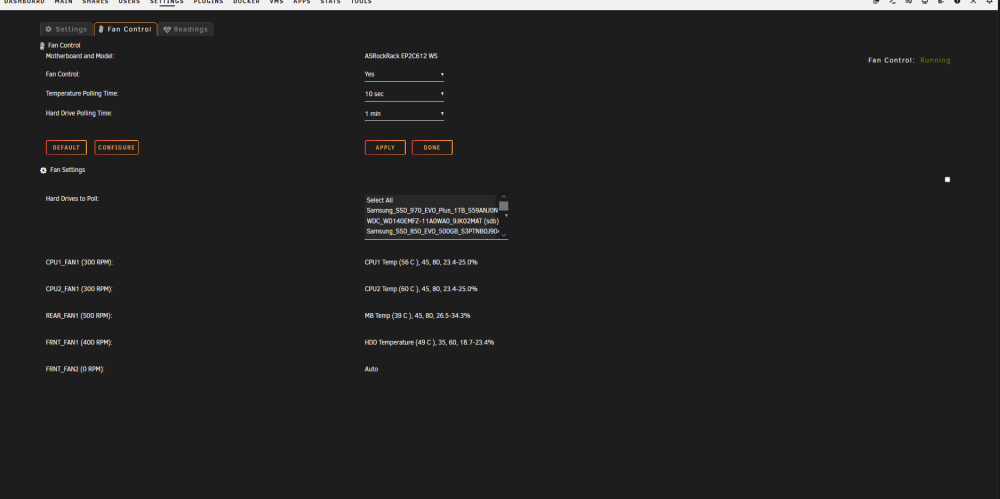
hmm, I updated to 12.06 and the fan control still works with my existing config files, but the settings page is broken now and I can't see or modify anything. Clicking on the buttons causes a new tab to be opened. If I remove my board.json config, the settings page starts to work again, but restoring it causes it to break { "ASRockRack": { "raw": "00 3a 01", "auto": "00 00 00 00 00 00 00 00", "full": "01 64 64 64 64 64 00 00", "fans": { "CPU1_FAN1": "01", "CPU2_FAN1": "01", "REAR_FAN1": "01", "FAN_POS4": "01", "FRNT_FAN1": "01", "FAN_POS6": "01", "FAN_POS7": "01", "FAN_POS8": "01" } } }
-
@SimonFonly thing I can think of would be to add the json files to the config editor dropdown so people less technically inclined can still see/adjust those files if necessary.





