





alabiana
Members
-
Joined
-
Last visited
Everything posted by alabiana
-
Okay the firmware update seemed to fix this. No issues since then.
-
Okay i made the firmware and bios upgrade of hba and checked all cables. Now i need an amount of data to write to the ssds.
-
I switched Ethernet and HBA card but it looks like the same issue. I think there is a firmware update for hba. I will look into this next. unraid-diagnostics-20260605-0702.zip
-
I had similar issues with another hba card. I will try another PCI slot, but the other one is also used by an 10g ethernet card
-
Okay i now have a a fan mounted on the hba heatblock. But tonight a ssd disappeared again. I will look for a cli tool for my hba to read out data from there. unraid-diagnostics-20260601-0844.zip
-
I have placed a small fan on the heatblock of the hba. I will see if it resolves this. The hba was from an old server and my server is an ATX Case. So it is possible there was not enough airflow on the hba card.
-
The time has come: the next SSD in the ZFS pool has been removed and is reporting “trimming.” The system has been running continuously since the pool was created. pool: ssd1pool state: DEGRADED status: One or more devices have been removed. Sufficient replicas exist for the pool to continue functioning in a degraded state. action: Online the device using zpool online' or replace the device with 'zpool replace'. scan: scrub repaired 0B in 00:00:01 with 0 errors on Fri May 22 23:29:56 2026 config: NAME STATE READ WRITE CKSUM ssd1pool DEGRADED 0 0 0 raidz1-0 DEGRADED 0 0 0 /dev/sdh1 ONLINE 0 0 0 /dev/sdi1 ONLINE 0 0 0 /dev/sdj1 ONLINE 0 0 0 /dev/sdk1 REMOVED 0 0 0 (trimming) errors: No known data errorsin lsblk the ssd disappeared. unraid-diagnostics-20260526-0656.zip
-
alright. The i will edit the new pool to zfs and let it format the disks right? Thanks for the Help anyway. I will wait until this evening, as there is parity check running in its last 15% after the hard shutdown yesterday. I will then report in a few days if the problem occurs again. I also have a hunch where the error is coming from: A while back, I had to replace an SSD because I was getting an increasing number of CRC errors. I just replaced it through the main view drop downs and didn't change anything in the ZFS configurations (zpool cli). That must be what's causing the SSD to keep "disappearing."
-
But im not shure if it is worth in trying to bring back the old cache volume rather than simply creating a proper new one. Mover is scheduled to run once a day. cache is only configured to run cache->array. So all i have to loose is data since the last mover run right? If i am right it only should be the data of some docker container )bad enough but i can restore it as it should be plex DB and paperless DB, the data lays all directly on array)
-
Here we go: root@Unraid:~# zpool import pool: cache id: 12246082903798894337 state: UNAVAIL status: One or more devices contains corrupted data. action: The pool cannot be imported due to damaged devices or data. see: https://openzfs.github.io/openzfs-docs/msg/ZFS-8000-5E config: cache UNAVAIL insufficient replicas raidz1-0 UNAVAIL insufficient replicas sdi1 ONLINE sdh1 ONLINE sdl1 UNAVAIL sdj1 FAULTED corrupted datait now seems looking for another drive... (now sdl instead of sdk)
-
After stating "No" it outputs: Do you want to remove the signature? [Y]es/[N]o: N /dev/sdk1 : 2048 1953525167 (931.5G) Linux
-
It instantly gives me a warning about zfs tag: root@Unraid:~# sfdisk /dev/sdk Welcome to sfdisk (util-linux 2.42). Changes will remain in memory only, until you decide to write them. Be careful before using the write command. Checking that no-one is using this disk right now ... OK The device contains 'zfs_member' signature and it may be removed by a write command. See sfdisk(8) man page and --wipe option for more details. Disk /dev/sdk: 931.51 GiB, 1000204886016 bytes, 1953525168 sectors Disk model: SanDisk SSD PLUS Units: sectors of 1 * 512 = 512 bytes Sector size (logical/physical): 512 bytes / 512 bytes I/O size (minimum/optimal): 512 bytes / 16776704 bytes sfdisk is going to create a new 'dos' disk label. Use 'label: <name>' before you define a first partition to override the default. Type 'help' to get more information. >>> 2048 Created a new DOS (MBR) disklabel with disk identifier 0x61c46fa5. The device contains 'zfs_member' signature and it may be removed by a write command. See sfdisk(8) man page and --wipe option for more details. Created a new partition 1 of type 'Linux' and of size 931.5 GiB. Partition #1 contains a zfs_member signature. Do you want to remove the signature? [Y]es/[N]o:
-
root@Unraid:~# zpool import -o readonly=on -F cache cannot import 'cache': one or more devices is currently unavailable root@Unraid:~# fdisk -l /dev/sdk Disk /dev/sdk: 931.51 GiB, 1000204886016 bytes, 1953525168 sectors Disk model: SanDisk SSD PLUS Units: sectors of 1 * 512 = 512 bytes Sector size (logical/physical): 512 bytes / 512 bytes I/O size (minimum/optimal): 512 bytes / 16776704 bytes
-
yes i left it in auto. The Main view suggests formatting the disks. zpool import: root@Unraid:~# zpool import pool: cache id: 12246082903798894337 state: UNAVAIL status: One or more devices contains corrupted data. action: The pool cannot be imported due to damaged devices or data. see: https://openzfs.github.io/openzfs-docs/msg/ZFS-8000-5E config: cache UNAVAIL insufficient replicas raidz1-0 UNAVAIL insufficient replicas sdi1 ONLINE sdh1 ONLINE sdk UNAVAIL invalid label sdj1 FAULTED corrupted data
-
Here we go. I had to hard shutdown my server. As the crashed pool was my cache Pool, i had multiple Zombie processes of stuck docker container waiting for io... unraid-diagnostics-20260517-2114.zip
-
In the "Main" view the disk is online and i can start smart checks. In lsblk the disk is also shown, but without any partition: sdh 8:112 0 931.5G 0 disk └─sdh1 8:113 0 931.5G 0 part sdi 8:128 0 931.5G 0 disk └─sdi1 8:129 0 931.5G 0 part sdj 8:144 0 931.5G 0 disk └─sdj1 8:145 0 931.5G 0 part sdk 8:160 0 931.5G 0 disk
-
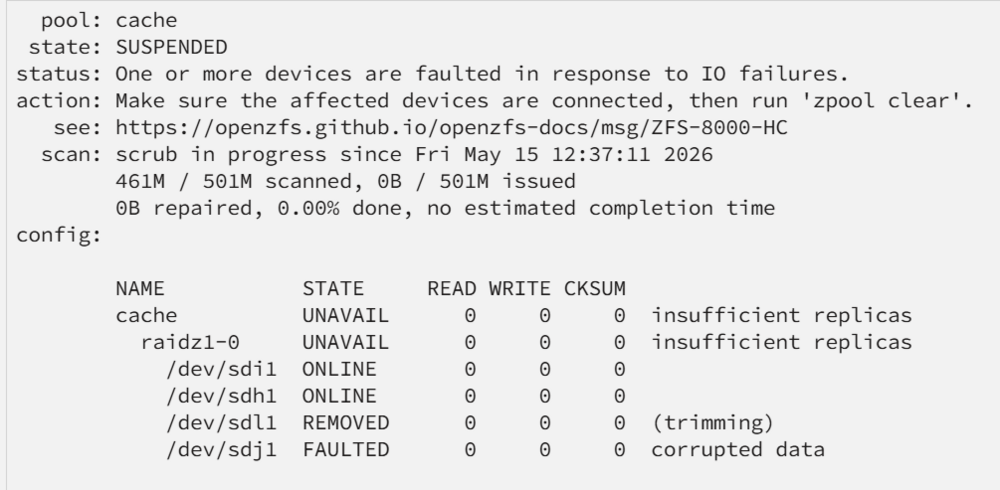
As stated i have seen the failure with the fourth disk (sdj1), but my point in this thread is that the disk keeps getting marked as "removed" due to "trimming." However, here are the diagnostics unraid-diagnostics-20260516-1355.zip
-
Hey guys, i have an issue with my ssd cache Pool. I set it up as raidz1 from 4x 1TB SSD. But one ssd often gets offline. The Overview shows in STATE the REMOVED for SSD. In the last Column of the state table it states "(trimming)". Have i misconfigured something? I know ssds need trimming for their health, but i think the ssd never exits the state when it enters it. Additionally one disk runs in FAULTED state because of corrupt data. But this is not the problem actually as there is for now no important data on the pool. So what do i have to do about the trimming? Pool state: When i restart the server the pool is back online but the same disk gets removed after some time again Thanks for any help.
-
Hello, i have gone the way from truenas back to unraid an now, since there is no nerdpack anymore i did like to ask how to install rar2fs in unraid? Do i really have to handle with docker for this? Mostly it will be used for plex, but i want to extract rar data via smb share also, so a plex+rar2fs docker would not be the best solution. Has anybody a hint for me? Best regards alabiana
-
Hey guys, diskover looks great, but at my system the cron seems not to be working. The abc crontab ist there and default set at 3:00 every day. Also is USE_CRON set true but it doesnt work. The --finddupes setting is also not working for me. EDIt: It seems, the workers are running, but they dont create a new index... Do i have to write the "--" in front of finddupes in the unraid docker config of diskover? I also saw something about "diskover.py not listening", how to fix this?

