





indian48
Members
-
Joined
-
Last visited
-
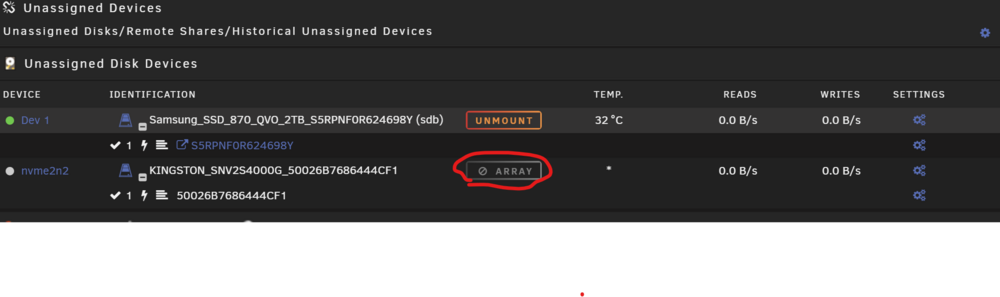
Hallo zusammen Ich musste den CPU tauschen und nach dem neustart wurde die HDD automatisch gemountet und dann als nicht im Array gekennzeichnet, auf der Plate sind meine VMs drauf, jetzt wird die platte aber unter/mnt/disks/ nicht angezeigt und somit laufen auch meine VMs natürlich nicht, hat jemand eventuell eine Ahnung wie ich das wieder hinbekomme ? Besten Dank
-
Hallo zusammen, Ich wollte auf 6.12.5 updaten, dass ist aber fehlgeschlagen, als ich versucht habe im abgesicherten Modus zu starten, habe ich festgestellt dass er kein Update gemacht hat. Ich habe dann ein altes Backup zurück gespielt, als ich dann gestartet habe kam er nur noch im abgesicherten Modus hoch, wenn überhaupt und wenn er es mahl schaft dann nicht lange, er hängt sich einfach auf (ping funktioniert auch nicht mehr) Als ich nochmals ein Backup auf den Stick laden wollte meinte dass Tool dass der Stick nicht kompatibel ist, also ein neuer Stick und Backup drauf, er startet nur noch sporadisch und nur noch im Abgesicherten Modus, dann kann ich mich einloggen und Kurz darauf Hängt er sich auf, VM und Docker sind deaktiviert. Ich habe zum Testen auch mal ein neues Mainboard eingebaut ohne Erfolg. Ich hänge mal die syslog an eventuell kann mir ja jemand weiterhelfen. Schon mal Danke im Voraus. syslog-192.168.1.167.zip
