





ayumifanshawn
Members
-
Joined
-
Last visited
-
This is what solved my problem somehow it was a faulty 10G fiber sfp i replaced it and now everything is working fine thanks for the help everyone!
-
This box has no internet connection and I don't understand why
-
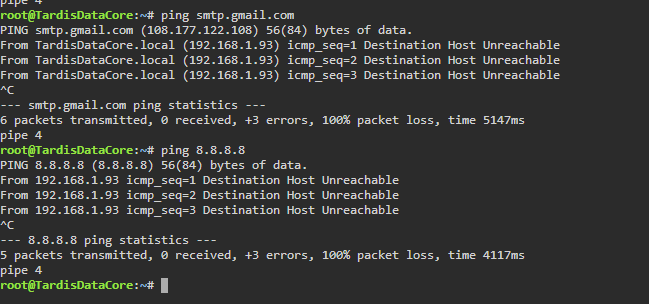
This has been dun in the start but here is the results again.
-
bumpty bumpty bump
-
bump
-
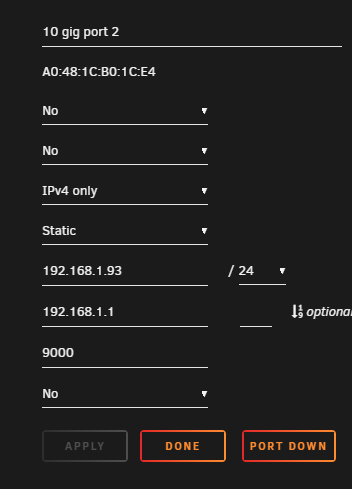
port 1 is disabled and nothing connected to it incase your wondering
-
so there is no option for dns on the 10 gig port that is odd.
-
any updates on this I don't want to be rude but I paid for the software and I would like it to work and when i ask for support they say go to community first and this has been the Sahara dessert on results
-
i cant ping that either i can from other machines on the same network but not unraid nothing has changed in my network that would affect that isp firewall router all have been the same for 1 year now.
-
bump
-
i have tried it using the application password and removing it and adding a new one that's how it was originally setup i also tried using the email account that my blueiris is sending me updates with and get the same error but if i test from that program it sends me a test email and this one gives me the error above i have also tried hotmail as well with the same result. its allmost as if a firewall was blocking it but as far as i know unraid does not have a built in firewall.
-
i have not i have also tried setting up multiple new accounts the error im getting would tell me its not even hitting the server at all.
-
tardisdatacore-diagnostics-20210917-2042.zip
-
i have had email notifications working fine for over a year out of the blue they stopped working ive tried to re add the email server but on test i get the error cannot open smtp.gmail.com:587 ive tried every port i can find with the same error but the port changes to the one i tried ive also tried hotmail with same results ive tried to use the terminal telnet smtp.gmail.com 587 as well as all other ports all results come back: root@TardisDataCore:~# telnet smtp.gmail.com 587 telnet: smtp.gmail.com: Name or service not known smtp.gmail.com: Unknown server error
-
ssd died i removed it and after restart the share was still missing does the cache drive have a baring on a whole share going away? I've decided not to use one for now
