





grumpy
Members
-
Joined
-
Last visited
-
Thanks @JorgeB for pointing me in the right direction, it was a multicast setting in Unifi that was screwing things up. Found it before I moved the server to its new home (router) no issues here.
-
Well not totally, Unraid Connect still works. But time server can not be found, apps load but cannot find the installs, the arrs are hit and miss.... Running a pretty default Unifi network with no changes other then playing with DNS settings to try to fix issue. Removed tailscale from Unraid, no change. At a lost of what the issue is, the rest of the computers devices on site seem to work fine. tower-diagnostics-20251014-1010.zip
-
Or does it provide any benefits? I have a ASUS Pro WS W680-ACE IPMI MB and in the bios is Control Iommu pre-boot Behavior right below the VT-d enabled. Now my understanding is they are the same, but hoping it adds more granularity in Unraid immou SATA controller: So I can pass through one hard-drive with out installing a pcie HBA/Sata controller. The goal is to have one drive that is in a pool not the array as close as native to the Win 11 VM running Blue Iris NVR. I guess that the other option maybe pcie_acs_override=multifunction as explained in @SpaceInvaderOne 7 year old video A little about Passthrough, PCIe, IOMMU Groups and breaking them up. I remember watching and doing this back then for something. Who would figure it is still viable today!
-
@JorgeB I have done as suggested, which I tried before but did incorrectly hence why I used /dev/sdg And it seems to be not spinning down as wanted in this short time, will keep an eye on it. In case any body else is wondering /dev/disk/by-id is a directory of your disks. So in the vm config: 2nd vDisk Location: Manual -> /dev/disk/by-id/ata-ST10000NE0004-1ZF101_ZA218RFH @bmartino1 The NVME is a no go for constant writing of a NVR, longevity and space constraints. As for the iommu, if I was bright enough and knew how I agree! I know there is mention of iommu in the bios but have no idea what that does, maybe break it out more granularly instead of the whole group. IOMMU group 9: [8086:7ae2] 00:17.0 SATA controller: Intel Corporation Alder Lake-S PCH SATA Controller [AHCI Mode] (rev 11) [1:0:0:0] disk ATA ST24000NT002-3N1 EN01 /dev/sdb 24.0TB [2:0:0:0] disk ATA ST16000NM001G-2K SN03 /dev/sdc 16.0TB [3:0:0:0] disk ATA ST24000NT002-3N1 EN01 /dev/sdd 24.0TB [4:0:0:0] disk ATA ST16000NM001G-2K SN03 /dev/sde 16.0TB [5:0:0:0] disk ATA ST24000NT002-3N1 EN01 /dev/sdf 24.0TB [6:0:0:0] disk ATA ST10000NE0004-1Z EN01 /dev/sdg 10.0TB [7:0:0:0] disk ATA ST16000NM001G-2K SN03 /dev/sdh 16.0TB [8:0:0:0] disk ATA WDC WDS400T1R0A 10WR /dev/sdi 4.00TB
-
@JorgeB Thank you, time will tell how well that works. But seeing as it is you advising this I'm 100% sure it will work. The current issue is the operator between the screen and chair! I have put the drive in its own pool, but retained the /dev/sdg and unraid formatted it as brtfs but I changed it to xfs as NTFS is not available. Within the windows 11 VM I deleted the volume and created a new ntfs volume with drive letter. But performance is dismal on the drive. Should I have chosen the 2nd vDisk location as the pool | and assigned vDisk size 10000GB or 10TB | vDisktype raw or qcow2 |vDisk Bus Virtio / SCSI / SATA / IDE as you can see I'm a little confused on getting the best performance from the VM F: drive. C:\Windows\system32>winsat disk -drive C:\Windows\system32>winsat disk -drive c Windows System Assessment Tool > Running: Feature Enumeration '' > Run Time 00:00:00.00 > Running: Storage Assessment '-drive c -ran -read' > Run Time 00:00:00.30 > Running: Storage Assessment '-drive c -seq -read' > Run Time 00:00:00.84 > Running: Storage Assessment '-drive c -seq -write' > Run Time 00:00:01.05 > Running: Storage Assessment '-drive c -flush -seq' > Run Time 00:00:00.59 > Running: Storage Assessment '-drive c -flush -ran' > Run Time 00:00:00.55 > Dshow Video Encode Time 0.00000 s > Dshow Video Decode Time 0.00000 s > Media Foundation Decode Time 0.00000 s > Disk Random 16.0 Read 351.04 MB/s 8.1 > Disk Sequential 64.0 Read 3192.82 MB/s 9.3 > Disk Sequential 64.0 Write 1368.37 MB/s 8.7 > Average Read Time with Sequential Writes 0.079 ms 8.8 > Latency: 95th Percentile 0.287 ms 8.8 > Latency: Maximum 3.304 ms 8.7 > Average Read Time with Random Writes 0.094 ms 8.9 > Total Run Time 00:00:03.69 C:\Windows\system32>winsat disk -drive f Windows System Assessment Tool > Running: Feature Enumeration '' > Run Time 00:00:00.00 > Running: Storage Assessment '-drive f -ran -read' > Run Time 00:00:05.48 > Running: Storage Assessment '-drive f -seq -read' > Run Time 00:00:03.09 > Running: Storage Assessment '-drive f -seq -write' > Run Time 00:00:01.33 > Running: Storage Assessment '-drive f -flush -seq' > Run Time 00:00:02.23 > Running: Storage Assessment '-drive f -flush -ran' > Run Time 00:00:05.13 > Dshow Video Encode Time 0.00000 s > Dshow Video Decode Time 0.00000 s > Media Foundation Decode Time 0.00000 s > Disk Random 16.0 Read 2.93 MB/s 4.6 > Disk Sequential 64.0 Read 146.62 MB/s 7.1 > Disk Sequential 64.0 Write 799.27 MB/s 8.3 > Average Read Time with Sequential Writes 0.971 ms 7.7 > Latency: 95th Percentile 8.449 ms 5.9 > Latency: Maximum 156.265 ms 7.5 > Average Read Time with Random Writes 1.952 ms 6.9 > Total Run Time 00:00:17.53
-
Is there a fast boot option in bios and or IGPU multi (view or something like that) There is a thread for WS W680-ACE IPMI with similar issues caused by the igpu and dgpu. This is where I searched because I have that motherboard. It was the fast boot that was the issue.
-
Are you local with a monitor or trying remotely? I over came this issue with a monitor that could be connected to all the GPU's outputs. I think I needed to make the dGPU as the main one. But there seems to be a fight between Igpu a dGpu in who is in control. I can no longer boot into graphical unraid only the cli. then Use the web login. But I do not remember exactly and my machine is in another building or I would look.
-
Thank you, but Sorry no! That is not my goal. I only want the one drive to not spin up or down, just to always be running. It is not in the array but as an Unassigned Disk Devices that is attached to a WIN 11 VM running Blue Iris Network Video Recorder 24/7. It surprises me that it even does spin down as it is constantly being written to; so it should not be spinning down. I have actually seen the green icon go gray for that quick second. But the spin down are only suppose to happen to each disk after 15 minutes of in activity. NVR's never get that long of a lull on a constant recording of each (10) cameras 2k to 12k formats. The actual array disks I do want to spin down when not in use to save that 8 to 15 watts of power each.
-
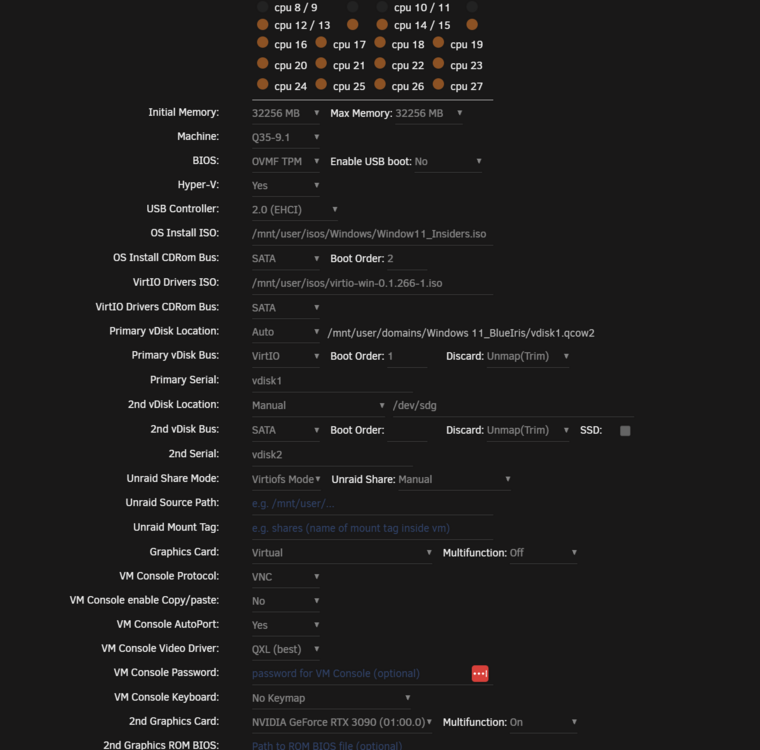
Unassigned Disk Devices /dev/sdg passthrough to VM Win 11 Blue Iris. This hardrive has no reason to spin down as it is constantly recording. Is there a way to select one drive as always spun up? Picture is of the VM settings in case I did the VM mounting wrong. Also is there a way to reset smart settings on drive to remove the old age messages? The drive is 7 years plus from a NAS. No I currently do not care if I lose the drive in a crash I re-use all me old drives until they are actually bad. Just not for the primary important data. nchan: Out of shared memory I'm aware of the 5 year long thread on this blaming open web browser tabs (wrongly in my opinion) 11 pages and counting. But their issue is spamming of the syslog with errors, mine is only 20 seconds. Unknown where or what caused it. At the time only plex was being used actively while the arr's ran as they do 24/7. and the 2 Win 11 VM's Home assistant and Blue iris 5 nchan_stub_status total published messages: 644634 stored messages: 15 shared memory used: 84K shared memory limit: 131072K channels: 20 subscribers: 6 redis pending commands: 0 redis connected servers: 0 redis unhealthy upstreams: 0 total redis commands sent: 0 total interprocess alerts received: 0 interprocess alerts in transit: 0 interprocess queued alerts: 0 total interprocess send delay: 0 total interprocess receive delay: 0 nchan version: 1.3.7 Syslog Mar 28 21:00:01 Tower docker: Success: Backup of RAM-Disk created. Mar 28 21:05:58 Tower emhttpd: spinning down /dev/sdh Mar 28 21:05:58 Tower emhttpd: spinning down /dev/sde Mar 28 21:05:58 Tower emhttpd: spinning down /dev/sdb Mar 28 21:05:58 Tower emhttpd: spinning down /dev/sdc Mar 28 21:06:11 Tower emhttpd: spinning down /dev/sdg Mar 28 21:06:14 Tower emhttpd: read SMART /dev/sdg Mar 28 21:21:13 Tower emhttpd: spinning down /dev/sdg Mar 28 21:21:16 Tower emhttpd: read SMART /dev/sdg Mar 28 21:36:16 Tower emhttpd: spinning down /dev/sdg Mar 28 21:36:19 Tower emhttpd: read SMART /dev/sdg Mar 28 21:51:18 Tower emhttpd: spinning down /dev/sdg Mar 28 21:51:25 Tower emhttpd: read SMART /dev/sdg Mar 28 22:00:01 Tower docker: Success: Backup of RAM-Disk created. Mar 28 22:06:22 Tower emhttpd: spinning down /dev/sdg Mar 28 22:06:25 Tower emhttpd: read SMART /dev/sdg Mar 28 22:21:24 Tower emhttpd: spinning down /dev/sdg Mar 28 22:21:28 Tower emhttpd: read SMART /dev/sdg Mar 28 22:36:27 Tower emhttpd: spinning down /dev/sdg Mar 28 22:36:31 Tower emhttpd: read SMART /dev/sdg Mar 28 22:51:30 Tower emhttpd: spinning down /dev/sdg Mar 28 22:51:36 Tower emhttpd: read SMART /dev/sdg Mar 28 23:00:01 Tower docker: Success: Backup of RAM-Disk created. Mar 28 23:06:34 Tower emhttpd: spinning down /dev/sdg Mar 28 23:06:46 Tower emhttpd: read SMART /dev/sdg Mar 28 23:21:39 Tower emhttpd: spinning down /dev/sdg Mar 28 23:21:45 Tower emhttpd: read SMART /dev/sdg Mar 28 23:36:42 Tower emhttpd: spinning down /dev/sdg Mar 28 23:36:46 Tower emhttpd: read SMART /dev/sdg Mar 28 23:51:44 Tower emhttpd: spinning down /dev/sdg Mar 28 23:51:49 Tower emhttpd: read SMART /dev/sdg Mar 29 00:00:01 Tower docker: Success: Backup of RAM-Disk created. Mar 29 00:06:47 Tower emhttpd: spinning down /dev/sdg Mar 29 00:06:50 Tower emhttpd: read SMART /dev/sdg Mar 29 00:21:50 Tower emhttpd: spinning down /dev/sdg Mar 29 00:21:55 Tower emhttpd: read SMART /dev/sdg Mar 29 00:26:40 Tower emhttpd: spinning down /dev/sdf Mar 29 00:36:53 Tower emhttpd: spinning down /dev/sdg Mar 29 00:37:03 Tower emhttpd: read SMART /dev/sdg Mar 29 00:41:29 Tower emhttpd: read SMART /dev/sdf Mar 29 00:51:58 Tower emhttpd: spinning down /dev/sdg Mar 29 00:52:02 Tower emhttpd: read SMART /dev/sdg Mar 29 01:00:01 Tower docker: Success: Backup of RAM-Disk created. Mar 29 01:07:01 Tower emhttpd: spinning down /dev/sdg Mar 29 01:07:12 Tower emhttpd: read SMART /dev/sdg Mar 29 01:22:07 Tower emhttpd: spinning down /dev/sdg Mar 29 01:22:11 Tower emhttpd: read SMART /dev/sdg Mar 29 01:37:10 Tower emhttpd: spinning down /dev/sdg Mar 29 01:37:17 Tower emhttpd: read SMART /dev/sdg Mar 29 01:51:29 Tower nginx: 2025/03/29 01:51:29 [crit] 19860#19860: ngx_slab_alloc() failed: no memory Mar 29 01:51:29 Tower nginx: 2025/03/29 01:51:29 [error] 19860#19860: shpool alloc failed Mar 29 01:51:29 Tower nginx: 2025/03/29 01:51:29 [error] 19860#19860: nchan: Out of shared memory while allocating message of size 14521. Increase nchan_max_reserved_memory. Mar 29 01:51:29 Tower nginx: 2025/03/29 01:51:29 [error] 19860#19860: *481988 nchan: error publishing message (HTTP status code 500), client: unix:, server: , request: "POST /pub/disks?buffer_length=1 HTTP/1.1", host: "localhost" Mar 29 01:51:29 Tower nginx: 2025/03/29 01:51:29 [error] 19860#19860: MEMSTORE:00: can't create shared message for channel /disks Mar 29 01:51:30 Tower nginx: 2025/03/29 01:51:30 [crit] 19860#19860: ngx_slab_alloc() failed: no memory Mar 29 01:51:30 Tower nginx: 2025/03/29 01:51:30 [error] 19860#19860: shpool alloc failed Mar 29 01:51:30 Tower nginx: 2025/03/29 01:51:30 [error] 19860#19860: nchan: Out of shared memory while allocating message of size 13072. Increase nchan_max_reserved_memory. Mar 29 01:51:30 Tower nginx: 2025/03/29 01:51:30 [error] 19860#19860: *481992 nchan: error publishing message (HTTP status code 500), client: unix:, server: , request: "POST /pub/devices?buffer_length=1 HTTP/1.1", host: "localhost" Mar 29 01:51:30 Tower nginx: 2025/03/29 01:51:30 [error] 19860#19860: MEMSTORE:00: can't create shared message for channel /devices Mar 29 01:51:30 Tower nginx: 2025/03/29 01:51:30 [crit] 19860#19860: ngx_slab_alloc() failed: no memory Mar 29 01:51:30 Tower nginx: 2025/03/29 01:51:30 [error] 19860#19860: shpool alloc failed Mar 29 01:51:30 Tower nginx: 2025/03/29 01:51:30 [error] 19860#19860: nchan: Out of shared memory while allocating message of size 14521. Increase nchan_max_reserved_memory. Mar 29 01:51:30 Tower nginx: 2025/03/29 01:51:30 [error] 19860#19860: *482000 nchan: error publishing message (HTTP status code 500), client: unix:, server: , request: "POST /pub/disks?buffer_length=1 HTTP/1.1", host: "localhost" Mar 29 01:51:30 Tower nginx: 2025/03/29 01:51:30 [error] 19860#19860: MEMSTORE:00: can't create shared message for channel /disks Mar 29 01:51:31 Tower nginx: 2025/03/29 01:51:31 [crit] 19860#19860: ngx_slab_alloc() failed: no memory Mar 29 01:51:31 Tower nginx: 2025/03/29 01:51:31 [error] 19860#19860: shpool alloc failed Mar 29 01:51:31 Tower nginx: 2025/03/29 01:51:31 [error] 19860#19860: nchan: Out of shared memory while allocating message of size 13072. Increase nchan_max_reserved_memory. Mar 29 01:51:31 Tower nginx: 2025/03/29 01:51:31 [error] 19860#19860: *482005 nchan: error publishing message (HTTP status code 500), client: unix:, server: , request: "POST /pub/devices?buffer_length=1 HTTP/1.1", host: "localhost" Mar 29 01:51:31 Tower nginx: 2025/03/29 01:51:31 [error] 19860#19860: MEMSTORE:00: can't create shared message for channel /devices Mar 29 01:51:31 Tower nginx: 2025/03/29 01:51:31 [crit] 19860#19860: ngx_slab_alloc() failed: no memory Mar 29 01:51:31 Tower nginx: 2025/03/29 01:51:31 [error] 19860#19860: shpool alloc failed Mar 29 01:51:31 Tower nginx: 2025/03/29 01:51:31 [error] 19860#19860: nchan: Out of shared memory while allocating message of size 14521. Increase nchan_max_reserved_memory. Mar 29 01:51:31 Tower nginx: 2025/03/29 01:51:31 [error] 19860#19860: *482011 nchan: error publishing message (HTTP status code 500), client: unix:, server: , request: "POST /pub/disks?buffer_length=1 HTTP/1.1", host: "localhost" Mar 29 01:51:31 Tower nginx: 2025/03/29 01:51:31 [error] 19860#19860: MEMSTORE:00: can't create shared message for channel /disks Mar 29 01:51:32 Tower nginx: 2025/03/29 01:51:32 [crit] 19860#19860: ngx_slab_alloc() failed: no memory Mar 29 01:51:32 Tower nginx: 2025/03/29 01:51:32 [error] 19860#19860: shpool alloc failed Mar 29 01:51:32 Tower nginx: 2025/03/29 01:51:32 [error] 19860#19860: nchan: Out of shared memory while allocating message of size 13068. Increase nchan_max_reserved_memory. Mar 29 01:51:32 Tower nginx: 2025/03/29 01:51:32 [error] 19860#19860: *482017 nchan: error publishing message (HTTP status code 500), client: unix:, server: , request: "POST /pub/devices?buffer_length=1 HTTP/1.1", host: "localhost" Mar 29 01:51:32 Tower nginx: 2025/03/29 01:51:32 [error] 19860#19860: MEMSTORE:00: can't create shared message for channel /devices Mar 29 01:51:32 Tower nginx: 2025/03/29 01:51:32 [crit] 19860#19860: ngx_slab_alloc() failed: no memory Mar 29 01:51:32 Tower nginx: 2025/03/29 01:51:32 [error] 19860#19860: shpool alloc failed Mar 29 01:51:32 Tower nginx: 2025/03/29 01:51:32 [error] 19860#19860: nchan: Out of shared memory while allocating message of size 14521. Increase nchan_max_reserved_memory. Mar 29 01:51:32 Tower nginx: 2025/03/29 01:51:32 [error] 19860#19860: *482023 nchan: error publishing message (HTTP status code 500), client: unix:, server: , request: "POST /pub/disks?buffer_length=1 HTTP/1.1", host: "localhost" Mar 29 01:51:32 Tower nginx: 2025/03/29 01:51:32 [error] 19860#19860: MEMSTORE:00: can't create shared message for channel /disks Mar 29 01:51:33 Tower nginx: 2025/03/29 01:51:33 [crit] 19860#19860: ngx_slab_alloc() failed: no memory Mar 29 01:51:33 Tower nginx: 2025/03/29 01:51:33 [error] 19860#19860: shpool alloc failed Mar 29 01:51:33 Tower nginx: 2025/03/29 01:51:33 [error] 19860#19860: nchan: Out of shared memory while allocating message of size 13068. Increase nchan_max_reserved_memory. Mar 29 01:51:33 Tower nginx: 2025/03/29 01:51:33 [error] 19860#19860: *482028 nchan: error publishing message (HTTP status code 500), client: unix:, server: , request: "POST /pub/devices?buffer_length=1 HTTP/1.1", host: "localhost" Mar 29 01:51:33 Tower nginx: 2025/03/29 01:51:33 [error] 19860#19860: MEMSTORE:00: can't create shared message for channel /devices Mar 29 01:51:33 Tower nginx: 2025/03/29 01:51:33 [crit] 19860#19860: ngx_slab_alloc() failed: no memory Mar 29 01:51:33 Tower nginx: 2025/03/29 01:51:33 [error] 19860#19860: shpool alloc failed Mar 29 01:51:33 Tower nginx: 2025/03/29 01:51:33 [error] 19860#19860: nchan: Out of shared memory while allocating message of size 14521. Increase nchan_max_reserved_memory. Mar 29 01:51:33 Tower nginx: 2025/03/29 01:51:33 [error] 19860#19860: *482035 nchan: error publishing message (HTTP status code 500), client: unix:, server: , request: "POST /pub/disks?buffer_length=1 HTTP/1.1", host: "localhost" Mar 29 01:51:33 Tower nginx: 2025/03/29 01:51:33 [error] 19860#19860: MEMSTORE:00: can't create shared message for channel /disks Mar 29 01:51:34 Tower nginx: 2025/03/29 01:51:34 [crit] 19860#19860: ngx_slab_alloc() failed: no memory Mar 29 01:51:34 Tower nginx: 2025/03/29 01:51:34 [error] 19860#19860: shpool alloc failed Mar 29 01:51:34 Tower nginx: 2025/03/29 01:51:34 [error] 19860#19860: nchan: Out of shared memory while allocating message of size 13070. Increase nchan_max_reserved_memory. Mar 29 01:51:34 Tower nginx: 2025/03/29 01:51:34 [error] 19860#19860: *482040 nchan: error publishing message (HTTP status code 500), client: unix:, server: , request: "POST /pub/devices?buffer_length=1 HTTP/1.1", host: "localhost" Mar 29 01:51:34 Tower nginx: 2025/03/29 01:51:34 [error] 19860#19860: MEMSTORE:00: can't create shared message for channel /devices Mar 29 01:51:34 Tower nginx: 2025/03/29 01:51:34 [crit] 19860#19860: ngx_slab_alloc() failed: no memory Mar 29 01:51:34 Tower nginx: 2025/03/29 01:51:34 [error] 19860#19860: shpool alloc failed Mar 29 01:51:34 Tower nginx: 2025/03/29 01:51:34 [error] 19860#19860: nchan: Out of shared memory while allocating message of size 14521. Increase nchan_max_reserved_memory. Mar 29 01:51:34 Tower nginx: 2025/03/29 01:51:34 [error] 19860#19860: *482046 nchan: error publishing message (HTTP status code 500), client: unix:, server: , request: "POST /pub/disks?buffer_length=1 HTTP/1.1", host: "localhost" Mar 29 01:51:34 Tower nginx: 2025/03/29 01:51:34 [error] 19860#19860: MEMSTORE:00: can't create shared message for channel /disks Mar 29 01:51:35 Tower nginx: 2025/03/29 01:51:35 [crit] 19860#19860: ngx_slab_alloc() failed: no memory Mar 29 01:51:35 Tower nginx: 2025/03/29 01:51:35 [error] 19860#19860: shpool alloc failed Mar 29 01:51:35 Tower nginx: 2025/03/29 01:51:35 [error] 19860#19860: nchan: Out of shared memory while allocating message of size 13070. Increase nchan_max_reserved_memory. Mar 29 01:51:35 Tower nginx: 2025/03/29 01:51:35 [error] 19860#19860: *482050 nchan: error publishing message (HTTP status code 500), client: unix:, server: , request: "POST /pub/devices?buffer_length=1 HTTP/1.1", host: "localhost" Mar 29 01:51:35 Tower nginx: 2025/03/29 01:51:35 [error] 19860#19860: MEMSTORE:00: can't create shared message for channel /devices Mar 29 01:51:35 Tower nginx: 2025/03/29 01:51:35 [crit] 19860#19860: ngx_slab_alloc() failed: no memory Mar 29 01:51:35 Tower nginx: 2025/03/29 01:51:35 [error] 19860#19860: shpool alloc failed Mar 29 01:51:35 Tower nginx: 2025/03/29 01:51:35 [error] 19860#19860: nchan: Out of shared memory while allocating message of size 14521. Increase nchan_max_reserved_memory. Mar 29 01:51:35 Tower nginx: 2025/03/29 01:51:35 [error] 19860#19860: *482057 nchan: error publishing message (HTTP status code 500), client: unix:, server: , request: "POST /pub/disks?buffer_length=1 HTTP/1.1", host: "localhost" Mar 29 01:51:35 Tower nginx: 2025/03/29 01:51:35 [error] 19860#19860: MEMSTORE:00: can't create shared message for channel /disks Mar 29 01:51:36 Tower nginx: 2025/03/29 01:51:36 [crit] 19860#19860: ngx_slab_alloc() failed: no memory Mar 29 01:51:36 Tower nginx: 2025/03/29 01:51:36 [error] 19860#19860: shpool alloc failed Mar 29 01:51:36 Tower nginx: 2025/03/29 01:51:36 [error] 19860#19860: nchan: Out of shared memory while allocating message of size 13065. Increase nchan_max_reserved_memory. Mar 29 01:51:36 Tower nginx: 2025/03/29 01:51:36 [error] 19860#19860: *482063 nchan: error publishing message (HTTP status code 500), client: unix:, server: , request: "POST /pub/devices?buffer_length=1 HTTP/1.1", host: "localhost" Mar 29 01:51:36 Tower nginx: 2025/03/29 01:51:36 [error] 19860#19860: MEMSTORE:00: can't create shared message for channel /devices Mar 29 01:51:36 Tower nginx: 2025/03/29 01:51:36 [crit] 19860#19860: ngx_slab_alloc() failed: no memory Mar 29 01:51:36 Tower nginx: 2025/03/29 01:51:36 [error] 19860#19860: shpool alloc failed Mar 29 01:51:36 Tower nginx: 2025/03/29 01:51:36 [error] 19860#19860: nchan: Out of shared memory while allocating message of size 14521. Increase nchan_max_reserved_memory. Mar 29 01:51:36 Tower nginx: 2025/03/29 01:51:36 [error] 19860#19860: *482070 nchan: error publishing message (HTTP status code 500), client: unix:, server: , request: "POST /pub/disks?buffer_length=1 HTTP/1.1", host: "localhost" Mar 29 01:51:36 Tower nginx: 2025/03/29 01:51:36 [error] 19860#19860: MEMSTORE:00: can't create shared message for channel /disks Mar 29 01:51:37 Tower nginx: 2025/03/29 01:51:37 [crit] 19860#19860: ngx_slab_alloc() failed: no memory Mar 29 01:51:37 Tower nginx: 2025/03/29 01:51:37 [error] 19860#19860: shpool alloc failed Mar 29 01:51:37 Tower nginx: 2025/03/29 01:51:37 [error] 19860#19860: nchan: Out of shared memory while allocating message of size 13065. Increase nchan_max_reserved_memory. Mar 29 01:51:37 Tower nginx: 2025/03/29 01:51:37 [error] 19860#19860: *482074 nchan: error publishing message (HTTP status code 500), client: unix:, server: , request: "POST /pub/devices?buffer_length=1 HTTP/1.1", host: "localhost" Mar 29 01:51:37 Tower nginx: 2025/03/29 01:51:37 [error] 19860#19860: MEMSTORE:00: can't create shared message for channel /devices Mar 29 01:51:37 Tower nginx: 2025/03/29 01:51:37 [crit] 19860#19860: ngx_slab_alloc() failed: no memory Mar 29 01:51:37 Tower nginx: 2025/03/29 01:51:37 [error] 19860#19860: shpool alloc failed Mar 29 01:51:37 Tower nginx: 2025/03/29 01:51:37 [error] 19860#19860: nchan: Out of shared memory while allocating message of size 14521. Increase nchan_max_reserved_memory. Mar 29 01:51:37 Tower nginx: 2025/03/29 01:51:37 [error] 19860#19860: *482082 nchan: error publishing message (HTTP status code 500), client: unix:, server: , request: "POST /pub/disks?buffer_length=1 HTTP/1.1", host: "localhost" Mar 29 01:51:37 Tower nginx: 2025/03/29 01:51:37 [error] 19860#19860: MEMSTORE:00: can't create shared message for channel /disks Mar 29 01:51:38 Tower nginx: 2025/03/29 01:51:38 [crit] 19860#19860: ngx_slab_alloc() failed: no memory Mar 29 01:51:38 Tower nginx: 2025/03/29 01:51:38 [error] 19860#19860: shpool alloc failed Mar 29 01:51:38 Tower nginx: 2025/03/29 01:51:38 [error] 19860#19860: nchan: Out of shared memory while allocating message of size 13071. Increase nchan_max_reserved_memory. Mar 29 01:51:38 Tower nginx: 2025/03/29 01:51:38 [error] 19860#19860: *482088 nchan: error publishing message (HTTP status code 500), client: unix:, server: , request: "POST /pub/devices?buffer_length=1 HTTP/1.1", host: "localhost" Mar 29 01:51:38 Tower nginx: 2025/03/29 01:51:38 [error] 19860#19860: MEMSTORE:00: can't create shared message for channel /devices Mar 29 01:51:38 Tower nginx: 2025/03/29 01:51:38 [crit] 19860#19860: ngx_slab_alloc() failed: no memory Mar 29 01:51:38 Tower nginx: 2025/03/29 01:51:38 [error] 19860#19860: shpool alloc failed Mar 29 01:51:38 Tower nginx: 2025/03/29 01:51:38 [error] 19860#19860: nchan: Out of shared memory while allocating message of size 14521. Increase nchan_max_reserved_memory. Mar 29 01:51:38 Tower nginx: 2025/03/29 01:51:38 [error] 19860#19860: *482093 nchan: error publishing message (HTTP status code 500), client: unix:, server: , request: "POST /pub/disks?buffer_length=1 HTTP/1.1", host: "localhost" Mar 29 01:51:38 Tower nginx: 2025/03/29 01:51:38 [error] 19860#19860: MEMSTORE:00: can't create shared message for channel /disks Mar 29 01:51:39 Tower nginx: 2025/03/29 01:51:39 [crit] 19860#19860: ngx_slab_alloc() failed: no memory Mar 29 01:51:39 Tower nginx: 2025/03/29 01:51:39 [error] 19860#19860: shpool alloc failed Mar 29 01:51:39 Tower nginx: 2025/03/29 01:51:39 [error] 19860#19860: nchan: Out of shared memory while allocating message of size 13071. Increase nchan_max_reserved_memory. Mar 29 01:51:39 Tower nginx: 2025/03/29 01:51:39 [error] 19860#19860: *482099 nchan: error publishing message (HTTP status code 500), client: unix:, server: , request: "POST /pub/devices?buffer_length=1 HTTP/1.1", host: "localhost" Mar 29 01:51:39 Tower nginx: 2025/03/29 01:51:39 [error] 19860#19860: MEMSTORE:00: can't create shared message for channel /devices Mar 29 01:51:40 Tower nginx: 2025/03/29 01:51:40 [crit] 19860#19860: ngx_slab_alloc() failed: no memory Mar 29 01:51:40 Tower nginx: 2025/03/29 01:51:40 [error] 19860#19860: shpool alloc failed Mar 29 01:51:40 Tower nginx: 2025/03/29 01:51:40 [error] 19860#19860: nchan: Out of shared memory while allocating message of size 14521. Increase nchan_max_reserved_memory. Mar 29 01:51:40 Tower nginx: 2025/03/29 01:51:40 [error] 19860#19860: *482105 nchan: error publishing message (HTTP status code 500), client: unix:, server: , request: "POST /pub/disks?buffer_length=1 HTTP/1.1", host: "localhost" Mar 29 01:51:40 Tower nginx: 2025/03/29 01:51:40 [error] 19860#19860: MEMSTORE:00: can't create shared message for channel /disks Mar 29 01:51:40 Tower nginx: 2025/03/29 01:51:40 [crit] 19860#19860: ngx_slab_alloc() failed: no memory Mar 29 01:51:40 Tower nginx: 2025/03/29 01:51:40 [error] 19860#19860: shpool alloc failed Mar 29 01:51:40 Tower nginx: 2025/03/29 01:51:40 [error] 19860#19860: nchan: Out of shared memory while allocating message of size 13065. Increase nchan_max_reserved_memory. Mar 29 01:51:40 Tower nginx: 2025/03/29 01:51:40 [error] 19860#19860: *482111 nchan: error publishing message (HTTP status code 500), client: unix:, server: , request: "POST /pub/devices?buffer_length=1 HTTP/1.1", host: "localhost" Mar 29 01:51:40 Tower nginx: 2025/03/29 01:51:40 [error] 19860#19860: MEMSTORE:00: can't create shared message for channel /devices Mar 29 01:51:41 Tower nginx: 2025/03/29 01:51:41 [crit] 19860#19860: ngx_slab_alloc() failed: no memory Mar 29 01:51:41 Tower nginx: 2025/03/29 01:51:41 [error] 19860#19860: shpool alloc failed Mar 29 01:51:41 Tower nginx: 2025/03/29 01:51:41 [error] 19860#19860: nchan: Out of shared memory while allocating message of size 14521. Increase nchan_max_reserved_memory. Mar 29 01:51:41 Tower nginx: 2025/03/29 01:51:41 [error] 19860#19860: *482117 nchan: error publishing message (HTTP status code 500), client: unix:, server: , request: "POST /pub/disks?buffer_length=1 HTTP/1.1", host: "localhost" Mar 29 01:51:41 Tower nginx: 2025/03/29 01:51:41 [error] 19860#19860: MEMSTORE:00: can't create shared message for channel /disks Mar 29 01:51:41 Tower nginx: 2025/03/29 01:51:41 [crit] 19860#19860: ngx_slab_alloc() failed: no memory Mar 29 01:51:41 Tower nginx: 2025/03/29 01:51:41 [error] 19860#19860: shpool alloc failed Mar 29 01:51:41 Tower nginx: 2025/03/29 01:51:41 [error] 19860#19860: nchan: Out of shared memory while allocating message of size 13065. Increase nchan_max_reserved_memory. Mar 29 01:51:41 Tower nginx: 2025/03/29 01:51:41 [error] 19860#19860: *482122 nchan: error publishing message (HTTP status code 500), client: unix:, server: , request: "POST /pub/devices?buffer_length=1 HTTP/1.1", host: "localhost" Mar 29 01:51:41 Tower nginx: 2025/03/29 01:51:41 [error] 19860#19860: MEMSTORE:00: can't create shared message for channel /devices Mar 29 01:51:42 Tower nginx: 2025/03/29 01:51:42 [crit] 19860#19860: ngx_slab_alloc() failed: no memory Mar 29 01:51:42 Tower nginx: 2025/03/29 01:51:42 [error] 19860#19860: shpool alloc failed Mar 29 01:51:42 Tower nginx: 2025/03/29 01:51:42 [error] 19860#19860: nchan: Out of shared memory while allocating message of size 14521. Increase nchan_max_reserved_memory. Mar 29 01:51:42 Tower nginx: 2025/03/29 01:51:42 [error] 19860#19860: *482132 nchan: error publishing message (HTTP status code 500), client: unix:, server: , request: "POST /pub/disks?buffer_length=1 HTTP/1.1", host: "localhost" Mar 29 01:51:42 Tower nginx: 2025/03/29 01:51:42 [error] 19860#19860: MEMSTORE:00: can't create shared message for channel /disks Mar 29 01:51:42 Tower nginx: 2025/03/29 01:51:42 [crit] 19860#19860: ngx_slab_alloc() failed: no memory Mar 29 01:51:42 Tower nginx: 2025/03/29 01:51:42 [error] 19860#19860: shpool alloc failed Mar 29 01:51:42 Tower nginx: 2025/03/29 01:51:42 [error] 19860#19860: nchan: Out of shared memory while allocating message of size 13065. Increase nchan_max_reserved_memory. Mar 29 01:51:42 Tower nginx: 2025/03/29 01:51:42 [error] 19860#19860: *482136 nchan: error publishing message (HTTP status code 500), client: unix:, server: , request: "POST /pub/devices?buffer_length=1 HTTP/1.1", host: "localhost" Mar 29 01:51:42 Tower nginx: 2025/03/29 01:51:42 [error] 19860#19860: MEMSTORE:00: can't create shared message for channel /devices Mar 29 01:51:43 Tower nginx: 2025/03/29 01:51:43 [crit] 19860#19860: ngx_slab_alloc() failed: no memory Mar 29 01:51:43 Tower nginx: 2025/03/29 01:51:43 [error] 19860#19860: shpool alloc failed Mar 29 01:51:43 Tower nginx: 2025/03/29 01:51:43 [error] 19860#19860: nchan: Out of shared memory while allocating message of size 14521. Increase nchan_max_reserved_memory. Mar 29 01:51:43 Tower nginx: 2025/03/29 01:51:43 [error] 19860#19860: *482145 nchan: error publishing message (HTTP status code 500), client: unix:, server: , request: "POST /pub/disks?buffer_length=1 HTTP/1.1", host: "localhost" Mar 29 01:51:43 Tower nginx: 2025/03/29 01:51:43 [error] 19860#19860: MEMSTORE:00: can't create shared message for channel /disks Mar 29 01:51:43 Tower nginx: 2025/03/29 01:51:43 [crit] 19860#19860: ngx_slab_alloc() failed: no memory Mar 29 01:51:43 Tower nginx: 2025/03/29 01:51:43 [error] 19860#19860: shpool alloc failed Mar 29 01:51:43 Tower nginx: 2025/03/29 01:51:43 [error] 19860#19860: nchan: Out of shared memory while allocating message of size 13065. Increase nchan_max_reserved_memory. Mar 29 01:51:43 Tower nginx: 2025/03/29 01:51:43 [error] 19860#19860: *482149 nchan: error publishing message (HTTP status code 500), client: unix:, server: , request: "POST /pub/devices?buffer_length=1 HTTP/1.1", host: "localhost" Mar 29 01:51:43 Tower nginx: 2025/03/29 01:51:43 [error] 19860#19860: MEMSTORE:00: can't create shared message for channel /devices Mar 29 01:51:44 Tower nginx: 2025/03/29 01:51:44 [crit] 19860#19860: ngx_slab_alloc() failed: no memory Mar 29 01:51:44 Tower nginx: 2025/03/29 01:51:44 [error] 19860#19860: shpool alloc failed Mar 29 01:51:44 Tower nginx: 2025/03/29 01:51:44 [error] 19860#19860: nchan: Out of shared memory while allocating message of size 14521. Increase nchan_max_reserved_memory. Mar 29 01:51:44 Tower nginx: 2025/03/29 01:51:44 [error] 19860#19860: *482156 nchan: error publishing message (HTTP status code 500), client: unix:, server: , request: "POST /pub/disks?buffer_length=1 HTTP/1.1", host: "localhost" Mar 29 01:51:44 Tower nginx: 2025/03/29 01:51:44 [error] 19860#19860: MEMSTORE:00: can't create shared message for channel /disks Mar 29 01:51:44 Tower nginx: 2025/03/29 01:51:44 [crit] 19860#19860: ngx_slab_alloc() failed: no memory Mar 29 01:51:44 Tower nginx: 2025/03/29 01:51:44 [error] 19860#19860: shpool alloc failed Mar 29 01:51:44 Tower nginx: 2025/03/29 01:51:44 [error] 19860#19860: nchan: Out of shared memory while allocating message of size 13068. Increase nchan_max_reserved_memory. Mar 29 01:51:44 Tower nginx: 2025/03/29 01:51:44 [error] 19860#19860: *482160 nchan: error publishing message (HTTP status code 500), client: unix:, server: , request: "POST /pub/devices?buffer_length=1 HTTP/1.1", host: "localhost" Mar 29 01:51:44 Tower nginx: 2025/03/29 01:51:44 [error] 19860#19860: MEMSTORE:00: can't create shared message for channel /devices Mar 29 01:51:45 Tower nginx: 2025/03/29 01:51:45 [crit] 19860#19860: ngx_slab_alloc() failed: no memory Mar 29 01:51:45 Tower nginx: 2025/03/29 01:51:45 [error] 19860#19860: shpool alloc failed Mar 29 01:51:45 Tower nginx: 2025/03/29 01:51:45 [error] 19860#19860: nchan: Out of shared memory while allocating message of size 14521. Increase nchan_max_reserved_memory. Mar 29 01:51:45 Tower nginx: 2025/03/29 01:51:45 [error] 19860#19860: *482166 nchan: error publishing message (HTTP status code 500), client: unix:, server: , request: "POST /pub/disks?buffer_length=1 HTTP/1.1", host: "localhost" Mar 29 01:51:45 Tower nginx: 2025/03/29 01:51:45 [error] 19860#19860: MEMSTORE:00: can't create shared message for channel /disks Mar 29 01:51:45 Tower nginx: 2025/03/29 01:51:45 [crit] 19860#19860: ngx_slab_alloc() failed: no memory Mar 29 01:51:45 Tower nginx: 2025/03/29 01:51:45 [error] 19860#19860: shpool alloc failed Mar 29 01:51:45 Tower nginx: 2025/03/29 01:51:45 [error] 19860#19860: nchan: Out of shared memory while allocating message of size 13068. Increase nchan_max_reserved_memory. Mar 29 01:51:45 Tower nginx: 2025/03/29 01:51:45 [error] 19860#19860: *482171 nchan: error publishing message (HTTP status code 500), client: unix:, server: , request: "POST /pub/devices?buffer_length=1 HTTP/1.1", host: "localhost" Mar 29 01:51:45 Tower nginx: 2025/03/29 01:51:45 [error] 19860#19860: MEMSTORE:00: can't create shared message for channel /devices Mar 29 01:51:46 Tower nginx: 2025/03/29 01:51:46 [crit] 19860#19860: ngx_slab_alloc() failed: no memory Mar 29 01:51:46 Tower nginx: 2025/03/29 01:51:46 [error] 19860#19860: shpool alloc failed Mar 29 01:51:46 Tower nginx: 2025/03/29 01:51:46 [error] 19860#19860: nchan: Out of shared memory while allocating message of size 14521. Increase nchan_max_reserved_memory. Mar 29 01:51:46 Tower nginx: 2025/03/29 01:51:46 [error] 19860#19860: *482178 nchan: error publishing message (HTTP status code 500), client: unix:, server: , request: "POST /pub/disks?buffer_length=1 HTTP/1.1", host: "localhost" Mar 29 01:51:46 Tower nginx: 2025/03/29 01:51:46 [error] 19860#19860: MEMSTORE:00: can't create shared message for channel /disks Mar 29 01:51:46 Tower nginx: 2025/03/29 01:51:46 [crit] 19860#19860: ngx_slab_alloc() failed: no memory Mar 29 01:51:46 Tower nginx: 2025/03/29 01:51:46 [error] 19860#19860: shpool alloc failed Mar 29 01:51:46 Tower nginx: 2025/03/29 01:51:46 [error] 19860#19860: nchan: Out of shared memory while allocating message of size 13078. Increase nchan_max_reserved_memory. Mar 29 01:51:46 Tower nginx: 2025/03/29 01:51:46 [error] 19860#19860: *482182 nchan: error publishing message (HTTP status code 500), client: unix:, server: , request: "POST /pub/devices?buffer_length=1 HTTP/1.1", host: "localhost" Mar 29 01:51:46 Tower nginx: 2025/03/29 01:51:46 [error] 19860#19860: MEMSTORE:00: can't create shared message for channel /devices Mar 29 01:51:47 Tower nginx: 2025/03/29 01:51:47 [crit] 19860#19860: ngx_slab_alloc() failed: no memory Mar 29 01:51:47 Tower nginx: 2025/03/29 01:51:47 [error] 19860#19860: shpool alloc failed Mar 29 01:51:47 Tower nginx: 2025/03/29 01:51:47 [error] 19860#19860: nchan: Out of shared memory while allocating message of size 14521. Increase nchan_max_reserved_memory. Mar 29 01:51:47 Tower nginx: 2025/03/29 01:51:47 [error] 19860#19860: *482189 nchan: error publishing message (HTTP status code 500), client: unix:, server: , request: "POST /pub/disks?buffer_length=1 HTTP/1.1", host: "localhost" Mar 29 01:51:47 Tower nginx: 2025/03/29 01:51:47 [error] 19860#19860: MEMSTORE:00: can't create shared message for channel /disks Mar 29 01:51:47 Tower nginx: 2025/03/29 01:51:47 [crit] 19860#19860: ngx_slab_alloc() failed: no memory Mar 29 01:51:47 Tower nginx: 2025/03/29 01:51:47 [error] 19860#19860: shpool alloc failed Mar 29 01:51:47 Tower nginx: 2025/03/29 01:51:47 [error] 19860#19860: nchan: Out of shared memory while allocating message of size 13078. Increase nchan_max_reserved_memory. Mar 29 01:51:47 Tower nginx: 2025/03/29 01:51:47 [error] 19860#19860: *482193 nchan: error publishing message (HTTP status code 500), client: unix:, server: , request: "POST /pub/devices?buffer_length=1 HTTP/1.1", host: "localhost" Mar 29 01:51:47 Tower nginx: 2025/03/29 01:51:47 [error] 19860#19860: MEMSTORE:00: can't create shared message for channel /devices Mar 29 01:51:48 Tower nginx: 2025/03/29 01:51:48 [crit] 19860#19860: ngx_slab_alloc() failed: no memory Mar 29 01:51:48 Tower nginx: 2025/03/29 01:51:48 [error] 19860#19860: shpool alloc failed Mar 29 01:51:48 Tower nginx: 2025/03/29 01:51:48 [error] 19860#19860: nchan: Out of shared memory while allocating message of size 14521. Increase nchan_max_reserved_memory. Mar 29 01:51:48 Tower nginx: 2025/03/29 01:51:48 [error] 19860#19860: *482200 nchan: error publishing message (HTTP status code 500), client: unix:, server: , request: "POST /pub/disks?buffer_length=1 HTTP/1.1", host: "localhost" Mar 29 01:51:48 Tower nginx: 2025/03/29 01:51:48 [error] 19860#19860: MEMSTORE:00: can't create shared message for channel /disks Mar 29 01:51:48 Tower nginx: 2025/03/29 01:51:48 [crit] 19860#19860: ngx_slab_alloc() failed: no memory Mar 29 01:51:48 Tower nginx: 2025/03/29 01:51:48 [error] 19860#19860: shpool alloc failed Mar 29 01:51:48 Tower nginx: 2025/03/29 01:51:48 [error] 19860#19860: nchan: Out of shared memory while allocating message of size 13066. Increase nchan_max_reserved_memory. Mar 29 01:51:48 Tower nginx: 2025/03/29 01:51:48 [error] 19860#19860: *482206 nchan: error publishing message (HTTP status code 500), client: unix:, server: , request: "POST /pub/devices?buffer_length=1 HTTP/1.1", host: "localhost" Mar 29 01:51:48 Tower nginx: 2025/03/29 01:51:48 [error] 19860#19860: MEMSTORE:00: can't create shared message for channel /devices Mar 29 01:51:49 Tower nginx: 2025/03/29 01:51:49 [crit] 19860#19860: ngx_slab_alloc() failed: no memory Mar 29 01:51:49 Tower nginx: 2025/03/29 01:51:49 [error] 19860#19860: shpool alloc failed Mar 29 01:51:49 Tower nginx: 2025/03/29 01:51:49 [error] 19860#19860: nchan: Out of shared memory while allocating message of size 14521. Increase nchan_max_reserved_memory. Mar 29 01:51:49 Tower nginx: 2025/03/29 01:51:49 [error] 19860#19860: *482212 nchan: error publishing message (HTTP status code 500), client: unix:, server: , request: "POST /pub/disks?buffer_length=1 HTTP/1.1", host: "localhost" Mar 29 01:51:49 Tower nginx: 2025/03/29 01:51:49 [error] 19860#19860: MEMSTORE:00: can't create shared message for channel /disks Mar 29 01:52:14 Tower emhttpd: spinning down /dev/sdg Mar 29 01:52:21 Tower emhttpd: read SMART /dev/sdg Mar 29 02:00:01 Tower docker: Success: Backup of RAM-Disk created. Mar 29 02:07:18 Tower emhttpd: spinning down /dev/sdg Mar 29 02:07:26 Tower emhttpd: read SMART /dev/sdg Mar 29 02:15:12 Tower emhttpd: read SMART /dev/sdh Mar 29 02:15:12 Tower emhttpd: read SMART /dev/sde Mar 29 02:15:12 Tower emhttpd: read SMART /dev/sdb Mar 29 02:15:12 Tower emhttpd: read SMART /dev/sdc Mar 29 02:22:21 Tower emhttpd: spinning down /dev/sdg Mar 29 02:22:24 Tower emhttpd: read SMART /dev/sdg Mar 29 02:37:23 Tower emhttpd: spinning down /dev/sdg Mar 29 02:37:26 Tower emhttpd: read SMART /dev/sdg tower-diagnostics-20250329-1330.zip
-
Thank you JorgeB
-
Several (100's) per minute Diag: attached Asus Pro WS W680-ACE IPMI MB, Intel® Core™ i7-14700, 192 GB Corsair CMK192GX5M4B5200C38, 48 GiB DDR5 @ 5200 MT/s How to correct? Remove Intel GPU TOP plugin. I have a Nvidia RTX 3090 for a Win 11 VM and use the igpu for everything else. IOMMU group 3: [8086:a74d] 00:06.0 PCI bridge: Intel Corporation Raptor Lake PCIe 4.0 Graphics Port (rev 01) Mar 28 10:13:30 Tower kernel: pcieport 0000:00:06.0: AER: Corrected error message received from 0000:00:06.0 Mar 28 10:13:30 Tower kernel: pcieport 0000:00:06.0: PCIe Bus Error: severity=Corrected, type=Physical Layer, (Receiver ID) Mar 28 10:13:30 Tower kernel: pcieport 0000:00:06.0: device [8086:a74d] error status/mask=00000001/00002000 Mar 28 10:13:30 Tower kernel: pcieport 0000:00:06.0: [ 0] RxErr (First) tower-diagnostics-20250328-1012.zip
-
@itimpi I'm a little confused on best approach on adding and rebuilding my replaced hard drive. I'm somewhat following what you are saying but just looking for the best, easiest and fastest approach. I do not need to replace the 24TB parity drive as it is only 5 months old, so I have changed my mind on that. The 16TB drives are coming up on 5 years of age. HD 1 is empty 16TB HD2 is 98% full @ 15.7TB free space of 342GB mostly TV @ 13.7TB MEDIA ONLY HD 3 and 4 is 4% are about 3.5TB each used out of 16TB HD 5 is 67% full @ 16.1TB used out of 24TB MEDIA ONLY 2 and 5 are media drives only as I wanted to allow for spin down on as many drives as possible I want to limit where media is. Now I screwed up in the original setup (years ago) putting all media in a media share instead of breaking it out into many individual shares. So with your knowledge and experience how would you do it today and going forward? (steps to take)
-
Hmm! I'm misunderstanding something here maybe. If I change the parity drive then there needs to be a rebuild. If I replace an array drive there needs to be a parity rebuild. Considering I want to change both. And only want one parity rebuild after replacing two drives and copy/move data to one on the array. Am I wrong, is there a way to do this without a parity rebuild?
-
Seeing as the Parity drive is the busiest drive in an array I want to semi retire my 24TB parity drive to a media drive cold storage. And because a rebuild of the array takes so long I only want one parity rebuild. I would like to replace my 24TB Iron Wolf Pro with another 24TB same model parity drive. Then move the old 24TB parity drive to slot 1 of array to replace the 16TB array drive. Which will give me two array drives for media and 3 mixed use drives. I may even break it down a little finer with one being TV shows while the other would be movies and everything else media wise. 1) replace parity drive 24TB for 24TB Iron Wolf Pro 2) move old parity drive to slot 1, 24TB replaces 16TB 3) Move data from slot 2 16TB to slot 1 24TB drive (media) 4) Then rebuild parity with new configuration. I have a backup of data Move the 16TB to synology backup NAS to replace 10TB, rebuild 2 disk parity.
-
Thanks for replying @MAM59. You alluded to the real reason for the question, guess I was not clear enough for my intentions. I have no desire to go from 2.5GB to 5GB never mind 10GB even though I have the switches and card. Ballance is the goal; going from a two lane path to 4 lane. If speed was the goal I would've went with an all flash Nas, with 10-20GB. As for active backup of a Nic/Nas, why bother? It uses a different IP so not as easy to find. 10GB on spinning rust is a waste of money, as for port aggregation I'm not even sure what it is and what it does other than uses two ports. I like your tag line and may steal it, kinda! "- English is my ONLY language, so please forgive me any typos or maybe too hard words now and then..."

