





Tomlox
Members
-
Joined
-
Last visited
-
i managed to see my big HDD my SSD was unreadable but i verified that all is backed thanks for the help
-
dosent say much i did the default in unraid nothing special
-
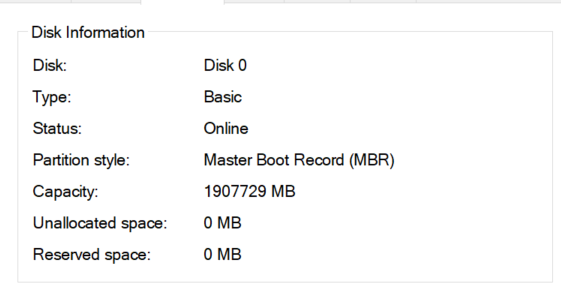
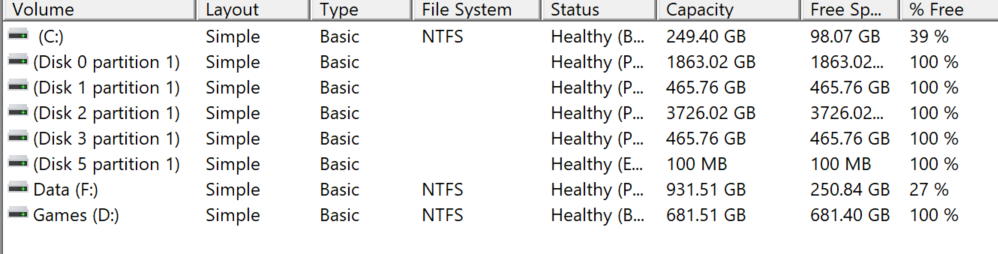
i cloned my vm machine into an ssd (not in the array). i booed the ssd into the same machine without using unraid. all the hard drives listed in the pictures named disk 0-1-2-3-5 used to be on the array of unraid but are not accesible not without formatting them
-
what do you mean? and how can i do that with out booting unraid?
-
ok so i managed to clone my VM to and ssd but now i cant see and use my HDD and other SSD i got hooked to the system (using physical pc) edit: just to be clear i can see the harddrives but cannot mount them. they display as partition. i can delete the data and reuse it but i want to be sure i got all the data out i need before that.
-
OK cool. I'll test it tommrow and replay back. Thanks
-
What does the command do? Where do I write the other lines to mentioned? Where does it clone that too?
-
i want to switch one of my VMS to a normal physical pc (bootable SSD and all) and i wondered how to do so? please help erezunraid-diagnostics-20210913-2032.zip
-
UP
-
i got 2 vms running one with gtx 1070 and one with rtx 3070. the one with 1070 runs fine no apperent spikes and drops., but my 3070 runs bad at some times and have huge drops in some games. i can get 140 fps in some places and when a little action starts it drops to 5-10. i got i9 9900k and 32 gb ram in total.
