





perfect
Members
-
Joined
-
Last visited
Everything posted by perfect
-
Thanks, Jorge. Updating the CA Backup/Restore app seems to have fixed the issue.
-
Thanks, JorgeB! That does seem like a good clue - but I don't see anything specifically stalling my CA Backup/Restore app. I do see that the app is deprecated, so maybe I need to change to the "KluthR" app instead?
-
I'm running Unraid v6.12.3 and am facing a strange issue for the last few months. Every Sunday night all of my active dockers stop and have to be manually restarted. All of these dockers are set to auto-start, so I'm not sure why they aren't auto-starting or what is stopping them in the first place. Nothing is jumping out to me in the logs - but I have attached my diagnostics. Any guidance on where to investigate would be appreciated. renfrewnas-diagnostics-20250825-0656.zip
-
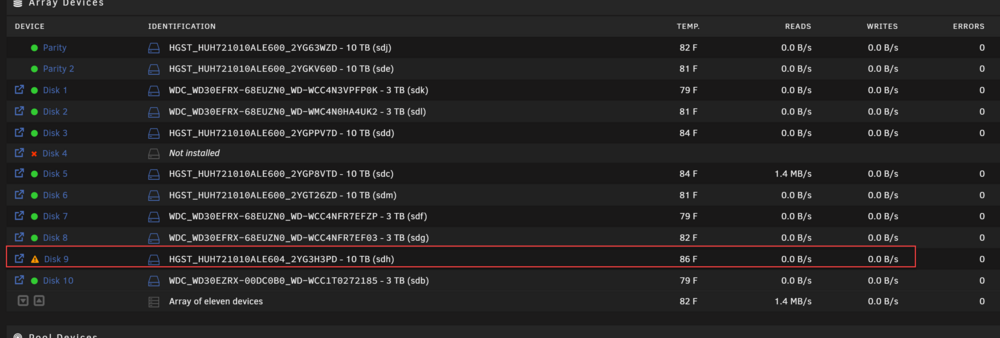
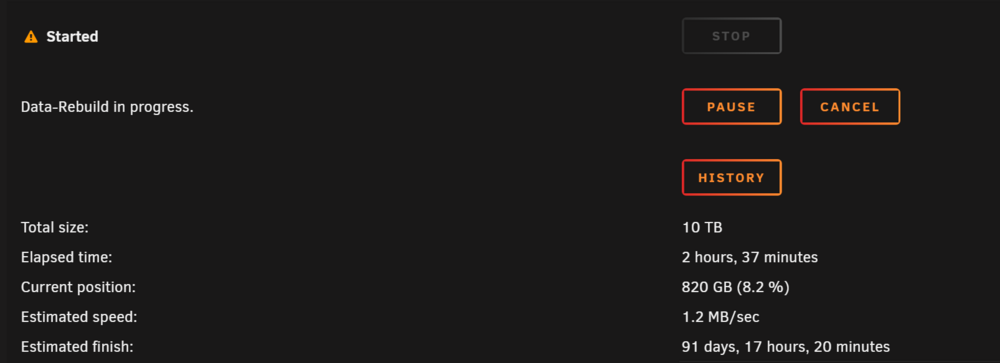
Hi all! I'm currently running Unraid v6.12.3. I have two 10TB parity disks and ten 3-10TB data drives. Last week, one of my 3TB data drives was giving me errors, so I bought a 10TB renewed drive as a replacement (I actually bought 3 of them to finally replace all of the 3TB drives). I followed the FAQ for replacing a disk drive, but my data-rebuild keeps failing or stalling out. The rebuild only gets to ~2% and then my writes to the replacement drop to zero and the whole thing starts to crawl (it has even crashed Unraid a few times and required me to hard-restart using the PSU). During the subsequent restarts, I've been getting random UDMA CRC errors on other drives and I'm now unclear on what the real problem is (bad memory, bad HBA breakout cables, PSU issues, etc)? When it gets to this point, I can't even reboot pause/cancel the rebuild nor restart/power-off the server. I've uploaded my diagnostic file for review. Any feedback or guidance on how to troubleshoot would be appreciated. Disk 9 (rebuild) no longer writing after ~2%: renfrewnas-diagnostics-20250814-1714.zip
-
Last month, I committed the cardinal sit of IT by changing two things at once. I upgraded my router (from an Unifi USG Pro to a Unifi Dream Machine) and upgraded my Unraid cache drive at the same time. During the cache drive update, I had to rebuild my docker image, but was mostly successful in getting everything working again. The only thing that I can't get working is my reverse proxy (I use SWAG, previously known as "Let's Encrypt"). I really only use SWAG to manage the reverse proxy connection for NextCloud (which I use to host files and give my friends/family an easy to access page for sharing files/photos) and BitWardenRS. Prior to these upgrades, everything worked just fine. I use duckdns and have confirmed that the IPs were updated in the duckdns portal (my external IP did change when upgrading the router). Symptoms: When I try to launch Nextcloud via the WebGUI, it takes me to MYNEXTCLOUD.duckdns.org/login - which does not work (refused to connect). When I try to launch Nextcloud via the internal IP address, it automatically routes me back to the MYNEXTCLOUD.duckdns.org/login (which failed because it refuses to connect). I have my SWAG and NextCloud dockers both set to use the "bridge" network. I'm not seeing anything in the logs that make me think it's not working correctly. Interestingly, BitWarden will work when using the internal IP, but fails the same way (refused connection) when using the reverse proxy via SWAG. Additional information: I am using port 444 for my NextCloud docker. I am using version 28.0.0 for NextCloud I have tried in both Chrome and Firefox My nextcloud iOS app will not connect (it uses the duckdns external portal). Any help would be appreciated!
-
I think that I have found the problem. After following the FAQ (I think!?) and setting the mover from Cache -> Array, I noticed that mover didn't move all of my files. On my old cache driver were both the docker.img and the libvirt.img. I manually moved these to a specific location on Disk 1 for safe keeping. My dockers and VMs were disabled during this move, so I'm unclear why they didn't seem to move properly. After replacing the cache drive the performing the mover operation from Array -> Cache, it looks like the libvirt.img and docker.img were manually recreated by Unraid, but weren't the correct ones (which explains why both my Docker and VM was blank). I disabled the VMs, deleted the "Libvirt Storage Location (/mnt/user/system/libvirt/libvirt.img) and redirected it to the libvirt.img file that I had previously manually moved to Disk 1. This worked and my Home Assistant VM came right up. My questions are: Why didn't my initial mover operation from the Cache -> Array omit these files (my VM was not enabled, as per the FAQ)? How do I safely move the working libvirt.img from my Disk1 location to the correct /mnt/user/system location on the cache? Is there a good reason to even move this VM libvirt.img to the cache or is it fine to leave on the array (Disk 1)?
-
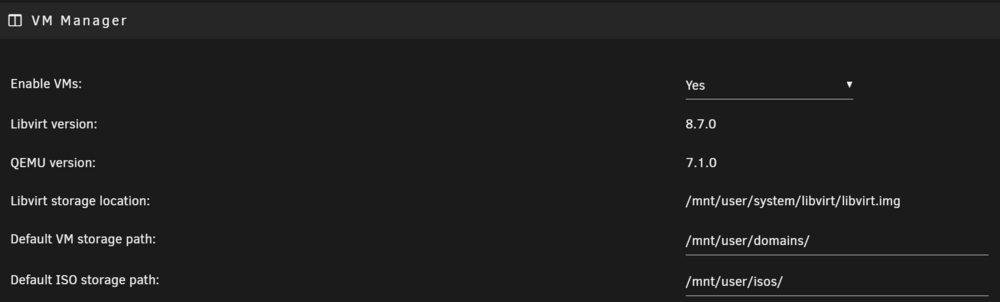
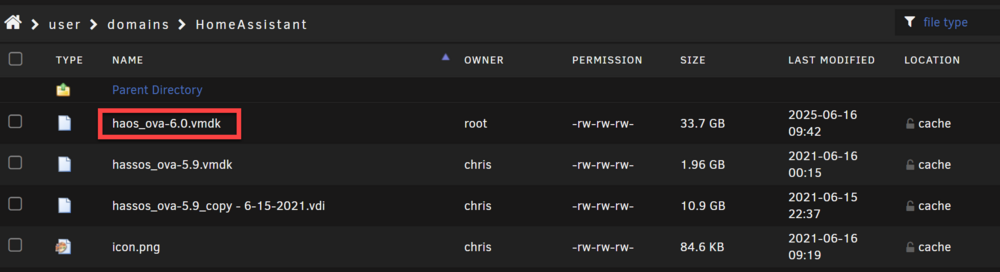
Hi all. My cache drive was starting to fail and was undersized for my usage. I attempted to replace the cache drive following the FAQ. During the mover phase, it seemed like some of my files were not properly moving from the cache to my main array (the libvirtimg was one such file that didn't seem to move). I manually moved this file to a specific disk share (for safe keeping) and went about replacing the cache drive. After installing the new cache drive (and running the mover back from array to cache), I found I was missing all my Docker containers as well my Virtual Machines (all empty!). Note - my previous cache drive was btrfs, same as my new cache drive. I am running v6.12.3, if that matters. I was able to restore my docker containers pretty quickly by re-installing from the Community Apps plugin. I have not found a convenient way to restore my Home Assistant VM. I confirmed that I do have the libvirt.img stored in the correct location: /mnt/user/system/libvirt/libvirt.img. I also confirmed that my Domains share is populated with the necessary virtual disk contents (.vmdk). I have backups for the .vmdk and the libvirt.img (and all AppData for that matter). I believe that I have the VM settings correct and that everything should be accessible: But no VMs show up: I have tried troubleshooting this for the last few hours and am not certain what steps to take next. Any help is appreciated. I've included my diagnostics. renfrewnas-diagnostics-20250616-1845.zip



-
You're right. I forgot that I tried this both ways and it wouldn't move off the cache into the array (so I set it back to cache as the primary). But I did try several times with Array as the primary and it wouldn't move the contents.
-
I'm following the FAQ for Replacing a Single Cache Drive (v6.12+) and am having difficulty moving my Home Assistant VM to the Array. I'm currently running v6.12.3. I went into the VM Manager and stopped/disabled the VMs. I set the shares to the following: Primary Storage: Cache Secondary Storage: Array Mover action: Cache->Array When I run the mover, it finishes in a few seconds, but the Home Assistant VM data is still found on the cache. Fortunately, my Home Assistant still works fine (after I re-enable the VM). I tried these same steps with my AppData and those files moved over successfully. Since I can't move the Home Assistant VM, I'm not able to upgrade my cache (250GB->2TB). Any advice would be appreciated. I've attached my diagnostics if that helps. renfrewnas-diagnostics-20240829-0038.zip
-
I have SWAG running on my Unraid (v6.12.3) for the last few years without an issue. Recently, I received an e-mail from Let's Encrypt that my Let's Encrypt certificates expire in 7 days. I wasn't sure why I was suddenly seeing this message. I restarted the docker (and ultimately the server) and am still getting this message when running "certbot renew" in the SWAG console: root@fb4ff453e394:/# certbot renew Saving debug log to /var/log/letsencrypt/letsencrypt.log - - - - - - - - - - - - - - - - - - - - - - - - - - - - - - - - - - - - - - - - Processing /etc/letsencrypt/renewal/Anasrp.duckdns.org.conf - - - - - - - - - - - - - - - - - - - - - - - - - - - - - - - - - - - - - - - - Renewing an existing certificate for Anasrp.duckdns.org and 3 more domains Certbot failed to authenticate some domains (authenticator: standalone). The Certificate Authority reported these problems: Domain: Abitwarden.duckdns.org Type: unauthorized Detail: 98.156.3.173: Invalid response from http://Abitwarden.duckdns.org/.well-known/acme-challenge/eUOCQd_YPD0oElb3CUNDwdaAaELTmY08jIHlMKi7IK4: 404 Domain: Anasrp.duckdns.org Type: unauthorized Detail: 98.156.3.173: Invalid response from http://Anasrp.duckdns.org/.well-known/acme-challenge/StQ2pSQqV1BM2ecxkSlA-inT3y4nYuKC8gKZpWRtP4k: 404 Domain: Anextcloud.duckdns.org Type: unauthorized Detail: 98.156.3.173: Invalid response from http://Anextcloud.duckdns.org/.well-known/acme-challenge/UIY3Tai7Bxp77hc_s9vGoajYm0CwxgoLT2g58gLOBUw: 404 Domain: Aoverseerr.duckdns.org Type: unauthorized Detail: 98.156.3.173: Invalid response from http://Aoverseerr.duckdns.org/.well-known/acme-challenge/7prnLRprrrzttvcKjCqu5A24DffX5kc9t9R1HzS6J4E: 404 Hint: The Certificate Authority failed to download the challenge files from the temporary standalone webserver started by Certbot on port 80. Ensure that the listed domains point to this machine and that it can accept inbound connections from the internet. Failed to renew certificate Anasrp.duckdns.org with error: Some challenges have failed. - - - - - - - - - - - - - - - - - - - - - - - - - - - - - - - - - - - - - - - - All renewals failed. The following certificates could not be renewed: /etc/letsencrypt/live/Anasrp.duckdns.org/fullchain.pem (failure) - - - - - - - - - - - - - - - - - - - - - - - - - - - - - - - - - - - - - - - - 1 renew failure(s), 0 parse failure(s) Ask for help or search for solutions at https://community.letsencrypt.org. See the logfile /var/log/letsencrypt/letsencrypt.log or re-run Certbot with -v for more details. I'm having a hard time understanding these messages. Are all of my certs failing or just the "Anasrp" cert? How do I fix this issue and ensure that my reverse proxies are still working? Note - I faced a similar issue a few years ago when the Let's Encrypt certificate was updated and my Unifi router needed to be updated in order to resolve the issue.
-
I feel like this should be a well documented process, but I couldn't find anything in the help manual specifically for how to upgrade / replace a small cache with a larger cache drive. I watched a few videos and have read several threads, but they don't show the same dialogues or options as my current version (v6.12.3). I'm simply trying to replace my 256GB SSD cache to a 1TB SSD cache. Most of my shares are using Cache -> Array, but my Appdata, Domains (VMs), and System shares remain on the Cache and are taking up about ~100GB and I'm frequently running out of room on the cache when transferring large amounts of data. Is there a guide or document that explains the correct procedure for replacing a cache drive with a larger version? I do not have enough free SATA ports for a cache pool. I found several older threads that used the following general process: 1. disable VM(s) 2. disable docker 3. change all shares to cache=yes 4. invoke mover, wait for it to finish 5. change drives 6. move everything back to the cache 7. re-enable VMs and Dockers My shares do not have an option for "cache = yes". Instead, I have primary and secondary storage choices and a "Mover Action" (Cache -> Array ... or ... Array -> Cache). I'm doing my homework before attempting this upgrade since I'm concerned about ruining my VMs or Dockers ☠️
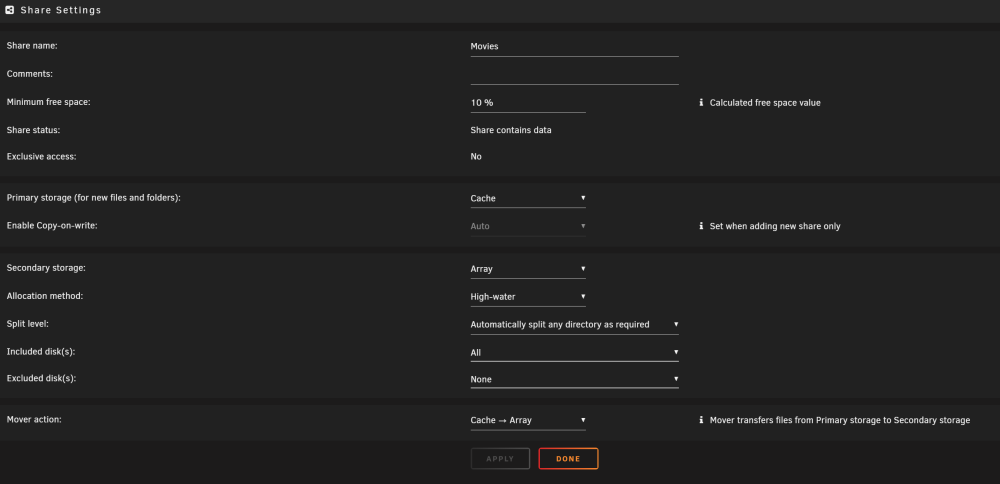
-
Thanks much for the support - I did that and continued updating all the way to the "latest" version. Now it works again! Is there a way to "pin" this version so that it doesn't update [with the docker "update all" command]?
-
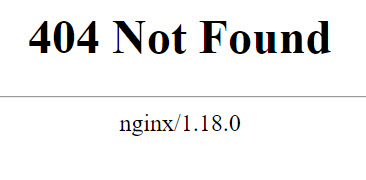
Thanks for the tip on how to delete .step file (I had to use Krusader to delete it since I didn't have permissions via Windows sharing). I was able to update the docker container all the way to v25.0.9... but I am still not able to access the GUI from either the internal IP or external (SWAG) link... (do I need now set the nextcloud container to the latest version - instead of 21.0.3-ls143)? Both my internal IP (x.x.x.x:443) and my external address (via SWAG) keep giving me this 404 error:
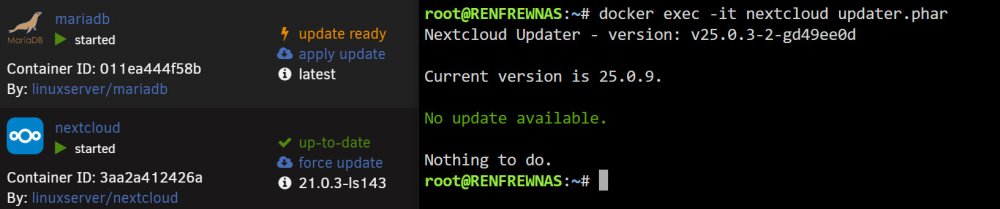
-
Count me in the group that learned the hard way that you can't update the Nextcloud docker directly from the Unraid GUI. I was on a pretty old version (21.0.0.18) and have spent hours trying to figure out how to correctly upgrade (or rollback to the previous working version). I tried following this guide: https://info.linuxserver.io/issues/2023-06-25-nextcloud/ I currently have installed repo: linuxserver/nextcloud:24.0.12 I tried running the "docker exec -it nextcloud updater.phar" command but it seems to be stuck at Step #3 (creating a backup) and nothing I do seems to release it or restart it. I can't see my GUI nor access Nextcloud from internal or external (SWAG) links. I end up getting a 404 error (maybe I need to edit my SWAG confs???). I have a config.php file (located here: \\UNRAID\appdata\nextcloud\www\nextcloud\config ) but not a version.php - so I can't really tell if I'm even updating the php correctly. The only error I seem to have in my log file is "s6-applyuidgid: fatal: unable to exec php7: No such file or directory" Any assistance would be greatly appreciated.
-
Hi! I posted a very similar issue yesterday and I thought I solved my problem.... maybe not. I purchased a few 10TB HGST UltraStar HDs (https://www.amazon.com/dp/B07DPKWLJR) that were used from a datacenter refresh. I already replaced my main parity drive (a 3TB WD) with one of the 10TB HGST datacenter drives. At first I couldn't get the 10TB HGST to appear in the system until I used the supplied "power disable" SATA adapter cable. This worked for my parity 1 drive and I was able to upgrade the parity drive. Today, I tried doing the exact same replacement procedure for my parity 2 drive (currently a 3TB WD) with an identical 10TB HGST datacenter drive. Of course, I first tried using the "power disable" SATA adapter cable - but unRAID didn't see the drive. I have since tried all sorts of combinations of SATA cables, HBA card ports, power cables, mobo SATA ports, different 10TB datacenter drives, etc. No matter what I do it doesn't seem to want to find the 2nd 10TB drive and I'm stumped as to why. If I plug in the 3TB WD it immediately recognizes it (as an unassigned device). Note - I can physically feel the drive spinning up (while using the "power disable" SATA adapter cable. What should I try next? I'm following this procedure here: https://flemmingss.com/replacing-a-parity-drive-in-unraid/ I've attached my diagnostics if that helps! renfrewnas-diagnostics-20230713-1958.zip
-
###SOLVED### The renewed hard drives that I bought have a "power save" feature and required me to use a special SATA power cable that I guess bypasses this feature. This was included with the HDD, but I didn't consider that it was needed until I read reviews on Amazon. I was able to find the disk and am re-building my parity with the upgraded 10TB HDD! I am replacing a 3TB WD HDD with a 10TB HGST HDD (renewed from a data center pull, mostly likely). I stopped the array, removed the original parity drive and replaced with the larger 10TB drive. When I restarted the system, the new 10TB is not showing up as assignable and my system doesn't seem to recognize it. I tried a 2nd 10TB HGST HDD (bought from the same source) and that doesn't show up either. Here are the drives that I bought in case that matters: https://www.amazon.com/dp/B07DPKWLJR I bought 5 of these HGST 10TB drives to upgrade my system - not off to a great start!
-
I might have actually solved my problem... My home router is a Unifi USG PRO-4. I did some reading and discovered that SWAG (Let's Encrypt) has been experiencing a certificate expiration issue since 9/30/2021 (right around the time that this started). This page really helped me better understand the issue. I did a firmware update to my USG PRO-4 and restarted my SWAG docker... and everything works now!!!
-
Awesome - thank you! That was a relief!!
-
I was able to safely roll back to 6.8.3, but all of my dockers and VM are missing. I have backups (from my flash drive) that I took before I did this. How can I restore them?
-
This was what I was afraid of... Can I roll back to 6.8.3? Edit - I'm restoring back to 6.8.3 now...
-
There are no errors on the Main page for any of my disks. No SMART warnings in the dashboard either. I have not run a memtest. I just setup the syslog server (to flash) and will monitor if a crash occurs again.
-
Yesterday, I upgraded from 6.8.3 to 6.9.2. At some point last night, my server went offline (crashed?). I restarted it manually and upon restart the parity check began. The parity check started off smoothly (~130MB/s), but soon slowed to a crawl (5.7MB/s - and dropping). I have stopped all of my dockers and VMs. I've attached the diagnostics. Note - I have a 30TB array (10 x 3TB + 2 x 3TB for parity). It usually takes me about 8 hours to complete a parity check. renfrewnas-diagnostics-20211014-1026.zip
-
I'm having a recent issue with SWAG that I need help to solve. Specs: Unraid version 6.9.2 (rebooted earlier today) SWAG (linuxserver) - up-to-date Problem: My duckdns subdomains will no longer work and I can't access any of my reverse proxies (on or off network). This all worked fine a few months ago. My ports are forwarded for 80 and 443 (I can see both ports as open using https://canyouseeme.org/) SWAG LOG: (redacted some private info) ErrorWarningSystemArrayLogin [s6-init] making user provided files available at /var/run/s6/etc...exited 0. [s6-init] ensuring user provided files have correct perms...exited 0. [fix-attrs.d] applying ownership & permissions fixes... [fix-attrs.d] done. [cont-init.d] executing container initialization scripts... [cont-init.d] 01-envfile: executing... [cont-init.d] 01-envfile: exited 0. [cont-init.d] 10-adduser: executing... ------------------------------------- _ () | | ___ _ __ | | / __| | | / \ | | \__ \ | | | () | |_| |___/ |_| \__/ Brought to you by linuxserver.io ------------------------------------- To support the app dev(s) visit: Certbot: https://supporters.eff.org/donate/support-work-on-certbot To support LSIO projects visit: https://www.linuxserver.io/donate/ ------------------------------------- GID/UID ------------------------------------- User uid: 99 User gid: 100 ------------------------------------- [cont-init.d] 10-adduser: exited 0. [cont-init.d] 20-config: executing... [cont-init.d] 20-config: exited 0. [cont-init.d] 30-keygen: executing... using keys found in /config/keys [cont-init.d] 30-keygen: exited 0. [cont-init.d] 50-config: executing... Variables set: PUID=99 PGID=100 TZ=America/Chicago URL=duckdns.org SUBDOMAINS=cdrA,cdrB,cdrC EXTRA_DOMAINS= ONLY_SUBDOMAINS=true VALIDATION=http CERTPROVIDER= DNSPLUGIN= EMAIL=REMOVED STAGING=false grep: /config/nginx/resolver.conf: No such file or directory Setting resolver to 127.0.0.11 grep: /config/nginx/worker_processes.conf: No such file or directory Setting worker_processes to 4 Using Let's Encrypt as the cert provider SUBDOMAINS entered, processing SUBDOMAINS entered, processing Only subdomains, no URL in cert Sub-domains processed are: -d cdrA.duckdns.org -d cdrB.duckdns.org -d cdrC.duckdns.org E-mail address entered: REMOVED http validation is selected Generating new certificate Saving debug log to /var/log/letsencrypt/letsencrypt.log Requesting a certificate for cdrnasrp.duckdns.org and 2 more domains Certbot failed to authenticate some domains (authenticator: standalone). The Certificate Authority reported these problems: Domain: cdrA.duckdns.org Type: unauthorized Detail: Invalid response from http://cdrA.duckdns.org/.well-known/acme-challenge/nJv_R9lJk8sxZtsoGX1gkZySREMOVED [98.156.3.999]: "<html>\r\n<head><title>404 Not Found</title></head>\r\n<body bgcolor=\"white\">\r\n<center><h1>404 Not Found</h1></center>\r\n<hr><center>" Domain: cdrB.duckdns.org Type: unauthorized Detail: Invalid response from http://cdrB.duckdns.org/.well-known/acme-challenge/VMwvJ3ck1dFUxwL12FG1CzRtmrs8REMOVED [98.156.3.999]: "<html>\r\n<head><title>404 Not Found</title></head>\r\n<body bgcolor=\"white\">\r\n<center><h1>404 Not Found</h1></center>\r\n<hr><center>" Domain: cdrC.duckdns.org Type: unauthorized Detail: Invalid response from http://cdrC.duckdns.org/.well-known/acme-challenge/7jQsQISoHcKOZpF_ajOE-AcDxz_REMOVED [98.156.3.999]: "<html>\r\n<head><title>404 Not Found</title></head>\r\n<body bgcolor=\"white\">\r\n<center><h1>404 Not Found</h1></center>\r\n<hr><center>" Hint: The Certificate Authority failed to download the challenge files from the temporary standalone webserver started by Certbot on port 80. Ensure that the listed domains point to this machine and that it can accept inbound connections from the internet. Some challenges have failed. Ask for help or search for solutions at https://community.letsencrypt.org. See the logfile /var/log/letsencrypt/letsencrypt.log or re-run Certbot with -v for more details. ERROR: Cert does not exist! Please see the validation error above. The issue may be due to incorrect dns or port forwarding settings. Please fix your settings and recreate the container
-
Thanks for the prompt response! I actually still have a lot of available storage left on my array and am avoiding buying a new HD (at current prices). I'm only at 50% storage usage on my 30TB array - and this particular drive is only using 1.5TB total. Is there a way that I can safely transfer the 1.5TB data from this disabled drive onto another drive and simply unmount disk3? I will then remove it from the array permanently and let the data live on the rest of the array. Is there a procedure for this?
-
I've attached the diagnostics file - thanks! renfrewnas-diagnostics-20210810-0915.zip



