





artkingjw
Members
-
Joined
-
Last visited
-
So I finally had time to look at the server today. Forced a power down etc. I took the opportunity to inspect the hardware. In short, I found 1 of the RAM sticks loose for some reason - one side didn't have the tab locked. I have no idea how this happened, I've built/rebuilt many computers, many times over several years and never had this happen once. I have a fondness for clicks and would have known if I installed a RAM stick which did not click twice. I'm not sure if this would have caused the aforementioned issues. Remember that my issues involves a failure to access the Unraid GUI and directories, yet, some functions such as VMs remained totally functional. In theory, the RAM stick could have also come loose while I was inspecting the hardware - I removed some nearby cables and could have bumped it. If this were the case, then a loose RAM stick would not be the cause for my crashes. In any case, I'll be running the server in safe mode, with no dockers nor VMs for the next while to see if the issues repeat. I noticed that in the past days, the issue happened more quickly. Months ago, the server would run for weeks without problems; recently, it would become inaccessible within a few hours, even though VMs could still be remotely accessed via VNC.
-
OH? Thanks for the tip, I'll read through that link soon. My impression was that the 'clean shutdown' signal would start AFTER 15 seconds on UPS battery power. What I've been told in the past is to have that number quite small, since my UPS uses an SLA battery, which does not like to run down to empty. It sounds like that time should be timed to be slightly greater than the typical time it takes for the server to perform a clean shutdown?
-
Seems like it's still not stable. When I tried it a few hours after your message, the webGUI became inaccessible again. I was busy so didn't have time to look into it but left the server on in case it came back. Fast forward a day or two, and the power went out while I was working away from home. My UPS Settings on Unraid were to shutdown after 15 seconds on UPS power, but according to people at home, it did not shut down. Instead, they tried shutting it down by pressing the power button once - which did not work after a few minutes. Then they forced it to shutdown by holding the power button down. I took this to mean that the server was still crashed during the power outage? After the power outage, the server didn't boot using the USB drive. I did a check disk repair operation in Windows, which allowed Unraid to boot again. I'm not sure what went wrong, but have attached the diags and syslog here. Thanks in advance. homecloudv2-diagnostics-20240127-1452.zip syslog censored 2.log
-
Unraid came back! Without a reboot into safe mode. I just closed the browser tabs as you suggested, and waited a few hours as I did other stuff. Came back to check out of curiosity and it returned. Should I boot into safe mode anyway? What would I do in safe mode? Just use it as a file server and see if it crashes in safe mode too?
-
Ok, I'll keep this in mind. Does this include any docker things like Krusader, Tdarr, etc? I got into a habit of having my most used tools open in pinned tabs. I think my server crashed again a few hours ago, after I retrieved the syslog file. I'll reboot and try safe mode later.
-
Well it's not censored, it had the names of my shares and my email on it. I've redacted them manually, hopefully didn't miss anything. The attached syslog is only of the session that ultimately crashed. It recorded prior sessions which did not crash, so I deleted them. In the end, I could not access the server to issue a shutdown command, not through the webgui, not through SSH. I tried to access it on console, locally (connected a monitor + keyboard to the server), and it didn't let me log in. Clicking the shutdown button didn't initiate a 'graceful shutdown...'. Then 'forcing shutdown...' also did not shut the server down. syslog censored.log
-
Ok it finally crashed again, and I have the syslog file now. Question: is there a way to anonymize the syslog? Otherwise I'll do it manually...
-
Gotcha, I'll do both just in case.
-
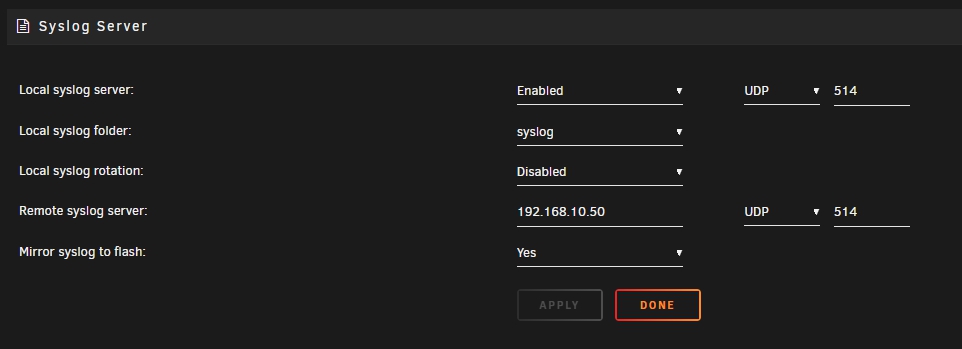
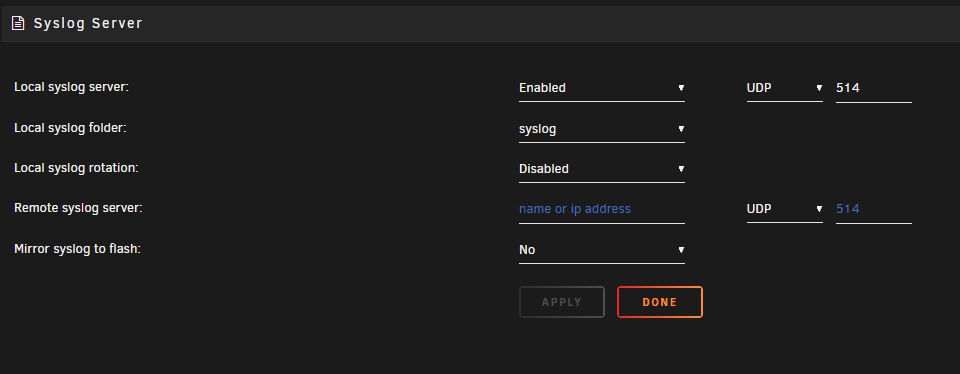
ok, i created a cache preferred share called 'syslog' and pointed the syslog server there. it looks like my next step is to just, let my server run, and wait for a crash?
-
Hi, I recently upgraded to 6.12.6, and decided to give zfs a try with a 2 disk array. Soon after that, Unraid seemed to stop working after a few hours/days of up time. The system remained powered on, drive power lights are on, but no disk activity, and no network access, and a file transfer to a local unassigned disk also stopped. This has happened 2 times now. Here are the diags, let me know what else I can do, I've temporarily plugged in a monitor to see what happens during the next crash. I don't plan to start the array yet though. Unfortunately, the only way out seems to be a hard reboot, which triggers a parity check. Thanks. homecloudv2-diagnostics-20231218-2251.zip
-
Yes, I mean, the 'cache_n' btrfs pool. I'll copy off the existing data, replace both 1tb ssd's with 2tb ssd's, format, name as 'cache_n', then move data back over. by "it", I think you meant the other device (the 2tb ssd)? which should be easy enough Cheers
-
Ok, if I were to reformat, I guess I could just as well replace those 1TB drives with 2TB drives if I wish? Will unraid recognize my new array as the 'same' as the old array? After I recopy all of the data back? I suspect not... but then I could just go to Shares and point it to the new array right? Everything should be seamless? Anyway, I tried fix-device-size again, and this time it worked, I no longer get that device size warning when i do a file system check. Attached are diags if relevant. First, I'm doing a scrub, just in case. Next, I'll make a copy of the data on the drive, and reformat/make a new array when able to. homecloudv2-diagnostics-20230830-2258.zip
-
Disconnected all drives not used in the arrays btrfs check output: [1/7] checking root items [2/7] checking extents WARNING: minor unaligned/mismatch device size detected: super block total bytes=4000805560320 found total bytes=2000407674880 WARNING: recommended to use 'btrfs rescue fix-device-size' to fix it [3/7] checking free space tree [4/7] checking fs roots [5/7] checking only csums items (without verifying data) [6/7] checking root refs [7/7] checking quota groups skipped (not enabled on this FS) Opening filesystem to check... Checking filesystem on /dev/sdk1 UUID: 09a80e5f-82a2-4a02-89d6-4ca4016b58f7 found 882812723200 bytes used, no error found total csum bytes: 762312024 total tree bytes: 1058029568 total fs tree bytes: 59916288 total extent tree bytes: 50003968 btree space waste bytes: 196698144 file data blocks allocated: 18196154212352 referenced 865362587648 starting the array normally allows all drives to mount. here are the diags. Thanks homecloudv2-diagnostics-20230830-1344.zip
-
Label: none uuid: e2554b33-7ded-4c8c-9329-017396f8f091 Total devices 2 FS bytes used 347.58GiB devid 2 size 931.51GiB used 388.03GiB path /dev/sdm1 devid 3 size 931.51GiB used 388.03GiB path /dev/sdl1 Label: none uuid: 09a80e5f-82a2-4a02-89d6-4ca4016b58f7 Total devices 2 FS bytes used 822.18GiB devid 2 size 931.51GiB used 931.51GiB path /dev/sdk1 devid 3 size 1.82TiB used 2.00GiB path /dev/sdo1 devid 4 size 931.51GiB used 931.51GiB path /dev/sdn1 There should be 2 btrfs raid 1 arrays, each made of 2X 1TB SSDs. The first array 'cache' is fine, the second 'cache_n' is the problem one. Based on this output, it looks like it's trying to look for sdo1, a 2tb ssd, to join the pool? this drive is attached but it's not part of any array, it's not mounted.
-
Hi! Need some help with one of my BTRFS arrays becoming unmountable. "Unsupported or no file system". I performed a filesystem check in maintenance mode, with the following result: [1/7] checking root items [2/7] checking extents ERROR: super total bytes 2000407674880 smaller than real device(s) size 4000805560320 ERROR: mounting this fs may fail for newer kernels ERROR: this can be fixed by 'btrfs rescue fix-device-size' [3/7] checking free space tree [4/7] checking fs roots [5/7] checking only csums items (without verifying data) [6/7] checking root refs [7/7] checking quota groups skipped (not enabled on this FS) Opening filesystem to check... Checking filesystem on /dev/sdo1 UUID: 09a80e5f-82a2-4a02-89d6-4ca4016b58f7 found 882812723200 bytes used, error(s) found total csum bytes: 762312024 total tree bytes: 1058029568 total fs tree bytes: 59916288 total extent tree bytes: 50003968 btree space waste bytes: 196698144 file data blocks allocated: 18196154212352 referenced 865362587648 I tried some of the steps from this post: I managed to do a read-only mount and copied the files onto my array. The fix-device-size step didn't work because the device was still mounted? Sorry I'm not familiar with the technical details. But I assume it needs to be unmounted? Diags attached. I upgraded to Unraid 6.12.3 very recently, from 6.10.3. The array worked fine after the upgrade, for at least 2 reboots. Any suggestions on what to do next? thanks in advance. homecloudv2-diagnostics-20230829-1511.zip
