






Atoxien
Members
-
Joined
-
Last visited
Everything posted by Atoxien
-
Danke für eure schnellen Antworten, habe sonst immer einen von SanStick und der hat bis dato funktioniert aber der ist Tot. Habe gerade vorher sogar versucht Manuel zu machen aber nicht mal das geht. Hab mir jetzt deinen bestellt @MPC561. Danke an @jj1987und @MPC561!
-
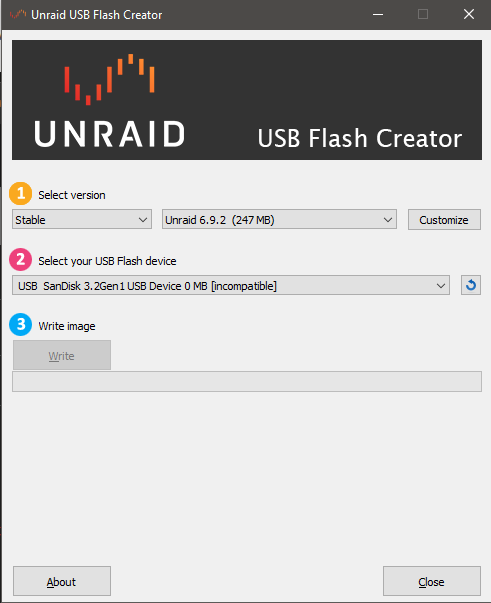
Heyho, ich habe mir einen 32 GB Stick bestellt der auch erkannt wird aber steht mit 0 MB und [incompatible] dabei, aber ich kann den Stick ohne Probleme nutzen (Siehe Anhang). Kann den Stick mit Proxmox beschreiben und das geht ohne Probleme. Finde nun meinen Fehler nicht. Der Stick: https://www.amazon.de/gp/product/B077VXV323/ref=ppx_yo_dt_b_asin_title_o00_s00?ie=UTF8&psc=1 Server: https://geizhals.at/msi-cubi-5-10m-074beu-936-b18311-074-a2625332.html Zuzgl. RAM: https://www.amazon.de/gp/product/B07BBQG6FR/ref=ppx_yo_dt_b_asin_title_o03_s00?ie=UTF8&psc=1 Jetzt möchte ich die Community fragen in der Hoffnung, das wir den Fehler finden. LG Leo
-
-
Hey, wenn ich unter Werkzeuge, Neue Konfiguration auswähle und alle Zuweisungen anklicke, lösche ich damit meine Daten? Also die auf die Festplatten sind? Mit freundlichen Grüßen Atoxien

