PirateGhost
Members
-
Joined
-
Last visited
Everything posted by PirateGhost
-
The issue disappeared itself after several reboots 😁
-
Hi. I have the same issue. I have it in different devices, with cleaned cache of browser and in incognito mode. In logs there is a spam with "Feb 4 10:33:03 Tower publish: curl to wireguard failed Feb 4 10:33:03 Tower publish: curl to update3 failed Feb 4 10:33:03 Tower publish: curl to temperature failed Feb 4 10:33:04 Tower publish: curl to update2 failed Feb 4 10:33:04 Tower publish: curl to apcups failed Feb 4 10:33:04 Tower publish: curl to wireguard failed Feb 4 10:33:04 Tower publish: curl to update3 failed Feb 4 10:33:04 Tower publish: curl to update1 failed Feb 4 10:33:05 Tower publish: curl to update3 failed Feb 4 10:33:05 Tower publish: curl to vm_dashusage failed" I have tailscale plugin installed. But afair, it started after patching of Unraid7 with the patch plugin
-
It makes sense. Thank you for resolving the mystery.
-
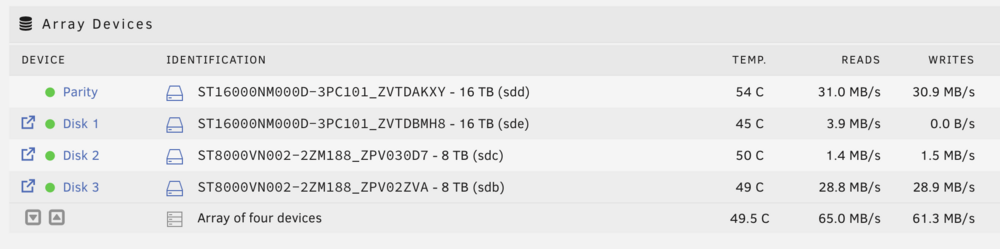
Hello. I've encountered an issue, when a turbo write is enabled, but write is still ongoing with usual read/modify/write. Could you please help to find a culprit? I'm migrating cache pool and nonworking turbo write drastically increases time. tower-diagnostics-20240521-1951.zip