Skip to content
View in the app

A better way to browse. Learn more.

Unraid

A full-screen app on your home screen with push notifications, badges and more.

To install this app on iOS and iPadOS
  1. Tap the Share icon in Safari
  2. Scroll the menu and tap Add to Home Screen.
  3. Tap Add in the top-right corner.
To install this app on Android
  1. Tap the 3-dot menu (⋮) in the top-right corner of the browser.
  2. Tap Add to Home screen or Install app.
  3. Confirm by tapping Install.

Cyb3rrunn3r

Members
  • Joined

  • Last visited

Everything posted by Cyb3rrunn3r

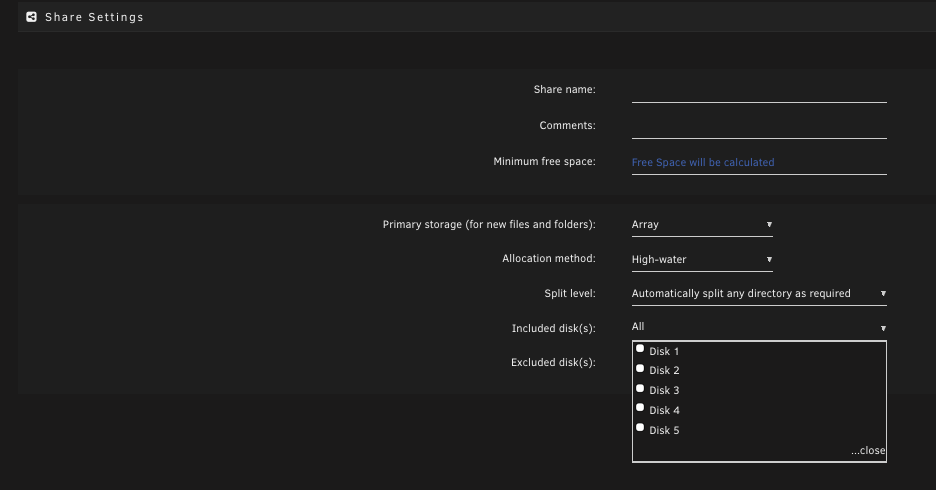
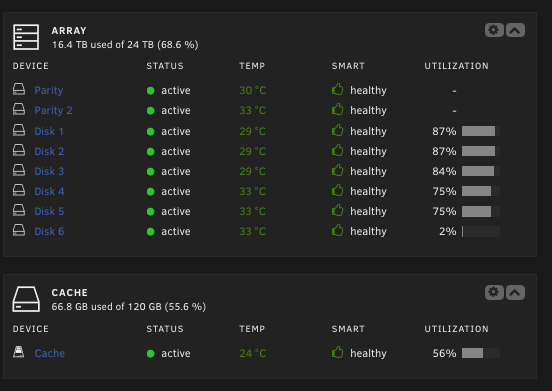
  1. Mein Unraid: 2x Parity 6x "normale" HDD für Daten 1x SSD für Cache 1x USB Stick mit der UnRaid-Software (Bootlaufwerk) Wenn ich nun ein Share anlegen will, kann ich aber nur aus 5 Laufwerken wählen Habe mal Bilder angehängt. Habe das Array schon gestoppt und geschaut, aber alle Platten sind mit Einträgen versehen, nur kann ich dennoch auf die neueste Platte NIX schreiben und diese quasi nicht benutzen. 😟 Was muss ich wo einstellen oder nachschauen oder oder oder?? 😟 Achja, zum 2. Bild: NEIN, diese ist auch NICHT auf den "Excluded Discs" zu sehen. Habe gerade nochmal geschaut. 😅 Schönen Abend noch 🙋‍♂️ Cyb3rrunn3r

Account

Navigation

Search

Search

Configure browser push notifications

Chrome (Android)
  1. Tap the lock icon next to the address bar.
  2. Tap Permissions → Notifications.
  3. Adjust your preference.
Chrome (Desktop)
  1. Click the padlock icon in the address bar.
  2. Select Site settings.
  3. Find Notifications and adjust your preference.