Skip to content
View in the app

A better way to browse. Learn more.

Unraid

A full-screen app on your home screen with push notifications, badges and more.

To install this app on iOS and iPadOS
  1. Tap the Share icon in Safari
  2. Scroll the menu and tap Add to Home Screen.
  3. Tap Add in the top-right corner.
To install this app on Android
  1. Tap the 3-dot menu (⋮) in the top-right corner of the browser.
  2. Tap Add to Home screen or Install app.
  3. Confirm by tapping Install.

droidgod

Members
  • Joined

  • Last visited

  1. droidgod changed their profile photo
  2. 如题,邮箱里没找到怎么办
  3. USB3.0 和2.0 在一起的,启动U盘在2.0的一个口上,开启了both和允许不安全中断,貌似还是没法分开啊

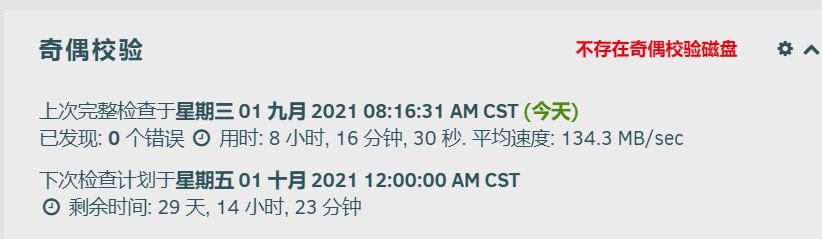
  4. 我没有配置校验盘,为什么还是会自动进行奇偶校验?我知道可以在设置里关闭计划自动校验。
Account

Navigation

Search

Search

Configure browser push notifications

Chrome (Android)
  1. Tap the lock icon next to the address bar.
  2. Tap Permissions → Notifications.
  3. Adjust your preference.
Chrome (Desktop)
  1. Click the padlock icon in the address bar.
  2. Select Site settings.
  3. Find Notifications and adjust your preference.