





Pentatonic
Members
-
Joined
-
Last visited
Everything posted by Pentatonic
-
I changed the nextcloud nginx site-confs from the appdata which gets mapped in the docker config folder. Listen port was changed to something other than 443. This didn't help but got rid of the original error of unable to bind to the port. Now it says a 502 gateway error when accessing via tailscale webUI.
-
Thank you for your reply. I am not sure how to make that change. Edit the docker config file for Nextcloud? I did change the webUI port for Nextcloud from 443 to something else. That didn't help either.
-
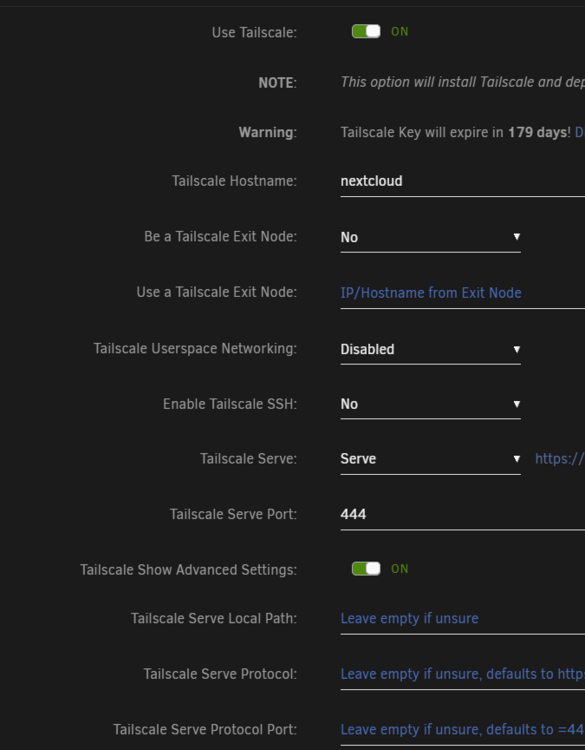
Hi Need some help with this - I am trying to bring up Nextcloud docker with tailscale option turned on and it does not work. The error that I see in the logs are: I tried changing the listen port in the advanced option of the container but it doesn't seem to take that. Is there anything I am missing here? I can't run anything on 443 as it is taken.
-
Thank you! Rebooted after adding that parameter in the sysconfig and PCIe errors are no longer visible in syslog.
-
Very strange. I was checking this on my mac earlier and I always see the banner. Now I am on my PC and I don't see it at all. Maybe something to do with client cache? Anyways, uploading the latest diagnostics. tower-diagnostics-20250211-1058.zip
-
Logged in today and seeing this banner again. Is there any other logs I should be attaching?
-
Just an update - I logged in to the server after a couple of hours and now the banner is not showing. It could have been just timing. All good and thanks JorgeB to check out the logs.
-
If I navigate to a different page, it vanishes but reappears after a few seconds. The previous USB was indeed corrupt - I couldn't read from it on my PC. Somehow it booted for one last time.
-
Today, I got this message about my 9 year old flash drive :-) Promptly changed to a new USB stick and was able to transfer the license to the new guid. The system is running alright after and busy doing a parity check. But I still see this banner. Should I be worried about this? Diagnostics are attached. Thanks! tower-diagnostics-20250210-1341.zip

