




Skip to content
View in the app

A better way to browse. Learn more.

Unraid

A full-screen app on your home screen with push notifications, badges and more.

To install this app on iOS and iPadOS
  1. Tap the Share icon in Safari
  2. Scroll the menu and tap Add to Home Screen.
  3. Tap Add in the top-right corner.
To install this app on Android
  1. Tap the 3-dot menu (⋮) in the top-right corner of the browser.
  2. Tap Add to Home screen or Install app.
  3. Confirm by tapping Install.

dmoneydfm

Members
  • Joined

  • Last visited

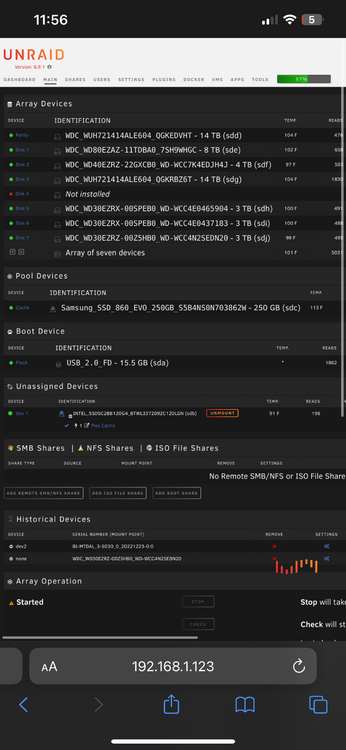
  1. Attached is photo of my config prior to the USB dying on me . Disk 3 (14tb) was added to parity by mistake .
  2. Hey Jorge! Thank you for your help with this. Here are the diagnostics tower-diagnostics-20240829-2317.zip
  3. As in title, my USB started presenting errors and had to create a new config. I accidentally selected my data drive as the parity drive and pressed start on the array. As soon as I saw the parity drive (no in the data array) showing “auto” for file system I knew I had made a mistake. i quickly created a new config and rearranged all the drives as they were before. What should I do next?

Account

Navigation

Search

Search

Configure browser push notifications

Chrome (Android)
  1. Tap the lock icon next to the address bar.
  2. Tap Permissions → Notifications.
  3. Adjust your preference.
Chrome (Desktop)
  1. Click the padlock icon in the address bar.
  2. Select Site settings.
  3. Find Notifications and adjust your preference.