





anthem221
Members
-
Joined
-
Last visited
-
Hello there, i guess i have the same Problem. So if i understand it right the final solution was to not passthrough anything to the VM? In my case it would be my GPU. Thanks ! CPU 13KVM TaintedP.txt
-
I have two VMs running, one windows 10 I had that of to test, Still crashes. The other one....I can't really turn of because that's a pfsense...if I turn that off I can't even turn on the light in my flat 😂😂 But for test I can install the old router back for some days - do you think it's the pfsense? It's just running in the background with nothing attached except one pcie ethernet card.
-
Sadly yes. I passed the BD the old way to a docker, need to do it the new way with add device in the docker settings. I had unplugged it for three days and still had the freezes. I will disconnect it again till it's repaired, probably the best. I had a lot of log entry's that something is wrong, I fixed everything I could but the original failure still remains.
-
Hello there, I hope I'm posting this in the correct thread—if not, please correct me. My Unraid system freezes approximately once a day, to the extent that I have to press the power button for a few seconds. I changed some Hard Drives recently and also restored my libvirt.img because is accedantly deleted it (1 Day old Backup - no changes made after the Backup). I'm mirroring my syslog to my Unraid Stick. I encounter the following error in the log multiple times a day, and sometimes the server simply freezes. I've checked numerous aspects, but I'm unable to pinpoint the issue. I also changed from mcvlan to ipvlan because my log mentioned it. I'm hopeful that you guys might have some insights. Thank you very much! Log_Kernel_Error.txt datenbunker-diagnostics-20240126-1938.zip Log_Kernel_Error_2.txt
-
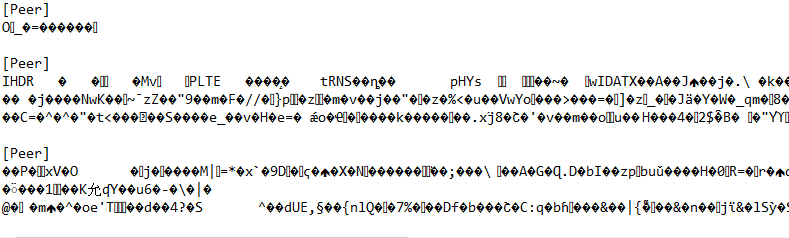
I found the Solution...very simple, just delete the wireguardconfig that looks not very healthy in the flash drive. As you can see in the picture it does not look as a config should look like. As i explained first i forgott to extract the vpn config from the zipfile and uploaded the complete zipfile. So i think wireguard somehow tryied to build out of bits and bytes from the zip a vpn configuration and that in the picture is the result. My other VPNs were still funktional but i could not go to the adminpage of wireguard in the webgui. I think the webgui just coud not present those kind of symbols. Strange that there is no securitylayer that prevents somebody uploading a zipfile but thats how it is. I hope - if somebody does the same mistake in the future like i did now - this post will help.
-
Hello there, i wanted to import a new wireguardtunnel - by mistake i did not unzip the tunnel first and uploaded the complete zipfile instead of the cfg file to import. After that my Gui in wireguard is looking like in the pikture. As far as i can tell wireguard is still working in the background but my webgui is gone. Even after a clean restart of unraid its not showing anything...so now i am not sure what to do. Any suggestions ? Did anybody had this problem before?

-
Found this, so my CPU is broken? mcelog: failed to prefill DIMM database from DMI data Kernel does not support page offline interface Hardware event. This is not a software error. MCE 0 CPU 3 BANK 0 TSC 2cc7f72ed29252 TIME 1683513240 Mon May 8 04:34:00 2023 MCG status: MCi status: Corrected error Error enabled MCA: Internal parity error STATUS 9000004000010005 MCGSTATUS 0 MCGCAP c10 APICID 6 SOCKETID 0 MICROCODE f4 CPUID Vendor Intel Family 6 Model 165 Step 5
-
Hello, i also have Machine Check Event Error - maybe you could help me to find the log entry that indicates what the problem is - i cant find it. Thank You! Found this: mcelog: failed to prefill DIMM database from DMI data Kernel does not support page offline interface Hardware event. This is not a software error. MCE 0 CPU 3 BANK 0 TSC 2cc7f72ed29252 TIME 1683513240 Mon May 8 04:34:00 2023 MCG status: MCi status: Corrected error Error enabled MCA: Internal parity error STATUS 9000004000010005 MCGSTATUS 0 MCGCAP c10 APICID 6 SOCKETID 0 MICROCODE f4 CPUID Vendor Intel Family 6 Model 165 Step 5 so my cpu is borken? datenbunker-diagnostics-20230508-0802.zip
-
Hello there, i just woke up and my system tells me i have a hardware error. Because i cant find the problem i do what "FixCommonProblems" suggested and post my log here. Maybe you can help me? Thank you! datenbunker-diagnostics-20230508-0802.zip

-
Hello, so simple Solution. The first i9 i had was not of good qualitiy. With the second i9 i got everything worked fine - except sometimes when the cpu got a big spike. Then i realised my PSU is to small - bought a oversized one 1200W Titanium and now everything works, nothing is crashing.
-
Hello there, first of all, thank you for your help. I try to keep it short so i will do a mainpart where i write down the facts. afther that i will do a "Sidestory" maybe it helps for finding the problems. Important Hardware: MSI z490 pro i5 10400k 16 x Crucial BL 64GB Ram I can reproduce the problem - but i cant read something out of the Logs - maybe you can? The System crashes and starts booting up again and then i downloaded the Syslog from the USB and the Diagnostics and attatched them here. Overall: I have the System running without Problems for the last 2,5 Years. I wanted to upgrade my CPU i5 10400k to the i9 10900k. (Hardware is supported). ATM i cant reproduce the crash with unraid itself (did a lot of corefreq-cli). I only can reproduce it in my gaming VM when i try to load a savegame. In my opinion a VM cant crash the host so i must have a hardware problem or a bad Bios setting. Logs attached. Sidestory: (If you have time maybe it helps to find a problem, thats just the story of my last week) I have a Gaming-VM and was just working fine. I chandged the CPU and the VM crashes, and with the VM the complete UNRAID-System. I installed the corefreq-cli Plugin and tested it - the Atomicburn is working fine but with the others it crashes. After some tests i thought the CPU is broken and sent it back (ordered a new one and will be delivered next week). Then i put my old i5 back, startet it and everything was fine. THEN i found that game UBOAT in steam - i like uboats. AND everytime i started that game my System with Unraid Crashes again - so also with my old CPU. I spent hours in the Bios and figured that when i was switchig back to the i5 a Overclocking was activated. Its not a good OC and i dont ned OC so i deactivated it and also deactivated XMP of the RAM - just for testing. Then everything worked fine for 2 Days, also the Uboat game which i have played for hours, so i thought i maybe found the Problem, just a bad biossetting and the i9 i sent back was fine. So i am waiting for my new i9 and was playing the game again and out of the sudden my VM with my Unraid is crashing again. NOW: everytime i am loading my last savegame everything crashes VM + Unraid. Everything else i try to crash it, to reproduce the problem is not working, i spent hours in the corefreq-cli with every stresstest it provides and everything works..but this uboartgame...puhh. Conclusions: It is not the PSU because i played some other games which are using more Hardware, more CPU, more GPU so more watt, everything is fine. Its not my ram, did a complete Memtest - everything is fine. The game is a Alpha so even if it breakes my VM...it should only breake my VM and not my Host. I do VM-Ware at work and i never had the situation where the Clientsystem breaks the Hostsystem and i still think that that is impossible...so i think i have a Hardware failure or a bad Bios-Setting but i cant figure out what the problem could be. Thanks again for reading all this. I hate it when i my system is unstable, was stable for the last years...but i am now also curious what the problem could be. If you need any information just text me. For the Logs: Crash happend 20:47 - 20:48 sometime datenbunker-diagnostics-20230320-2051.zip syslog
-
I have the same problem and tryed all the stuff i found in the Internet. 1665484148.323 2022-10-11 12:29:08.323/CEST: ERROR [uv.common] [ExtendedThreadPoolExecutor] !!!ERROR!!! Future ExecutionException:java.lang.NullPointerException in CSTask-00 1665484101.738 2022-10-11 12:28:21.738/CEST: ERROR [uv.db.svc] Failed to acquire client connection null in MongoDb-Connecting You got a solution by now - or anyone got an idea?
-
Hello there, i posted it in General Support and now moved it into here. Nextcloudversion: 22.2.3 PHP Version showed in Nextcloud: 7.4.26 i updated my Nextcloud and sadly my Onlyoffice is not working anymore. I get this Errormessage: Fehler beim Anschließen (cURL error 28: Failed to connect to DOMAINNAME.de port 443 after 45001 ms: Operation timed out (see https://curl.haxx.se/libcurl/c/libcurl-errors.html) for https://DOMAINNAME/healthcheck)✖ My Onlyoffice is working and accesible over the Domainname in the Browser with a Certificate - i use Nigrin Proxymanager. I analysed some logfiles but cant figure out what the problem is, i just get the timeout which says no connection. Thanks for your help!


-
Hello there, Nextcloudversion: 22.2.3 PHP Version showed in Nextcloud: 7.4.26 i updated my Nextcloud and sadly my Onlyoffice is not working anymore. I get this Errormessage: Fehler beim Anschließen (cURL error 28: Failed to connect to DOMAINNAME.de port 443 after 45001 ms: Operation timed out (see https://curl.haxx.se/libcurl/c/libcurl-errors.html) for https://DOMAINNAME/healthcheck)✖ My Onlyoffice is working and accesible over the Domainname in the Browser with a Certificate - i use Nigrin Proxymanager. I analysed some logfiles but cant figure out what the problem is, i just get the timeout which says no connection. Thanks for your help!


-
Someone got a solution? A friend and i are syncing our backups of 50TB and the sync goes for days. So i wannt to limit the upload, otherwise i hardly can access my server.



