Tyler Durden
Members
-
Joined
-
Last visited
Everything posted by Tyler Durden
-
Just read your post. Did you solve it already?
-
This has been solved. Thank you @trurlfor your time
-
Ive read it wrong. I definitely know what u mean by 'container path' I will check it again
-
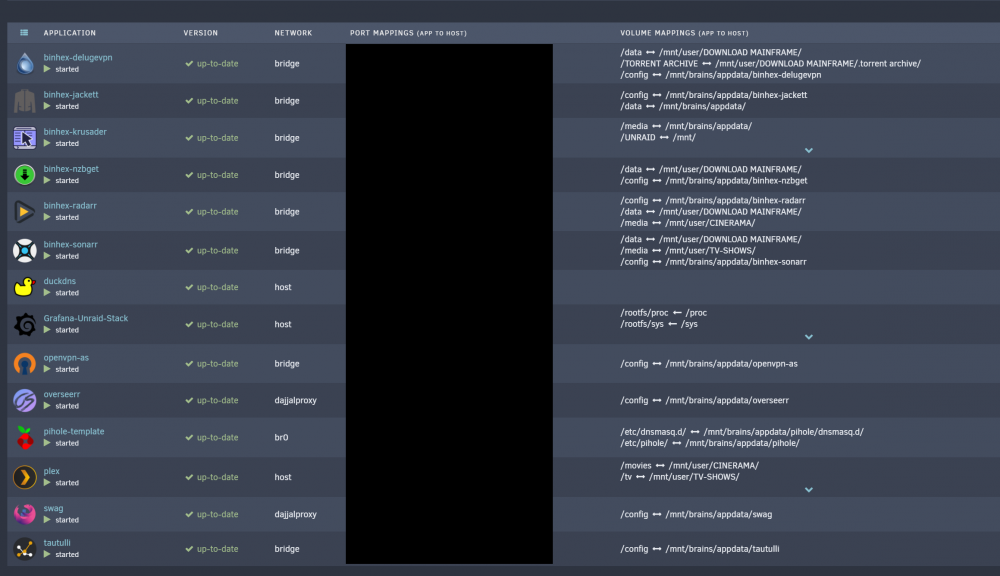
No, i've been doing it different this time with my new server. What else did you notice about my dockers? Have I been making a terrible mistake? It's my first time using NZBget, I thought I had it all good. I will change the path mappings and see if there's an improvement.
-
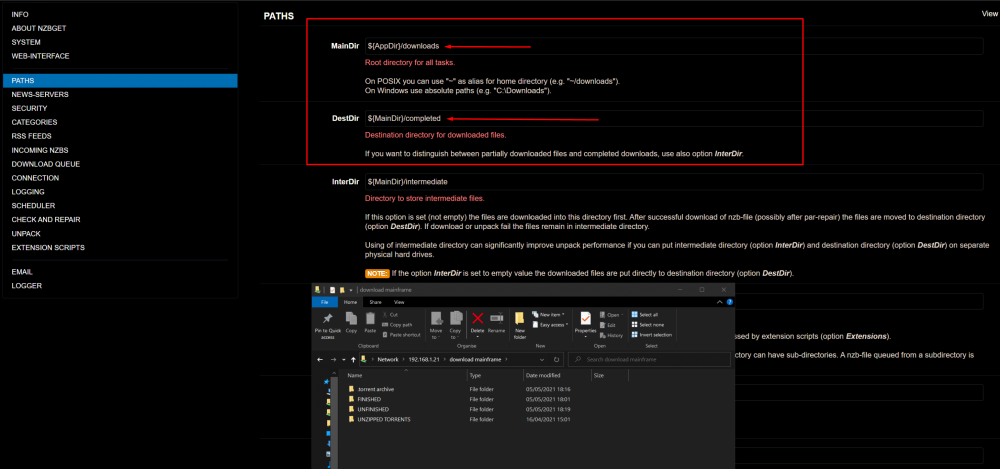
So I need to edit the pathnames WITHIN nzbget that matches the folders on the 'DOWNLOAD MAINFRAME' folder
-
Good to know that Linux is case-sensitive. Can I get away with it if I mapped them all good? And from now on, I will not use CAPITAL
-
Here you are sir. dajjal-diagnostics-20210505-2027.zip
-
Ahaaa, That's why im seeing docker.img utilization is high popup.
-
Hey guys, First post and that's because im totally clueless now. Ive been using Unraid for several years with great pleasure. But somehow, I can't seem to find the problem here. Ive been configuring my new server the last few weeks and now ive been using Deluge and NZBget as download clients and besides that I'm using Sonarr and Radarr to manage them. Somehow I cannot locate my downloaded NZBget files. Can someone please double check my path mappings. Thank you in advance and I really appreciate all the help I can get.