





MrSliff
Members
-
Joined
-
Last visited
-
Thanks! Until then, can i just put a placeholder file in the folder?
-
Unraid version: 7.3.2 The integrated Docker Manager references the fallback image: /plugins/dynamix.docker.manager/images/question.png However, the file is not present in: /usr/local/emhttp/plugins/dynamix.docker.manager/images/ That directory only contains tailscale.png. The reference exists in: - include/DockerClient.php:346 - include/DockerContainers.php:99-100 The affected containers are managed externally by Komodo. These containers do not have a Docker Manager icon configured, so the fallback image is requested when the Unraid Docker page is loaded. This generated approximately 150,000 identical nginx errors from one client: open() ".../dynamix.docker.manager/images/question.png" failed (2: No such file or directory) The errors were written both to nginx error.log and syslog. The 128 MB /var/log tmpfs reached 100% usage and contained approximately: - syslog.1: 62 MB - nginx/error.log.1: 55 MB The log files have now been cleared manually. Could you please clarify whether: 1. question.png should be included in the dynamix.docker.manager package; 2. the fallback should point to an existing asset; 3. or the Docker Manager should avoid logging this expected fallback request as an nginx error? Because Komodo-managed containers commonly do not have an icon configured, this can reproduce the issue easily and fill the Unraid log tmpfs. unraid-diagnostics-20260905-2221.zip
-
Ok, thanks. I will try that out!
-
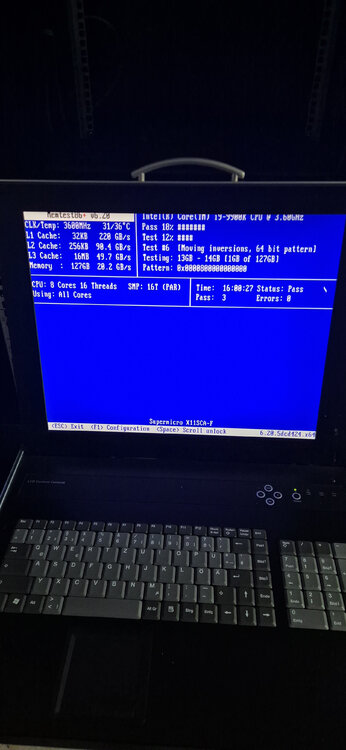
So, Ram does not seem to be a problem here. The only running containers the last time /mnt/user got dropped and access /mnt/user were Plex, Sonarr, Radarr, Lidarr, Immich. Stopped all other containers from autostarting.
-
1st pass Passed. Will leave it running through the night.
-
Going through memtest now, 40% no errors yet
-
Hey, thanks for reply. not yet. One thing to consider. Can you see any hints regarding corruption? I am a bit concerned about possible data loss, because since the crash I currently cannot reliably access my backups. To reduce the risk, I already started making an inventory of where important data is already backed up, so I can verify that nothing critical is missing and identify gaps before I make bigger changes to the system. At the moment my main concern is not confirmed filesystem corruption, but that the repeated /mnt/user / shfs failures make access unreliable enough that I do not want to assume my backup situation is fully safe until I verify it manually. Already made mistakes, and i want to prevent more mistakes.
-
Hello, i had a hard server crash some days ago and since then i have many problems with my server. The crash happened while backing up my most important files over night. Backup procedure: SIA renterd providing a S3 bucket backrest backing up a zfs disk to SIA Primarly shfs crashed on the following operations: Creating/Renaming/deleting files inside a zfs dataset over SMB mounting/rescanning my Media Library in plex Maybe you can see any problems regarding corruption or other stuff in the diagnostics. I did not have these problems before the crash, so for me it seems its the most likely cause for this. Maybe i have to recreate my Cache pools? Right now im transferring files from the server to prevent loss of important data. Heres a summary by codex after analyzing the logs: I am seeing repeated /mnt/user failures caused by shfs crashing, not by an obvious disk, XFS, or ZFS I/O error. Primary crash: Apr 12 12:43:38 Unraid shfs: shfs: ../lib/fuse.c:1402: unlink_node: Assertion 'node->nlookup > 1' failed. Immediate context at the time of the crash: Apr 12 12:43:38 Unraid smbd: Could not close dir! fname=binhex-sabnzbdvpn/Neuer Ordner, fd=-1, err=107=Transport endpoint is not connected Immediate follow-up errors: rsyslogd starts failing to write to /mnt/user/syslogs/... with Transport endpoint is not connected Samba starts failing for shares under /mnt/user, for example: canonicalize_connect_path failed for service appdata, path /mnt/user/appdata vfs_ChDir(/mnt/user/appdata) failed: Transport endpoint is not connected emhttpd later reports: malloc_share_locations ... Operation not supported (95): getxattr: /mnt/user/syslogs Later affected shares included: appdata Cryptomator previously also Documents, Walli, and others This does not look like a one-off event. I found the same shfs assertion crash multiple times: Apr 9 19:11:10 Apr 11 23:29:39 Apr 12 00:35:15 Apr 12 12:43:38 A previous crash at Apr 12 00:35:15 also happened during active file access over SMB and produced the same Transport endpoint is not connected fallout. My current conclusion: The primary failure is shfs itself crashing /mnt/user then becomes broken/stale SMB and rsyslog errors are secondary effects In my case, SMB operations on paths under /mnt/user seem to be a likely trigger Additional note: Array disks, cache, and pool mounts themselves appeared healthy in the logs I did not find matching primary XFS/ZFS/media I/O errors around the crash points unraid-diagnostics-20260412-1300.zip
-
@elibosley Thank you for picking this up!
-
I just discovered the OIDC login features. Is there a way to completely disable the User/Password login when a OIDC provider is configured? As an extra, just disable it on specific IP-Ranges?
-
I know its possible to back up the encryption headers of the disks. But in general it is also possible to delete the headers or even initially set up LUKS2 encryption with detached headers. LinuxConfigHow to use LUKS with a detached headerLearn using LUKS with a detached header for better encryption security. This guide covers header backups, detached headers, and full disk encryption. Would it be possible to set up kind of this in Unraid? I think of either having a USB-Stick, or (without modifying any of the mounting scripts of unraid), run a script to fetch and provide the headers somehow. Or maybe write back the headers to the disk before mounting.
-
Seems like it was either a connection issue, or it was due to the fact my HDD caddies are metal (idk if steel or aluminium) and the Disk PCB made contact with the frame of the caddie. Last Parity Rebuild went through without any errors after reseating the HDD.
-
There you go unraid-diagnostics-20250101-1614.zip
-
Seems like a Hardware Problem, but ill ask here first. Since some days my Parity Disk is randomly "Hot Plugging" which results in a remount of the Disk from sde to sdk. This also disables the disk. What can be the Problem here? The disk is mounted in a SAS-Chassis connected to a SAS-Controller.

-
SOLVED: If you ever get in trouble, because you have special characters in your Passphrase (maybe in combination with a non-english keyboard): Create a new script with: #!/bin/sh export BORG_PASSPHRASE="your_passphrase_with_special_characters" #any borg command works borg mount /path/to/repo /path/to/mountpoint That worked in my case --------------------------------------------------------------------------------------------------- Long story short, i used to back up my most important files with a borgbackup script found here: https://www.reddit.com/r/unRAID/comments/e6l4x6/tutorial_borg_rclone_v2_the_best_method_to/ Due to some circumstances (long story) i wanted to recover parts of my backups, so i tried to recover them on another (Ubuntu 22.04 and Ubuntu on WSL) system with borg mount. However, borg asks me for the repo password, which is not accepted. My password is randomly generated and has some special characters which should be ASCII: $ # ^ These characters can be typed in with the keyboard. I am pretty sure the password is right: Recovered my flash backup and compared password in the script with the backed up one - both the same Compared the repokey with the one i backed up - both the same I know the script worked fine, because i had to manually start backups from time to time, because borgbackup did not get installed automatically through nerdtools. So sometimes i started the script manually and some times tested with borg create. I am thinking of some character encoding issues, that unraid may use a different character encoding or something else, so the password was encoded different when setting up the repository and using the script. Maybe the character ^ makes problems? Because on German keyboards you have to type in ^ with a following keyboard input, otherwise the char does not get printed out on the screen. Can anybody help me out how i could get access to my backups?


