flausch
Members
-
Joined
-
Last visited
-
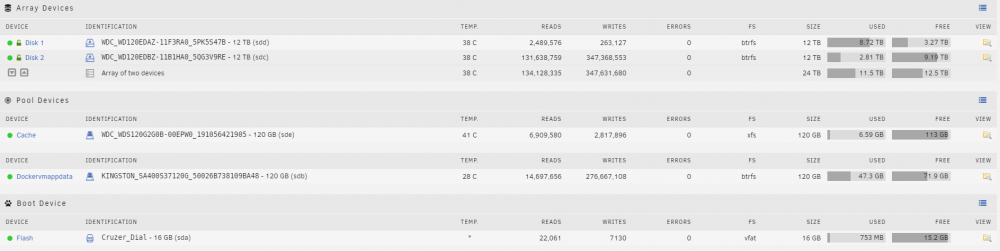
Currently there is only PLEX and TimeMachine accessing the NAS. I am just worried that TimeMachine or PLEX causes more wear than necessary. Might it be a good idea to buy a smaller drive to run TimeMachine on it? Currently I have 2x 12TB drives. Uptime 2 months 17 days 6 hours 6 minutes
-
Hello @JorgeB here are stats differences: https://www.diffchecker.com/cCQJCsGj Would be lovely to get some insights ❤️
-
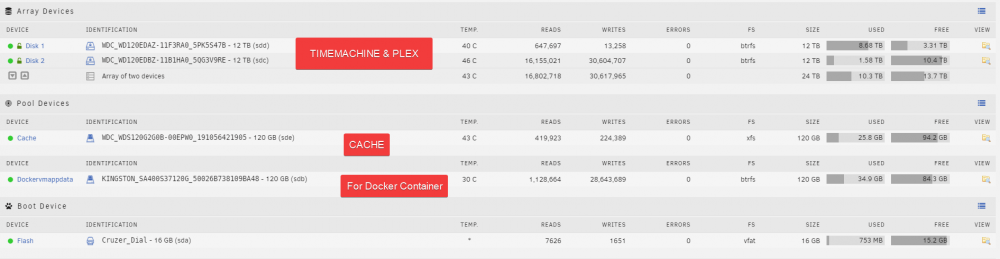
I moved all the docker containers (PLEX etc.) on their own SSD and read/writes did not really go down. Are 30 million writes in 8 days too much? My concern is that PLEX and Time Machine wear the HDDs without any good purpose (they were quite expensive for me :D). Would really appreciate some feedback ❤️
-
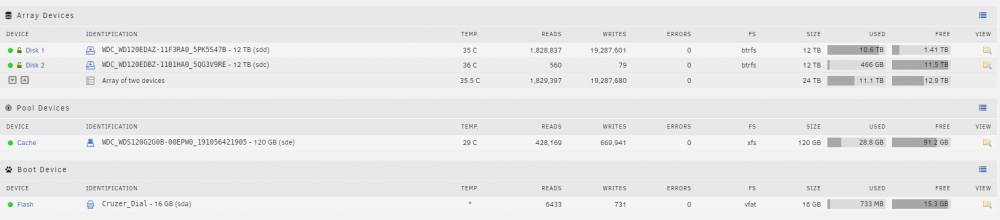
Hey, I am a bit worried about my HDD usage (read/writes). This is what the reads/writes look within 2 days of uptime. Is that normal? Usage is PLEX and Time Machine Backup.